Free
$0
No price change · limits changed Sep 27
- Units100 /day
- Image concurrency1
- Video concurrency0
- Images per LoRA50
Verdict · Image generation · by Krea
Krea's free plan is too limited for serious work; paid tiers unlock speed, volume, and essential video features.
Start on the free plan first. The button opens krea.ai through shouldipay.ai/go/krea. It may be an affiliate link: we may earn a commission. Commissions never decide a verdict: the evidence on this page does. Disclosure
Personal
No price change · limits changed Sep 27
First recorded as a plan on Sep 27, 2026
No price change · limits changed Sep 27
No price change · limits changed Sep 27
No price change · limits changed Sep 27
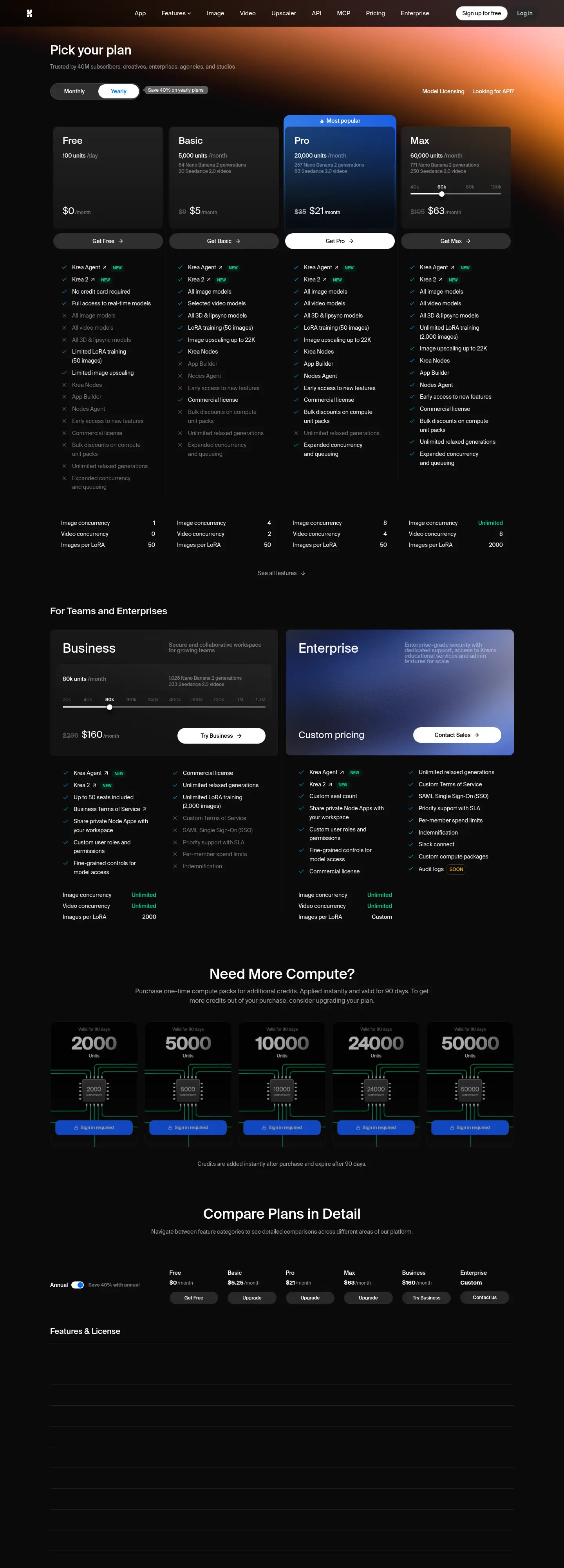
Krea offers a free plan that provides 100 units per day. This tier includes access to all image models, all video models, and all 3D and lipsync models. You also get limited LoRA training for up to 50 images, basic image upscaling up to 2K resolution, and Krea Nodes for building workflows. The free plan allows one image concurrency and zero video concurrency, meaning you can only generate one image at a time and cannot generate videos concurrently. It also includes a commercial license and early access to new features.
Paying unlocks significantly higher volume and concurrency. The Basic plan at $5/month provides 5,000 units per month, 4 image concurrency, and 2 video concurrency. It also grants access to paid image upscalers that support outputs up to 22K, such as Topaz Standard. The Pro plan at $21/month offers 20,000 units per month, 8 image concurrency, and 4 video concurrency, along with full access to all video models including Veo3, Sora, and Kling. The Max plan at $63/month provides 60,000 units per month, unlimited image concurrency, and 8 video concurrency. It also increases LoRA training limits to 2,000 images. The Business plan at $160/month offers 80,000 units per month with unlimited image and video concurrency and 2,000 images for LoRA training. All paid plans include bulk discounts on compute unit packs and unlimited relaxed generations after exhausting units.
Krea's free plan is suitable for light users who generate less than 100 images a day and do not need video generation. For most regular users, the Basic plan at $5/month is a good starting point, offering 5,000 units and better concurrency. The Pro plan at $21/month is ideal for professionals who need high volume and access to all video models. The Max and Business plans cater to power users and teams requiring unlimited concurrency and higher LoRA limits.
Users praise Krea 2 for its quality and ability to understand characters and clothing RedditUser report · positive · Redditr/StableDiffusion, posted Jun 23, 2026See the report ↓. Some find the model brilliant for reimagining ideas and generating amazing results RedditUser report · positive · Redditr/StableDiffusion, posted Jun 30, 2026See the report ↓. Training LoRAs is described as easy and wonderful, with users successfully publishing models RedditUser report · positive · Redditr/StableDiffusion, posted Jun 28, 2026See the report ↓. Krea 2 Turbo is noted for doing the Ghibli art style well out of the box RedditUser report · positive · Redditr/StableDiffusion, posted Jun 23, 2026See the report ↓. However, some users report that Krea 2 uses a terrible VAE, resulting in overly smoothed images with poor color and contrast RedditUser report · negative · Redditr/StableDiffusion, posted Jun 24, 2026See the report ↓. Others suggest using alternative VAEs to improve skin texture and reduce plastic skin effects RedditUser report · positive · Redditr/StableDiffusion, posted Jun 26, 2026See the report ↓RedditUser report · positive · Redditr/StableDiffusion, posted Jun 27, 2026See the report ↓. The model is also appreciated for its stellar prompt following and anatomy stability RedditUser report · positive · Redditr/StableDiffusion, posted Jun 24, 2026See the report ↓.
Users praise Krea 2 for its quality and ability to understand characters and clothing.
Krea 2 is really good at knowing and understanding characters and their clothing.
Some find the model brilliant for reimagining ideas and generating amazing results.
… Reimagined with Krea 2 I've had this idea for quite some time. But only with the brilliance of Krea 2 it has become possible. Truly an amazing model. …
Training LoRAs is described as easy and wonderful, with users successfully publishing models.
Training LoRA for Krea 2 is easy and wonderful I've trained like 10 LoRAs so far, 2 are published on my Civitai Account: available for the download. Both are trained on ai-toolkit, here is the settings and the guide: Impressive model.
Krea 2 Turbo is noted for doing the Ghibli art style well out of the box.
Krea 2 Turbo does the Ghibli art style quite well out of the box Here's the workflow for the last one (it's the same workflow for all of them, just different minimal prompts): You probably already have the Qwen VAE, and the text encoder is the 4B from here:
Others suggest using alternative VAEs to improve skin texture and reduce plastic skin effects.
Krea 2 | Clownsampler | DDim/Beta57... quality unlocked? No upscaled, no tricks. The only difference to the main workflow is Clownsampler and Wan2.1 VAE. Goodbye Qwen-plastic skin and poor grain. Turbo, 8 steps, 720x1280
Others suggest using alternative VAEs to improve skin texture and reduce plastic skin effects.
Improve the skin texture in Krea 2 by using an alternative version of Qwen Image VAE. You need this custom node to use it High res comparaison image:
The model is also appreciated for its stellar prompt following and anatomy stability.
Krea 2 Turbo - Western Art - 50 Gens Prompts + WF - Part 1 - Prompts + WF - Part 2 - Prompts + WF - Part 3 - 5060 ti 16 gb - 1536x768 - 12 sec per Gen. \- Stellar prompt following (when uncensored). \- Awesome anatomy stability and overall scene stability. …
However, some users report that Krea 2 uses a terrible VAE, resulting in overly smoothed images with poor color and contrast.
Krea 2 uses a terrible VAE, but luckily for us, PID is here to save the day. What is PID -> Krea 2 uses the worst VAE for DiT models (Qwen Image VAE), as a result, the final image is overly smoothed and has poor color and contrast. …
The free plan gives you 100 units per day.
Yes, but video concurrency is 0, meaning you cannot generate videos concurrently. You can generate videos but may need to wait for other jobs.
Basic costs $5/month with 5,000 units and 4 image concurrency. Pro costs $21/month with 20,000 units, 8 image concurrency, and access to all video models.
Yes, you can train LoRAs using up to 50 images on the free plan.
You get unlimited relaxed generations with supported in-house image models after exhausting your compute units.
The "Visit" buttons go through shouldipay.ai/go/ and may be affiliate links, so we may earn a commission if you subscribe. Commissions never decide a verdict: the evidence on this page does. Verdicts are drafted with AI from the vendors' own pricing and documentation pages and, for this verdict, public user reports we link to, and checked automatically against those sources before they are published; a person reviews first verdicts, changed answers and anything the checks flag. Affiliate disclosure