Starter
$0
- AgentDaily credits for Agent use, up to a monthly cap
- Published apps1 (the link goes down after 30 days)
- Storage2 GB
Verdict · Coding · by Replit
The free Starter plan handles basic app building well, but paying unlocks essential credits, collaboration, and commercial features.
Start on the free plan first. The button opens replit.com through shouldipay.ai/go/replit. It may be an affiliate link: we may earn a commission. Commissions never decide a verdict: the evidence on this page does. Disclosure
Personal
or $216/yr
No price change · limits changed Nov 1
"The Core plan is the best value for most users who need more than the free limits." Bottom line
or $1,080/yr
No price change · limits changed Nov 1
8.6/10
Free tier, average of 5 tasks
Free tier: run by hand in the product's own web app on the Replit Free plan by our editor on Sep 29, 2026 (free tier); the app showed the model Replit Agent in its 'Free' mode (the default on the free plan).
We only publish paid-tier scores from access we actually have (our own subscription, a trial or access given by the vendor), and we have no paid-tier results for Replit yet. So this page cannot show what paying changes in answer quality; the verdict relies on the plans and, where we have them, user reports for that.
Score = 50% quality (AI judges) + 50% automatic checks passed
Each task below opens to show the prompt, the objective checks and the full answer of each tier.
Build a single-page tip calculator. Inputs: bill amount, tip percentage (default 15) and number of people (default 1). Show the tip per person and the total per person, rounded to 2 decimals, updating as the user types. Handle bad input without showing NaN or Infinity. No login, no backend, no external services.
// artifacts/tip-calculator/src/App.tsx
import { useMemo, useState, type ChangeEvent, type ReactNode } from 'react';
import { QueryClient, QueryClientProvider } from '@tanstack/react-query';
import { ErrorBoundary } from '@/components/error-boundary';
import { Toaster } from '@/components/ui/toaster';
import { TooltipProvider } from '@/components/ui/tooltip';
import NotFound from '@/pages/not-found';
import { Calculator, RotateCcw, Sparkles, UsersRound } from 'lucide-react';
import {
Route,
Switch,
useLocation,
Router as WouterRouter,
} from 'wouter';
const queryClient = new QueryClient();
function Home() {
const [bill, setBill] = useState('');
const [tipPercent, setTipPercent] = useState('15');
const [people, setPeople] = useState('1');
const calculations = useMemo(() => {
const decimalPattern = /^(?:\d+(?:.\d+)?|.\d+)$/;
const wholePattern = /^\d+$/;
const billIsValid =
decimalPattern.test(bill.trim()) &&
Number.isFinite(Number(bill)) &&
Number(bill) > 0;
const tipIsValid =
decimalPattern.test(tipPercent.trim()) &&
Number.isFinite(Number(tipPercent)) &&
Number(tipPercent) >= 0;
const peopleIsValid =
wholePattern.test(people.trim()) &&
Number.isFinite(Number(people)) &&
Number(people) > 0;
const billValue = Number(bill);
const tipValue = Number(tipPercent);
const peopleValue = Number(people);
const valid = billIsValid && tipIsValid && peopleIsValid;

if (!valid) {
  return {
    billIsValid,
    tipIsValid,
    peopleIsValid,
    valid,
    tipPerPerson: null,
    totalPerPerson: null,
    message: !bill.trim()
      ? 'Start with the bill amount.'
      : !billIsValid
        ? 'Enter a bill amount greater than zero.'
        : !tipPercent.trim()
          ? 'Add a tip percentage to continue.'
          : !tipIsValid
            ? 'Tip percentage must be zero or greater.'
            : !people.trim()
              ? 'Add the number of people splitting the bill.'
              : !peopleIsValid
                ? 'People must be a whole number greater than zero.'
                : 'Check the details above to continue.',
  };
}

const roundCurrency = (value: number) =>
  Math.round((value + Number.EPSILON) * 100) / 100;
const tipPerPerson = roundCurrency((billValue * (tipValue / 100)) / peopleValue);
const totalPerPerson = roundCurrency(
  (billValue + billValue * (tipValue / 100)) / peopleValue,
);

return {
  billIsValid,
  tipIsValid,
  peopleIsValid,
  valid,
  tipPerPerson,
  totalPerPerson,
  message: 'Everything looks good. Time to enjoy the meal.',
};
}, [bill, people, tipPercent]);
const formatCurrency = (value: number | null) =>
value === null || !Number.isFinite(value) ? '—' : $${value.toFixed(2)};
const handleBillChange = (event: ChangeEvent<HTMLInputElement>) => {
setBill(event.target.value);
};
const handleTipChange = (event: ChangeEvent<HTMLInputElement>) => {
setTipPercent(event.target.value);
};
const handlePeopleChange = (event: ChangeEvent<HTMLInputElement>) => {
setPeople(event.target.value);
};
const resetCalculator = () => {
setBill('');
setTipPercent('15');
setPeople('1');
};
const chooseTip = (value: string) => {
setTipPercent(value);
};
return (
<main className="tip-page">
<div className="tip-shell">
<section className="tip-intro" aria-labelledby="page-title">
<div className="tip-brand">
<span className="tip-brand-mark" aria-hidden="true">
<Sparkles size={15} strokeWidth={1.8} />
</span>
Tablelight
</div>
      <div className="tip-intro-content">
        <p className="tip-kicker">A little help at the table</p>
        <h1 id="page-title" className="tip-heading">
          Leave room for <em>good company.</em>
        </h1>
        <p className="tip-intro-copy">
          A calm, quick way to settle the small math and get back to the
          conversation.
        </p>
      </div>

      <p className="tip-note">
        <span className="tip-note-mark" aria-hidden="true" />
        Your numbers stay right here in the browser. Nothing is saved or
        sent anywhere.
      </p>
    </section>

    <section className="tip-workspace" aria-labelledby="calculator-title">
      <div className="tip-form-header">
        <p className="tip-kicker" style={{ color: 'hsl(164 43% 29%)' }}>
          Split the check
        </p>
        <h2 id="calculator-title" className="tip-form-title">
          Let’s do the math.
        </h2>
        <p className="tip-form-subtitle">
          Enter the details below and we’ll make each share clear.
        </p>
      </div>

      <div className="tip-input-grid">
        <div className="tip-field">
          <label className="tip-field-label" htmlFor="bill-amount">
            Bill amount
            <span className="tip-field-hint">before tip</span>
          </label>
          <div className="tip-input-wrap">
            <span className="tip-input-prefix" aria-hidden="true">$</span>
            <input
              id="bill-amount"
              className="tip-input tip-input--prefix"
              data-testid="input-bill-amount"
              type="text"
              inputMode="decimal"
              placeholder="0.00"
              value={bill}
              onChange={handleBillChange}
              aria-invalid={bill.length > 0 && !calculations.billIsValid}
              aria-describedby="validation-message"
              autoComplete="off"
            />
          </div>
        </div>

        <div className="tip-field">
          <label className="tip-field-label" htmlFor="tip-percent">
            Tip percentage
            <span className="tip-field-hint">your call</span>
          </label>
          <div className="tip-input-wrap">
            <input
              id="tip-percent"
              className="tip-input tip-input--suffix"
              data-testid="input-tip-percentage"
              type="text"
              inputMode="decimal"
              placeholder="15"
              value={tipPercent}
              onChange={handleTipChange}
              aria-invalid={tipPercent.length > 0 && !calculations.tipIsValid}
              aria-describedby="validation-message"
              autoComplete="off"
            />
            <span className="tip-input-suffix" aria-hidden="true">
              %
            </span>
          </div>
          <div className="tip-presets" aria-label="Common tip percentages">
            {['15', '18', '20'].map((preset) => (
              <button
                key={preset}
                type="button"
                className="tip-preset"
                data-testid={`button-tip-${preset}`}
                data-selected={tipPercent === preset}
                onClick={() => chooseTip(preset)}
                aria-label={`Set tip to ${preset} percent`}
              >
                {preset}%
              </button>
            ))}
          </div>
        </div>

        <div className="tip-field">
          <label className="tip-field-label" htmlFor="people-count">
            Number of people
            <span className="tip-field-hint">splitting evenly</span>
          </label>
          <div className="tip-input-wrap">
            <input
              id="people-count"
              className="tip-input tip-input--suffix"
              data-testid="input-people-count"
              type="text"
              inputMode="numeric"
              placeholder="1"
              value={people}
              onChange={handlePeopleChange}
              aria-invalid={people.length > 0 && !calculations.peopleIsValid}
              aria-describedby="validation-message"
              autoComplete="off"
            />
            <span className="tip-input-suffix" aria-hidden="true">
              <UsersRound size={18} strokeWidth={1.8} />
            </span>
          </div>
        </div>
      </div>

      <p
        id="validation-message"
        className="tip-validation"
        data-testid="status-validation"
        role="status"
        aria-live="polite"
      >
        {calculations.valid ? '' : calculations.message}
      </p>

      <div className="tip-results" aria-label="Calculated amounts">
        <div className="tip-result">
          <span className="tip-result-label">Tip per person</span>
          <output
            className="tip-result-value"
            data-testid="output-tip-per-person"
            aria-live="polite"
          >
            {formatCurrency(calculations.tipPerPerson)}
          </output>
        </div>
        <div className="tip-result">
          <span className="tip-result-label">Total per person</span>
          <output
            className="tip-result-value"
            data-testid="output-total-per-person"
            aria-live="polite"
          >
            {formatCurrency(calculations.totalPerPerson)}
          </output>
        </div>
      </div>

      <div className="tip-form-footer">
        <span className="tip-status" data-testid="status-calculation">
          {calculations.valid ? (
            <>
              <Calculator
                size={13}
                strokeWidth={2}
                aria-hidden="true"
                style={{ verticalAlign: 'text-bottom', marginRight: 5 }}
              />
              Ready to split evenly
            </>
          ) : (
            'Waiting for the details'
          )}
        </span>
        <button
          type="button"
          className="tip-reset"
          data-testid="button-reset-calculator"
          onClick={resetCalculator}
        >
          <RotateCcw size={14} strokeWidth={2} aria-hidden="true" />
          Reset
        </button>
      </div>
    </section>
  </div>
</main>
);
}
function Router() {
return (
// Keep a shared shell (sidebar, navbar) outside the boundary so it
// survives a page crash.
<RoutedErrorBoundary>
<Switch>
<Route path="/" component={Home} />
<Route component={NotFound} />
</Switch>
</RoutedErrorBoundary>
);
}
function RoutedErrorBoundary({ children }: { children: ReactNode }) {
const [location] = useLocation();
return <ErrorBoundary resetKey={location}>{children}</ErrorBoundary>;
}
function App() {
return (
<QueryClientProvider client={queryClient}>
<TooltipProvider>
<WouterRouter base={import.meta.env.BASE_URL.replace(//$/, '')}>
<Router />
</WouterRouter>
<Toaster />
</TooltipProvider>
</QueryClientProvider>
);
}
export default App;
Build a to-do list app. The user can add an item (ignore empty input), mark an item done or not done, and delete an item. Done items look visibly different. The list is saved in the browser (localStorage) and is still there after a reload. No login, no backend, no external services.
// artifacts/todo-list/src/App.tsx
import { type FormEvent, type ReactNode, useEffect, useMemo, useState } from 'react';
import { QueryClient, QueryClientProvider } from '@tanstack/react-query';
import { ErrorBoundary } from '@/components/error-boundary';
import { Toaster } from '@/components/ui/toaster';
import { TooltipProvider } from '@/components/ui/tooltip';
import NotFound from '@/pages/not-found';
import { Check, CircleCheck, Plus, Sparkles, Trash2 } from 'lucide-react';
import {
Route,
Switch,
useLocation,
Router as WouterRouter,
} from 'wouter';
const queryClient = new QueryClient();
function Home() {
type Task = { id: string; text: string; done: boolean; createdAt: number };
const storageKey = 'quiet-list-tasks';
const [tasks, setTasks] = useState<Task[]>(() => {
try {
const saved = localStorage.getItem(storageKey);
return saved ? JSON.parse(saved) as Task[] : [];
} catch {
return [];
}
});
const [draft, setDraft] = useState('');
const [justCompleted, setJustCompleted] = useState<string | null>(null);
useEffect(() => {
localStorage.setItem(storageKey, JSON.stringify(tasks));
}, [tasks]);
const doneCount = useMemo(() => tasks.filter((task) => task.done).length, [tasks]);
const remainingCount = tasks.length - doneCount;
const today = new Intl.DateTimeFormat('en-US', {
weekday: 'long',
month: 'long',
day: 'numeric',
}).format(new Date());
function addTask(event: FormEvent<HTMLFormElement>) {
event.preventDefault();
const text = draft.trim();
if (!text) return;
setTasks((current) => [
{ id: ${Date.now()}-${Math.random().toString(36).slice(2)}, text, done: false, createdAt: Date.now() },
...current,
]);
setDraft('');
}
function toggleTask(id: string) {
setTasks((current) => current.map((task) => {
if (task.id !== id) return task;
const done = !task.done;
if (done) {
setJustCompleted(id);
window.setTimeout(() => setJustCompleted((currentId) => currentId === id ? null : currentId), 500);
}
return { ...task, done };
}));
}
function removeTask(id: string) {
setTasks((current) => current.filter((task) => task.id !== id));
}
return (
<main className="paper-noise min-h-[100dvh] bg-background px-5 py-8 text-foreground sm:px-8 sm:py-12">
<div className="page-enter mx-auto flex w-full max-w-2xl flex-col">
<header className="mb-10 flex items-start justify-between gap-4 sm:mb-14">
<div>
<p className="mb-3 flex items-center gap-2 text-xs font-semibold uppercase tracking-[0.2em] text-primary">
<span className="inline-block h-2 w-2 rounded-full bg-primary" aria-hidden="true" />
A quiet list
</p>
<h1 className="font-serif text-4xl leading-none tracking-[-0.04em] text-foreground sm:text-5xl">
Today, gently.
</h1>
</div>
<div className="mt-1 text-right">
<p data-testid="text-today" className="text-sm font-medium text-muted-foreground">{today}</p>
<p data-testid="text-progress" className="mt-1 text-xs text-muted-foreground">
{tasks.length === 0 ? 'A fresh page' : ${doneCount} of ${tasks.length} finished}
</p>
</div>
</header>
    <section className="relative overflow-hidden rounded-[1.25rem] border border-card-border bg-card shadow-[var(--shadow-md)]">
      <div className="absolute inset-x-0 top-0 h-1 bg-gradient-to-r from-primary via-accent to-secondary" aria-hidden="true" />
      <div className="notebook-lines px-5 pb-7 pt-7 sm:px-10 sm:pb-10 sm:pt-9">
        <div className="mb-7 flex items-end justify-between gap-4 pl-0 sm:pl-[1px]">
          <div>
            <p className="text-xs font-semibold uppercase tracking-[0.18em] text-muted-foreground">Your next few things</p>
            <p className="mt-2 max-w-sm font-serif text-2xl leading-tight text-foreground sm:text-[1.7rem]">
              Keep it small enough to begin.
            </p>
          </div>
          {tasks.length > 0 && (
            <div className="hidden h-11 w-11 shrink-0 items-center justify-center rounded-full border border-secondary/60 bg-secondary/20 sm:flex" aria-label={`${remainingCount} tasks remaining`}>
              <span className="font-serif text-lg text-secondary-foreground">{remainingCount}</span>
            </div>
          )}
        </div>

        <form onSubmit={addTask} className="mb-8 flex items-center gap-2 rounded-xl border border-input bg-background/80 p-1.5 shadow-sm transition focus-within:border-primary focus-within:ring-4 focus-within:ring-primary/10">
          <label htmlFor="new-task" className="sr-only">Add a task</label>
          <input
            id="new-task"
            data-testid="input-new-task"
            value={draft}
            onChange={(event) => setDraft(event.target.value)}
            placeholder="What would feel good to finish?"
            className="min-w-0 flex-1 bg-transparent px-3 py-2.5 text-[0.95rem] text-foreground outline-none placeholder:text-muted-foreground/75"
          />
          <button
            type="submit"
            data-testid="button-add-task"
            aria-label="Add task"
            className="focus-ring flex h-10 w-10 shrink-0 items-center justify-center rounded-lg bg-primary text-primary-foreground transition hover:-translate-y-0.5 hover:bg-primary/90 active:translate-y-0 disabled:cursor-not-allowed disabled:opacity-50"
            disabled={!draft.trim()}
          >
            <Plus size={20} strokeWidth={2.4} aria-hidden="true" />
          </button>
        </form>

        {tasks.length === 0 ? (
          <div data-testid="empty-state" className="flex flex-col items-center px-4 pb-4 pt-5 text-center">
            <div className="empty-mark mb-5 flex h-16 w-16 items-center justify-center rounded-full border border-accent/70 bg-accent/30 text-accent-foreground">
              <Sparkles size={27} strokeWidth={1.5} aria-hidden="true" />
            </div>
            <h2 className="font-serif text-2xl text-foreground">Nothing pressing yet.</h2>
            <p className="mt-2 max-w-xs text-sm leading-6 text-muted-foreground">
              Start with one small thing. The list will meet you there.
            </p>
          </div>
        ) : (
          <div className="space-y-2" role="list" aria-label="Your tasks">
            {tasks.map((task, index) => (
              <div
                key={task.id}
                data-testid={`task-row-${task.id}`}
                role="listitem"
                className={`task-enter group flex items-center gap-3 rounded-xl border px-3 py-3 transition duration-200 sm:px-4 ${task.done ? 'border-secondary/50 bg-secondary/10' : 'border-transparent bg-background/65 hover:border-card-border hover:bg-background' } ${justCompleted === task.id ? 'task-complete' : ''}`}
                style={{ animationDelay: `${Math.min(index * 55, 300)}ms` }}
              >
                <button
                  type="button"
                  data-testid={`button-toggle-task-${task.id}`}
                  onClick={() => toggleTask(task.id)}
                  aria-label={task.done ? `Mark "${task.text}" as not done` : `Mark "${task.text}" as done`}
                  className={`focus-ring check-pop flex h-7 w-7 shrink-0 items-center justify-center rounded-full border-2 transition duration-200 ${task.done ? 'border-secondary bg-secondary text-secondary-foreground' : 'border-muted-foreground/45 text-transparent hover:border-primary hover:bg-primary/10'}`}
                >
                  <Check size={16} strokeWidth={2.7} aria-hidden="true" />
                </button>
                <span data-testid={`text-task-${task.id}`} className={`min-w-0 flex-1 break-words text-[0.95rem] leading-6 transition ${task.done ? 'text-muted-foreground line-through decoration-secondary decoration-2' : 'text-foreground'}`}>
                  {task.text}
                </span>
                {task.done && <CircleCheck className="hidden shrink-0 text-secondary sm:block" size={17} strokeWidth={1.8} aria-label="Completed" />}
                <button
                  type="button"
                  data-testid={`button-delete-task-${task.id}`}
                  onClick={() => removeTask(task.id)}
                  aria-label={`Delete "${task.text}"`}
                  className="focus-ring flex h-8 w-8 shrink-0 items-center justify-center rounded-lg text-muted-foreground/60 opacity-100 transition hover:bg-destructive/10 hover:text-destructive sm:opacity-0 sm:group-hover:opacity-100"
                >
                  <Trash2 size={16} strokeWidth={1.8} aria-hidden="true" />
                </button>
              </div>
            ))}
          </div>
        )}
      </div>
      <div className="flex items-center justify-between border-t border-card-border bg-muted/35 px-5 py-3.5 text-xs text-muted-foreground sm:px-10">
        <span data-testid="status-list-count">{tasks.length === 0 ? 'Your list is ready when you are.' : `${remainingCount} ${remainingCount === 1 ? 'thing' : 'things'} to go`}</span>
        <span className="flex items-center gap-1.5">
          <span className="h-1.5 w-1.5 rounded-full bg-secondary" aria-hidden="true" />
          Saved on this device
        </span>
      </div>
    </section>

    <footer className="mt-8 flex items-center justify-center gap-2 text-center text-xs text-muted-foreground">
      <span className="h-px w-8 bg-border" aria-hidden="true" />
      <span>One page. Enough for today.</span>
      <span className="h-px w-8 bg-border" aria-hidden="true" />
    </footer>
  </div>
</main>
);
}
function Router() {
return (
// Keep a shared shell (sidebar, navbar) outside the boundary so it
// survives a page crash.
<RoutedErrorBoundary>
<Switch>
<Route path="/" component={Home} />
<Route component={NotFound} />
</Switch>
</RoutedErrorBoundary>
);
}
function RoutedErrorBoundary({ children }: { children: ReactNode }) {
const [location] = useLocation();
return <ErrorBoundary resetKey={location}>{children}</ErrorBoundary>;
}
function App() {
return (
<QueryClientProvider client={queryClient}>
<TooltipProvider>
<WouterRouter base={import.meta.env.BASE_URL.replace(//$/, '')}>
<Router />
</WouterRouter>
<Toaster />
</TooltipProvider>
</QueryClientProvider>
);
}
export default App;
Build a kilometres/miles converter with two linked fields: typing in one updates the other, rounded to 2 decimals (1 mile = 1.609344 km). Invalid input must not show NaN. No login, no backend, no external services.
// src/App.tsx (Kilometres-Miles-Converter artifact)
import { type ChangeEvent, type ReactNode, useState } from 'react';
import { ArrowLeftRight, CircleDot, RotateCcw, Ruler } from 'lucide-react';
import { QueryClient, QueryClientProvider } from '@tanstack/react-query';
import { ErrorBoundary } from '@/components/error-boundary';
import { Toaster } from '@/components/ui/toaster';
import { TooltipProvider } from '@/components/ui/tooltip';
import NotFound from '@/pages/not-found';
import {
Route,
Switch,
useLocation,
Router as WouterRouter,
} from 'wouter';
const queryClient = new QueryClient();
const MILES_TO_KILOMETRES = 1.609344;
function parseFiniteValue(value: string): number | null {
const trimmedValue = value.trim();
if (trimmedValue === '') {
return null;
}
const parsedValue = Number(trimmedValue);
return Number.isFinite(parsedValue) ? parsedValue : null;
}
function formatConvertedValue(value: number): string {
const roundedValue = Number(value.toFixed(2));
return Number.isFinite(roundedValue) ? roundedValue.toFixed(2) : '';
}
function Home() {
const [kilometres, setKilometres] = useState('');
const [miles, setMiles] = useState('');
const handleKilometresChange = (event: ChangeEvent<HTMLInputElement>) => {
const nextValue = event.target.value;
setKilometres(nextValue);
if (nextValue.trim() === '') {
  setMiles('');
  return;
}

const parsedKilometres = parseFiniteValue(nextValue);
if (parsedKilometres !== null) {
  setMiles(formatConvertedValue(parsedKilometres / MILES_TO_KILOMETRES));
}
};
const handleMilesChange = (event: ChangeEvent<HTMLInputElement>) => {
const nextValue = event.target.value;
setMiles(nextValue);
if (nextValue.trim() === '') {
  setKilometres('');
  return;
}

const parsedMiles = parseFiniteValue(nextValue);
if (parsedMiles !== null) {
  setKilometres(formatConvertedValue(parsedMiles * MILES_TO_KILOMETRES));
}
};
const resetValues = () => {
setKilometres('');
setMiles('');
};
const hasValue = kilometres.trim() !== '' || miles.trim() !== '';
const kilometresIsValid = parseFiniteValue(kilometres) !== null;
const milesIsValid = parseFiniteValue(miles) !== null;
const isReady = kilometresIsValid || milesIsValid;
return (
<main className="distance-page">
<div className="distance-shell relative z-10">
<header className="flex items-center justify-between pt-7 md:pt-10">
<div className="flex items-center gap-3">
<div
className="flex h-9 w-9 items-center justify-center rounded-full bg-[hsl(var(--primary))] text-[hsl(var(--primary-foreground))]"
data-testid="icon-brand"
aria-hidden="true"
>
<Ruler size={17} strokeWidth={1.8} />
</div>
<div>
<p className="distance-mono text-[10px] font-bold uppercase tracking-[0.17em] text-[hsl(var(--primary))]">
Field note 01
</p>
<p className="text-sm font-semibold tracking-[-0.02em] text-[hsl(var(--foreground))]">
Distance / converter
</p>
</div>
</div>
<span className="distance-mono hidden text-[10px] uppercase tracking-[0.18em] text-[hsl(var(--muted-foreground))] sm:block">
km ↔ mi
</span>
</header>
    <section className="grid gap-12 pb-12 pt-16 md:grid-cols-[minmax(0,0.82fr)_minmax(500px,1.18fr)] md:items-center md:gap-20 md:pb-20 md:pt-24">
      <div className="distance-fade-up">
        <div className="mb-7 flex items-center gap-2 text-[hsl(var(--accent))]">
          <CircleDot size={13} strokeWidth={2.4} aria-hidden="true" />
          <span className="distance-mono text-[10px] font-bold uppercase tracking-[0.18em]">
            Move with confidence
          </span>
        </div>
        <h1 className="max-w-[520px] text-[clamp(3.2rem,7vw,6.2rem)] font-semibold leading-[0.92] tracking-[-0.075em] text-[hsl(var(--primary))]">
          Go the
          <br />
          <span className="text-[hsl(var(--accent))]">extra mile.</span>
        </h1>
        <p className="mt-8 max-w-[390px] text-[15px] leading-7 text-[hsl(var(--muted-foreground))]">
          A clear, quick conversion for the road ahead. Enter a distance in either unit and the other follows.
        </p>
        <div className="mt-10 hidden items-center gap-3 md:flex" aria-hidden="true">
          <div className="h-px w-20 bg-[hsl(var(--accent))]" />
          <div className="distance-mono text-[10px] uppercase tracking-[0.16em] text-[hsl(var(--muted-foreground))]">
            one direction at a time
          </div>
        </div>
      </div>

      <div className="distance-fade-up-delay">
        <section
          className="rounded-[1.75rem] border border-[hsl(var(--card-border))] bg-[hsl(var(--card)/0.86)] p-5 shadow-[var(--shadow-md)] backdrop-blur-sm sm:p-7"
          aria-labelledby="converter-title"
        >
          <div className="mb-7 flex items-start justify-between gap-4">
            <div>
              <p className="distance-mono mb-2 text-[10px] font-bold uppercase tracking-[0.16em] text-[hsl(var(--muted-foreground))]">
                Live conversion
              </p>
              <h2 id="converter-title" className="text-xl font-semibold tracking-[-0.04em] text-[hsl(var(--foreground))]">
                Find your distance
              </h2>
            </div>
            <button
              type="button"
              onClick={resetValues}
              className="distance-clear group inline-flex shrink-0 items-center gap-2 rounded-full px-2 py-1.5 text-xs font-semibold text-[hsl(var(--muted-foreground))] transition-colors hover:bg-[hsl(var(--secondary))] hover:text-[hsl(var(--foreground))] focus-visible:outline-none focus-visible:ring-2 focus-visible:ring-[hsl(var(--ring))] focus-visible:ring-offset-2 focus-visible:ring-offset-[hsl(var(--card))]"
              data-testid="button-clear-values"
              aria-label="Clear both distance fields"
            >
              <RotateCcw className="distance-clear-icon" size={13} aria-hidden="true" />
              Clear
            </button>
          </div>

          <div className="grid gap-3 sm:grid-cols-[1fr_auto_1fr] sm:items-center">
            <label className="distance-field group rounded-2xl border border-[hsl(var(--input))] bg-[hsl(var(--background)/0.68)] p-4 transition-[border-color,box-shadow,transform] duration-200 sm:p-5">
              <span className="mb-4 flex items-center justify-between gap-3">
                <span className="distance-mono text-[10px] font-bold uppercase tracking-[0.16em] text-[hsl(var(--muted-foreground))]">
                  Kilometres
                </span>
                <span className="rounded-md bg-[hsl(var(--secondary))] px-2 py-1 distance-mono text-[10px] font-bold text-[hsl(var(--secondary-foreground))]">
                  km
                </span>
              </span>
              <input
                type="text"
                inputMode="decimal"
                autoComplete="off"
                value={kilometres}
                onChange={handleKilometresChange}
                placeholder="0.00"
                aria-label="Distance in kilometres"
                data-testid="input-kilometres"
                className="w-full min-w-0 bg-transparent text-4xl font-semibold tracking-[-0.07em] text-[hsl(var(--primary))] outline-none sm:text-[2.7rem]"
              />
            </label>

            <div
              className="flex h-9 w-9 rotate-90 items-center justify-center justify-self-center rounded-full border border-[hsl(var(--border))] bg-[hsl(var(--card))] text-[hsl(var(--accent))] sm:rotate-0"
              data-testid="icon-conversion-direction"
              aria-hidden="true"
            >
              <ArrowLeftRight size={15} strokeWidth={2} />
            </div>

            <label className="distance-field group rounded-2xl border border-[hsl(var(--input))] bg-[hsl(var(--background)/0.68)] p-4 transition-[border-color,box-shadow,transform] duration-200 sm:p-5">
              <span className="mb-4 flex items-center justify-between gap-3">
                <span className="distance-mono text-[10px] font-bold uppercase tracking-[0.16em] text-[hsl(var(--muted-foreground))]">
                  Miles
                </span>
                <span className="rounded-md bg-[hsl(var(--secondary))] px-2 py-1 distance-mono text-[10px] font-bold text-[hsl(var(--secondary-foreground))]">
                  mi
                </span>
              </span>
              <input
                type="text"
                inputMode="decimal"
                autoComplete="off"
                value={miles}
                onChange={handleMilesChange}
                placeholder="0.00"
                aria-label="Distance in miles"
                data-testid="input-miles"
                className="w-full min-w-0 bg-transparent text-4xl font-semibold tracking-[-0.07em] text-[hsl(var(--primary))] outline-none sm:text-[2.7rem]"
              />
            </label>
          </div>

          <div className="mt-7 flex min-h-6 items-center justify-between gap-3 border-t border-[hsl(var(--border))] pt-5">
            <p
              className="distance-mono text-[10px] uppercase tracking-[0.1em] text-[hsl(var(--muted-foreground))]"
              data-testid="status-conversion"
              aria-live="polite"
            >
              {isReady ? 'Converted · rounded to 2 decimals' : hasValue ? 'Keep typing a valid number' : 'Waiting for a distance'}
            </p>
            <span className="distance-mono text-[10px] font-bold text-[hsl(var(--accent))]" data-testid="text-conversion-factor">
              1 : 1.609344
            </span>
          </div>
        </section>
      </div>
    </section>

    <section className="distance-fade-up-delay-2 grid gap-7 border-t border-[hsl(var(--border))] pb-10 pt-7 md:grid-cols-[1fr_1.25fr] md:gap-20 md:pt-8" aria-label="Conversion reference">
      <div className="flex items-start gap-3">
        <div className="mt-0.5 flex h-7 w-7 shrink-0 items-center justify-center rounded-full bg-[hsl(var(--accent)/0.13)] text-[hsl(var(--accent))]" aria-hidden="true">
          <span className="distance-mono text-[11px] font-bold">=</span>
        </div>
        <div>
          <h2 className="text-sm font-semibold text-[hsl(var(--foreground))]">The reference</h2>
          <p className="mt-1 text-sm leading-6 text-[hsl(var(--muted-foreground))]">
            Every result follows the international exact conversion factor.
          </p>
        </div>
      </div>
      <div className="flex flex-col justify-between gap-4 sm:flex-row sm:items-end">
        <p className="distance-mono text-[clamp(1.35rem,3vw,2rem)] font-bold tracking-[-0.07em] text-[hsl(var(--primary))]" data-testid="text-exact-reference">
          1 mile = 1.609344 km
        </p>
        <p className="max-w-[220px] text-xs leading-5 text-[hsl(var(--muted-foreground))]">
          Values shown in the fields are rounded to two decimal places.
        </p>
      </div>
    </section>
  </div>
</main>
);
}
function Router() {
return (
<RoutedErrorBoundary>
<Switch>
<Route path="/" component={Home} />
<Route component={NotFound} />
</Switch>
</RoutedErrorBoundary>
);
}
function RoutedErrorBoundary({ children }: { children: ReactNode }) {
const [location] = useLocation();
return <ErrorBoundary resetKey={location}>{children}</ErrorBoundary>;
}
function App() {
return (
<QueryClientProvider client={queryClient}>
<TooltipProvider>
<WouterRouter base={import.meta.env.BASE_URL.replace(//$/, '')}>
<Router />
</WouterRouter>
<Toaster />
</TooltipProvider>
</QueryClientProvider>
);
}
export default App;
Build a Pomodoro timer: it shows 25:00, with Start, Pause and Reset buttons, and a Short break button that sets it to 05:00. The time counts down once per second while running. No login, no backend, no external services.
// src/App.tsx (Pomodoro-Timer artifact)
import { useEffect, useState } from 'react';
import { Coffee, Play, Pause, RotateCcw, CircleDot, Check } from 'lucide-react';
import { type ReactNode } from 'react';
import { QueryClient, QueryClientProvider } from '@tanstack/react-query';
import { ErrorBoundary } from '@/components/error-boundary';
import { Toaster } from '@/components/ui/toaster';
import { TooltipProvider } from '@/components/ui/tooltip';
import NotFound from '@/pages/not-found';
import { Route, Switch, useLocation, Router as WouterRouter } from 'wouter';
const queryClient = new QueryClient();
function Home() {
const workDuration = 25 * 60;
const breakDuration = 5 * 60;
const [remaining, setRemaining] = useState(workDuration);
const [totalSeconds, setTotalSeconds] = useState(workDuration);
const [running, setRunning] = useState(false);
const [completed, setCompleted] = useState(false);
const [mode, setMode] = useState<'work' | 'break'>('work');
useEffect(() => {
document.title = 'One block — Pomodoro timer';
}, []);
useEffect(() => {
if (!running) return;
const interval = window.setInterval(() => {
  setRemaining((current) => {
    if (current <= 1) {
      setRunning(false);
      setCompleted(true);
      return 0;
    }
    return current - 1;
  });
}, 1000);

return () => window.clearInterval(interval);
}, [running]);
const minutes = Math.floor(remaining / 60).toString().padStart(2, '0');
const seconds = (remaining % 60).toString().padStart(2, '0');
const progress = completed ? 1 : totalSeconds === 0 ? 0 : remaining / totalSeconds;
const circumference = 2 * Math.PI * 112;
const dashOffset = circumference * (1 - progress);
const startTimer = () => {
if (completed || remaining === 0) {
setRemaining(totalSeconds);
setCompleted(false);
}
setRunning(true);
};
const pauseTimer = () => {
setRunning(false);
};
const resetToWork = () => {
setRunning(false);
setCompleted(false);
setMode('work');
setTotalSeconds(workDuration);
setRemaining(workDuration);
};
const chooseBreak = () => {
setRunning(false);
setCompleted(false);
setMode('break');
setTotalSeconds(breakDuration);
setRemaining(breakDuration);
};
const status = completed
? 'Block complete'
: running
? mode === 'work' ? 'In the flow' : 'A quiet pause'
: remaining < totalSeconds ? 'Paused · keep your place' : 'Ready when you are';
return (
<div className="ritual-page flex min-h-[100dvh] flex-col">
<header className="page-reveal mx-auto flex w-full max-w-[1160px] items-center justify-between px-6 py-7 sm:px-10 lg:py-9">
<div className="flex items-center gap-3" data-testid="brand-mark">
<span className="flex h-9 w-9 items-center justify-center rounded-full bg-foreground text-background shadow-sm">
<CircleDot size={18} strokeWidth={1.7} aria-hidden="true" />
</span>
<span className="font-mono text-[11px] font-medium uppercase tracking-[0.18em] text-foreground/80">
One block
</span>
</div>
<div className="hidden items-center gap-2 text-[11px] uppercase tracking-[0.17em] text-muted-foreground sm:flex">
<span className="h-1.5 w-1.5 rounded-full bg-accent" aria-hidden="true" />
Personal focus ritual
</div>
</header>
  <main className="mx-auto grid w-full max-w-[1160px] flex-1 items-center gap-10 px-6 pb-12 sm:px-10 lg:grid-cols-[0.9fr_1.1fr] lg:gap-16 lg:pb-16">
    <section className="page-reveal max-w-[440px]">
      <p className="mb-6 flex items-center gap-3 font-mono text-[11px] font-medium uppercase tracking-[0.18em] text-primary">
        <span className="h-px w-8 bg-primary" aria-hidden="true" />
        Make room for it
      </p>
      <h1 className="max-w-[420px] font-serif text-[clamp(3.5rem,8vw,6.6rem)] leading-[0.94] tracking-[-0.055em] text-foreground">
        A little room
        <span className="block italic text-primary">for the work.</span>
      </h1>
      <p className="mt-8 max-w-[330px] text-[15px] leading-7 text-muted-foreground">
        One meaningful block is enough to begin. Settle in, choose a small
        horizon, and let the minutes hold your attention.
      </p>
      <div className="mt-10 hidden items-center gap-3 text-muted-foreground/80 sm:flex">
        <div className="flex -space-x-1" aria-hidden="true">
          <span className="h-2 w-2 rounded-full border-2 border-background bg-primary" />
          <span className="h-2 w-2 rounded-full border-2 border-background bg-accent" />
          <span className="h-2 w-2 rounded-full border-2 border-background bg-foreground/40" />
        </div>
        <span className="font-mono text-[10px] uppercase tracking-[0.14em]">
          Start where you are
        </span>
      </div>
    </section>

    <section className="page-reveal-delay flex justify-center lg:justify-end" aria-label="Pomodoro timer">
      <div className="w-full max-w-[560px] rounded-[2rem] border border-card-border bg-card/75 p-5 shadow-[0_28px_70px_-32px_hsl(269_31%_22%_/_0.46)] backdrop-blur-sm sm:p-8">
        <div className="flex items-start justify-between gap-5">
          <div>
            <div className="flex items-center gap-2 text-primary">
              {mode === 'work' ? <CircleDot size={15} strokeWidth={2} aria-hidden="true" /> : <Coffee size={15} strokeWidth={2} aria-hidden="true" />}
              <span className="font-mono text-[11px] font-medium uppercase tracking-[0.17em]">
                {mode === 'work' ? 'Deep work' : 'Short break'}
              </span>
            </div>
            <p
              className={`mt-3 text-sm font-medium ${completed ? 'text-accent' : 'text-muted-foreground'}`}
              aria-live="polite"
              data-testid="status-timer"
            >
              {completed && <Check className="mr-1.5 inline-block" size={14} strokeWidth={2.5} aria-hidden="true" />}
              {status}
            </p>
          </div>
          <span className="rounded-full border border-border px-3 py-1.5 font-mono text-[10px] uppercase tracking-[0.13em] text-muted-foreground">
            {mode === 'work' ? '25 min' : '05 min'}
          </span>
        </div>

        <div className={`relative mx-auto my-8 flex aspect-square w-[min(72vw,390px)] items-center justify-center ${completed ? 'timer-complete' : ''}`}>
          <div className={`absolute inset-[8%] rounded-full bg-background/60 ${running ? 'breathe' : ''}`} aria-hidden="true" />
          <svg className="absolute inset-0 h-full w-full -rotate-90" viewBox="0 0 256 256" aria-hidden="true">
            <circle cx="128" cy="128" r="112" fill="none" stroke="hsl(var(--muted))" strokeWidth="2" />
            <circle
              cx="128"
              cy="128"
              r="112"
              fill="none"
              stroke={completed ? 'hsl(var(--accent))' : 'hsl(var(--primary))'}
              strokeWidth="5"
              strokeLinecap="round"
              strokeDasharray={circumference}
              strokeDashoffset={dashOffset}
              className="transition-[stroke-dashoffset] duration-700 ease-out"
            />
          </svg>
          <div className="relative z-10 text-center">
            <div className="timer-numerals text-[clamp(4rem,12vw,7.8rem)] leading-none text-foreground" data-testid="text-time-remaining">
              {minutes}:{seconds}
            </div>
            <div className="mt-4 font-mono text-[10px] uppercase tracking-[0.2em] text-muted-foreground">
              {completed ? 'take the win' : running ? 'minutes in motion' : 'minutes set aside'}
            </div>
          </div>
        </div>

        <div className="grid grid-cols-2 gap-3 sm:grid-cols-[1fr_1fr_1fr]">
          <button
            type="button"
            onClick={startTimer}
            disabled={running}
            className="group flex h-12 items-center justify-center gap-2 rounded-xl bg-primary px-4 text-sm font-bold text-primary-foreground shadow-[0_10px_24px_-12px_hsl(var(--primary))] transition-transform duration-200 hover:-translate-y-0.5 hover:bg-primary/90 disabled:cursor-not-allowed disabled:opacity-45 disabled:hover:translate-y-0"
            data-testid="button-start"
          >
            <Play size={15} fill="currentColor" strokeWidth={2.5} aria-hidden="true" />
            {completed ? 'Start again' : 'Start'}
          </button>
          <button
            type="button"
            onClick={pauseTimer}
            disabled={!running}
            className="flex h-12 items-center justify-center gap-2 rounded-xl border border-border bg-background/55 px-4 text-sm font-bold text-foreground transition-colors duration-200 hover:border-foreground/30 hover:bg-background disabled:cursor-not-allowed disabled:opacity-35"
            data-testid="button-pause"
          >
            <Pause size={15} strokeWidth={2.5} aria-hidden="true" />
            Pause
          </button>
          <button
            type="button"
            onClick={resetToWork}
            className="col-span-2 flex h-12 items-center justify-center gap-2 rounded-xl border border-border bg-transparent px-4 text-sm font-bold text-muted-foreground transition-colors duration-200 hover:border-foreground/30 hover:bg-background/60 sm:col-span-1"
            data-testid="button-reset"
          >
            <RotateCcw size={15} strokeWidth={2.3} aria-hidden="true" />
            Reset
          </button>
        </div>
        <button
          type="button"
          onClick={chooseBreak}
          className="mt-3 flex h-11 w-full items-center justify-center gap-2 rounded-xl border border-transparent text-xs font-bold text-muted-foreground transition-colors duration-200 hover:border-border hover:bg-background/55 hover:text-foreground"
          data-testid="button-short-break"
        >
          <Coffee size={14} strokeWidth={2.2} aria-hidden="true" />
          Short break · 05:00
        </button>
      </div>
    </section>
  </main>

  <footer className="mx-auto flex w-full max-w-[1160px] items-center justify-between px-6 pb-7 text-muted-foreground sm:px-10 lg:pb-9">
    <span className="font-mono text-[10px] uppercase tracking-[0.16em]">No rush, just now</span>
    <span className="font-mono text-[10px] uppercase tracking-[0.16em]">01 / 01</span>
  </footer>
</div>
);
}
function Router() {
return (
// Keep a shared shell (sidebar, navbar) outside the boundary so it
// survives a page crash.
<RoutedErrorBoundary>
<Switch>
<Route path="/" component={Home} />
<Route component={NotFound} />
</Switch>
</RoutedErrorBoundary>
);
}
function RoutedErrorBoundary({ children }: { children: ReactNode }) {
const [location] = useLocation();
return <ErrorBoundary resetKey={location}>{children}</ErrorBoundary>;
}
function App() {
return (
<QueryClientProvider client={queryClient}>
<TooltipProvider>
<WouterRouter base={import.meta.env.BASE_URL.replace(//$/, '')}>
<Router />
</WouterRouter>
<Toaster />
</TooltipProvider>
</QueryClientProvider>
);
}
export default App;
Add filter buttons All, Active and Done to the to-do list, and a counter that says how many items are left, like "1 item left" or "2 items left". Keep everything that already works.
// artifacts/todo-list/src/App.tsx (after the change)
import { type FormEvent, type ReactNode, useEffect, useMemo, useState } from 'react';
import { QueryClient, QueryClientProvider } from '@tanstack/react-query';
import { ErrorBoundary } from '@/components/error-boundary';
import { Toaster } from '@/components/ui/toaster';
import { TooltipProvider } from '@/components/ui/tooltip';
import NotFound from '@/pages/not-found';
import { Check, CircleCheck, Plus, Sparkles, Trash2 } from 'lucide-react';
import {
Route,
Switch,
useLocation,
Router as WouterRouter,
} from 'wouter';
const queryClient = new QueryClient();
function Home() {
type Task = { id: string; text: string; done: boolean; createdAt: number };
type Filter = 'all' | 'active' | 'done';
const storageKey = 'quiet-list-tasks';
const [tasks, setTasks] = useState<Task[]>(() => {
try {
const saved = localStorage.getItem(storageKey);
return saved ? JSON.parse(saved) as Task[] : [];
} catch {
return [];
}
});
const [draft, setDraft] = useState('');
const [justCompleted, setJustCompleted] = useState<string | null>(null);
const [filter, setFilter] = useState<Filter>('all');
useEffect(() => {
localStorage.setItem(storageKey, JSON.stringify(tasks));
}, [tasks]);
const doneCount = useMemo(() => tasks.filter((task) => task.done).length, [tasks]);
const remainingCount = tasks.length - doneCount;
const visibleTasks = useMemo(() => {
if (filter === 'active') return tasks.filter((task) => !task.done);
if (filter === 'done') return tasks.filter((task) => task.done);
return tasks;
}, [filter, tasks]);
const today = new Intl.DateTimeFormat('en-US', {
weekday: 'long',
month: 'long',
day: 'numeric',
}).format(new Date());
function addTask(event: FormEvent<HTMLFormElement>) {
event.preventDefault();
const text = draft.trim();
if (!text) return;
setTasks((current) => [
{ id: ${Date.now()}-${Math.random().toString(36).slice(2)}, text, done: false, createdAt: Date.now() },
...current,
]);
setDraft('');
}
function toggleTask(id: string) {
setTasks((current) => current.map((task) => {
if (task.id !== id) return task;
const done = !task.done;
if (done) {
setJustCompleted(id);
window.setTimeout(() => setJustCompleted((currentId) => currentId === id ? null : currentId), 500);
}
return { ...task, done };
}));
}
function removeTask(id: string) {
setTasks((current) => current.filter((task) => task.id !== id));
}
return (
<main className="paper-noise min-h-[100dvh] bg-background px-5 py-8 text-foreground sm:px-8 sm:py-12">
<div className="page-enter mx-auto flex w-full max-w-2xl flex-col">
<header className="mb-10 flex items-start justify-between gap-4 sm:mb-14">
<div>
<p className="mb-3 flex items-center gap-2 text-xs font-semibold uppercase tracking-[0.2em] text-primary">
<span className="inline-block h-2 w-2 rounded-full bg-primary" aria-hidden="true" />
A quiet list
</p>
<h1 className="font-serif text-4xl leading-none tracking-[-0.04em] text-foreground sm:text-5xl">
Today, gently.
</h1>
</div>
<div className="mt-1 text-right">
<p data-testid="text-today" className="text-sm font-medium text-muted-foreground">{today}</p>
<p data-testid="text-progress" className="mt-1 text-xs text-muted-foreground">
{tasks.length === 0 ? 'A fresh page' : ${doneCount} of ${tasks.length} finished}
</p>
</div>
</header>
    <section className="relative overflow-hidden rounded-[1.25rem] border border-card-border bg-card shadow-[var(--shadow-md)]">
      <div className="absolute inset-x-0 top-0 h-1 bg-gradient-to-r from-primary via-accent to-secondary" aria-hidden="true" />
      <div className="notebook-lines px-5 pb-7 pt-7 sm:px-10 sm:pb-10 sm:pt-9">
        <div className="mb-7 flex items-end justify-between gap-4 pl-0 sm:pl-[1px]">
          <div>
            <p className="text-xs font-semibold uppercase tracking-[0.18em] text-muted-foreground">Your next few things</p>
            <p className="mt-2 max-w-sm font-serif text-2xl leading-tight text-foreground sm:text-[1.7rem]">
              Keep it small enough to begin.
            </p>
          </div>
          {tasks.length > 0 && (
            <div className="hidden h-11 w-11 shrink-0 items-center justify-center rounded-full border border-secondary/60 bg-secondary/20 sm:flex" aria-label={`${remainingCount} tasks remaining`}>
              <span className="font-serif text-lg text-secondary-foreground">{remainingCount}</span>
            </div>
          )}
        </div>

        <form onSubmit={addTask} className="mb-8 flex items-center gap-2 rounded-xl border border-input bg-background/80 p-1.5 shadow-sm transition focus-within:border-primary focus-within:ring-4 focus-within:ring-primary/10">
          <label htmlFor="new-task" className="sr-only">Add a task</label>
          <input
            id="new-task"
            data-testid="input-new-task"
            value={draft}
            onChange={(event) => setDraft(event.target.value)}
            placeholder="What would feel good to finish?"
            className="min-w-0 flex-1 bg-transparent px-3 py-2.5 text-[0.95rem] text-foreground outline-none placeholder:text-muted-foreground/75"
          />
          <button
            type="submit"
            data-testid="button-add-task"
            aria-label="Add task"
            className="focus-ring flex h-10 w-10 shrink-0 items-center justify-center rounded-lg bg-primary text-primary-foreground transition hover:-translate-y-0.5 hover:bg-primary/90 active:translate-y-0 disabled:cursor-not-allowed disabled:opacity-50"
            disabled={!draft.trim()}
          >
            <Plus size={20} strokeWidth={2.4} aria-hidden="true" />
          </button>
        </form>

        {tasks.length === 0 ? (
          <div data-testid="empty-state" className="flex flex-col items-center px-4 pb-4 pt-5 text-center">
            <div className="empty-mark mb-5 flex h-16 w-16 items-center justify-center rounded-full border border-accent/70 bg-accent/30 text-accent-foreground">
              <Sparkles size={27} strokeWidth={1.5} aria-hidden="true" />
            </div>
            <h2 className="font-serif text-2xl text-foreground">Nothing pressing yet.</h2>
            <p className="mt-2 max-w-xs text-sm leading-6 text-muted-foreground">
              Start with one small thing. The list will meet you there.
            </p>
          </div>
        ) : visibleTasks.length === 0 ? (
          <div data-testid="filtered-empty-state" className="flex flex-col items-center px-4 pb-4 pt-10 text-center">
            <h2 className="font-serif text-2xl text-foreground">
              {filter === 'active' ? 'All caught up.' : 'Nothing finished yet.'}
            </h2>
            <p className="mt-2 max-w-xs text-sm leading-6 text-muted-foreground">
              {filter === 'active' ? 'You have finished everything on your list.' : 'Complete a task and it will appear here.'}
            </p>
          </div>
        ) : (
          <div className="space-y-2" role="list" aria-label="Your tasks">
            {visibleTasks.map((task, index) => (
              <div
                key={task.id}
                data-testid={`task-row-${task.id}`}
                role="listitem"
                className={`task-enter group flex items-center gap-3 rounded-xl border px-3 py-3 transition duration-200 sm:px-4 ${task.done ? 'border-secondary/50 bg-secondary/10' : 'border-transparent bg-background/65 hover:border-card-border hover:bg-background' } ${justCompleted === task.id ? 'task-complete' : ''}`}
                style={{ animationDelay: `${Math.min(index * 55, 300)}ms` }}
              >
                <button
                  type="button"
                  data-testid={`button-toggle-task-${task.id}`}
                  onClick={() => toggleTask(task.id)}
                  aria-label={task.done ? `Mark "${task.text}" as not done` : `Mark "${task.text}" as done`}
                  className={`focus-ring check-pop flex h-7 w-7 shrink-0 items-center justify-center rounded-full border-2 transition duration-200 ${task.done ? 'border-secondary bg-secondary text-secondary-foreground' : 'border-muted-foreground/45 text-transparent hover:border-primary hover:bg-primary/10'}`}
                >
                  <Check size={16} strokeWidth={2.7} aria-hidden="true" />
                </button>
                <span data-testid={`text-task-${task.id}`} className={`min-w-0 flex-1 break-words text-[0.95rem] leading-6 transition ${task.done ? 'text-muted-foreground line-through decoration-secondary decoration-2' : 'text-foreground'}`}>
                  {task.text}
                </span>
                {task.done && <CircleCheck className="hidden shrink-0 text-secondary sm:block" size={17} strokeWidth={1.8} aria-label="Completed" />}
                <button
                  type="button"
                  data-testid={`button-delete-task-${task.id}`}
                  onClick={() => removeTask(task.id)}
                  aria-label={`Delete "${task.text}"`}
                  className="focus-ring flex h-8 w-8 shrink-0 items-center justify-center rounded-lg text-muted-foreground/60 opacity-100 transition hover:bg-destructive/10 hover:text-destructive sm:opacity-0 sm:group-hover:opacity-100"
                >
                  <Trash2 size={16} strokeWidth={1.8} aria-hidden="true" />
                </button>
              </div>
            ))}
          </div>
        )}
      </div>
      <div className="flex flex-wrap items-center justify-between gap-x-4 gap-y-3 border-t border-card-border bg-muted/35 px-5 py-3.5 text-xs text-muted-foreground sm:px-10">
        <span data-testid="status-list-count">{tasks.length === 0 ? 'Your list is ready when you are.' : `${remainingCount} ${remainingCount === 1 ? 'item' : 'items'} left`}</span>
        <nav className="order-3 flex w-full items-center justify-center gap-1 sm:order-none sm:w-auto" aria-label="Filter tasks">
          {(['all', 'active', 'done'] as const).map((option) => (
            <button
              key={option}
              type="button"
              data-testid={`button-filter-${option}`}
              aria-pressed={filter === option}
              onClick={() => setFilter(option)}
              className={`focus-ring rounded-md px-2.5 py-1 font-medium capitalize transition ${filter === option ? 'bg-card text-foreground shadow-sm' : 'text-muted-foreground hover:bg-card/60 hover:text-foreground'}`}
            >
              {option}
            </button>
          ))}
        </nav>
        <span className="flex items-center gap-1.5">
          <span className="h-1.5 w-1.5 rounded-full bg-secondary" aria-hidden="true" />
          Saved on this device
        </span>
      </div>
    </section>

    <footer className="mt-8 flex items-center justify-center gap-2 text-center text-xs text-muted-foreground">
      <span className="h-px w-8 bg-border" aria-hidden="true" />
      <span>One page. Enough for today.</span>
      <span className="h-px w-8 bg-border" aria-hidden="true" />
    </footer>
  </div>
</main>
);
}
function Router() {
return (
// Keep a shared shell (sidebar, navbar) outside the boundary so it
// survives a page crash.
<RoutedErrorBoundary>
<Switch>
<Route path="/" component={Home} />
<Route component={NotFound} />
</Switch>
</RoutedErrorBoundary>
);
}
function RoutedErrorBoundary({ children }: { children: ReactNode }) {
const [location] = useLocation();
return <ErrorBoundary resetKey={location}>{children}</ErrorBoundary>;
}
function App() {
return (
<QueryClientProvider client={queryClient}>
<TooltipProvider>
<WouterRouter base={import.meta.env.BASE_URL.replace(//$/, '')}>
<Router />
</WouterRouter>
<Toaster />
</TooltipProvider>
</QueryClientProvider>
);
}
export default App;
The Starter plan is free and includes daily credits for the Agent, up to a monthly cap. You can publish one app, though the link goes down after 30 days. Storage is limited to 2 GB. plan list checked by handSource · owner-checked plan listPlan list checked by hand (replit.com), checked Oct 2, 2026.Go to sources ↓
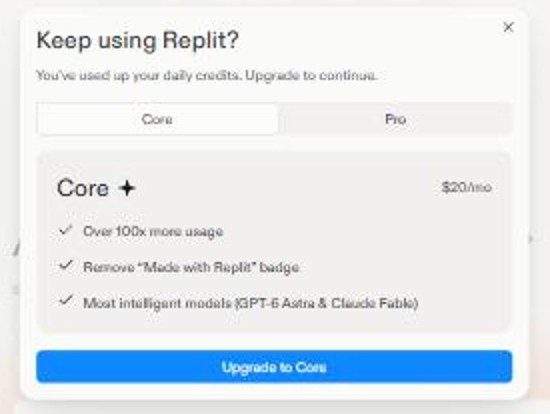
Paying unlocks higher usage limits and commercial features. The Core plan costs $20/month or $216/year. It provides up to 30 hours of chat on Free Mode, up to 60 projects, and $20 towards more powerful models. It also includes unlimited workspaces. The Pro plan costs $100/month or $1,080/year. It adds up to 15 collaborators, database rollback up to 28 days, and $100 credits. pricing pageSource · vendor pagePricing page (replit.com), checked Nov 1, 2026.Go to sources ↓
We tested the free tier hands-on in the app 7.8Our test · free tierBuild a tip calculator: 7.8/10, 5 of 5 checks passed.Read the answer ↓8.1Our test · free tierBuild a to-do list that remembers: 8.1/10, 6 of 6 checks passed.Read the answer ↓9.4Our test · free tierBuild a unit converter: 9.4/10, 4 of 4 checks passed.Read the answer ↓8.4Our test · free tierBuild a focus timer: 8.4/10, 6 of 6 checks passed.Read the answer ↓9.4Our test · free tierChange an existing app: 9.4/10, 5 of 5 checks passed.Read the answer ↓. On the tip calculator task, the free tier scored 7.8/10 7.8Our test · free tierBuild a tip calculator: 7.8/10, 5 of 5 checks passed.Read the answer ↓. On the to-do list task, it scored 8.1/10 8.1Our test · free tierBuild a to-do list that remembers: 8.1/10, 6 of 6 checks passed.Read the answer ↓. On the unit converter task, it scored 9.4/10 9.4Our test · free tierBuild a unit converter: 9.4/10, 4 of 4 checks passed.Read the answer ↓. On the focus timer task, it scored 8.4/10 8.4Our test · free tierBuild a focus timer: 8.4/10, 6 of 6 checks passed.Read the answer ↓. On the existing app change task, it scored 9.4/10 9.4Our test · free tierChange an existing app: 9.4/10, 5 of 5 checks passed.Read the answer ↓.
The free plan is sufficient for light use or learning. Paying is necessary for regular use, collaboration, and commercial deployment. The Core plan is the best value for most users who need more than the free limits.
Many users praise the platform for enabling non-technical founders to build and launch apps successfully RedditUser report · positive · Redditr/replit, posted Jan 12, 2026See the report ↓RedditUser report · positive · Redditr/replit, posted May 1, 2026See the report ↓. Some users report that the free tier's credits run out quickly when they are actively building multiple projects RedditUser report · positive · Redditr/replit, posted May 2, 2026See the report ↓RedditUser report · mixed · Redditr/replit, posted Mar 5, 2026See the report ↓. A few users mention that the agent mode can be frustrating and may not follow technical instructions precisely RedditUser report · negative · Redditr/replit, posted Mar 10, 2026See the report ↓. Others appreciate the ability to host and buy domains directly through the platform App StoreUser report · positive · App Store reviewPosted Nov 12, 2026See the report ↓.
Many users praise the platform for enabling non-technical founders to build and launch apps successfully.
Our replit app just closed $38k in the last 30 days from launching - I LOVE Replit I just wanted to say how much I was blown away when I first started using replit. I am an entrepreneur that has literally zero coding experience. The fact that I could use this tool to create a software company... …
Many users praise the platform for enabling non-technical founders to build and launch apps successfully.
What I tell every non-technical founder once their Replit app starts making money Something I keep telling the founders I work with that I think is worth sharing here too. This isn't about leaving Replit. …
Some users report that the free tier's credits run out quickly when they are actively building multiple projects.
Are you servers on fire yet Replit? This is either crazy or genius. I am running 5 new projects and updating ALL those crazy dead ideas. ..what is that you say? you are done? No Agent, you will not be done tonight. Coffee + Inspiration + Free Tokens = me slamming the servers. …
Others appreciate the ability to host and buy domains directly through the platform.
… Replit built it better than I envisioned it. I explained some changes and it fully understood and suggested more. A few minutes and I had a working app that I really liked. You can buy the domain and hosting right through replit and your site is live. Unbelievably fast and intuitive!
A few users mention that the agent mode can be frustrating and may not follow technical instructions precisely.
Looking for a Replit alternative I’m looking for a Replit alternative. The agent mode is awful. It doesn’t really follow your technical instructions, and it keeps burning checkpoints (25 cents) whenever it wants you to review progress. …
Some users report that the free tier's credits run out quickly when they are actively building multiple projects.
… Someone built something cool in Lovable or v0 or Replit, it works, users are signing up, and now every small change costs credits or hits some weird platform limit. You're editing in a browser IDE and praying nothing breaks. You don't need to rewrite anything. …
GitHub Copilot Pro is $10/month, which is lower than Replit Core's $20/month price. It offers unlimited inline suggestions for coding tasks.
Cursor Pro is priced at $20/month, matching Replit Core's monthly cost while offering extended agent limits and model access.
Windsurf Pro costs $20/month, aligning with Replit Core's price point while providing full model availability and cloud agents.
The Core plan costs $20/month and includes up to 60 projects and $20 in model credits. The Pro plan costs $100/month and adds up to 15 collaborators, database rollback up to 28 days, and $100 in credits.
Yes, the free Starter plan allows you to publish only one app, and the link goes down after 30 days.
The Core plan costs $216/year when billed annually.
The free Starter plan does not explicitly list collaborator limits, but the Pro plan allows up to 15 collaborators.
The "Visit" buttons go through shouldipay.ai/go/ and may be affiliate links, so we may earn a commission if you subscribe. Commissions never decide a verdict: the evidence on this page does. Verdicts are drafted with AI from the vendors' own pricing and documentation pages and, for this verdict, our own tests shown on this page and public user reports we link to, and checked automatically against those sources before they are published; a person reviews first verdicts, changed answers and anything the checks flag. Affiliate disclosure