Independent verdicts on paid AI plans. Prices re-checked every day. We may earn a commission from "Visit" links. How we make money
shouldipay.ai

Verdict · Productivity · by Napkin

Is Napkin AI worth paying for in 2026?

Depends: Free suits occasional use, while Plus adds more credits, premium AI image models, exports, branding control and team billing.

Evidence: tested Pricing & docs No user reports cited Tested by us · free tier Paid tier not tested yet
Cheapest paid
$9/user/moPlus · 10,000 per month ai credits
What's free
$0AI credits 500 per week, Visuals editing Unlimited, File import Unlimited (PPT,…
Our test score
7.7/10Free tierPaid: not tested yet
Prices checked
Tested by us Oct 1, 2026Verdict published Nov 13, 2026
Visit Napkin AI(opens in a new tab)

Start on the free plan first. The button opens napkin.ai through shouldipay.ai/go/napkin-ai. It may be an affiliate link: we may earn a commission. Commissions never decide a verdict: the evidence on this page does. Disclosure

Who should pay

  • Regular creators who need more than 500 AI credits per week.
  • Teams that need PPT and SVG exports and removed Napkin branding.
  • Plus users who want premium AI image models and 3 Brand Styles.
  • Pro teams needing 30,000 monthly credits and unlimited custom branding.

Who shouldn't

  • Occasional users who can stay within 500 AI credits per week.
  • Solo creators who only need unlimited PNG and PDF exports.
  • People happy with built-in styles and Napkin branding.

Free vs paid: the plans

Prices checked Nov 21, 2026

Business

Free

$0
  • AI credits500 per week
  • Visuals editingUnlimited
  • File importUnlimited (PPT, DOC, PDF, HTML, MD)
  • ExportUnlimited PNG & PDF
Our pick

Plus

$9/user/mo
  • AI credits10,000 per month
  • PPT & SVG exportUnlimited
  • Brand Styles3

"Pay for Plus if regular generation needs more credits, premium AI image models, PPT or SVG export, branding removal, or team billing." Bottom line
Pro

$22/user/mo
  • AI credits30,000 per month
  • Custom BrandingUnlimited
Prices in USD from Napkin's own pricing page. Checked automatically every day.
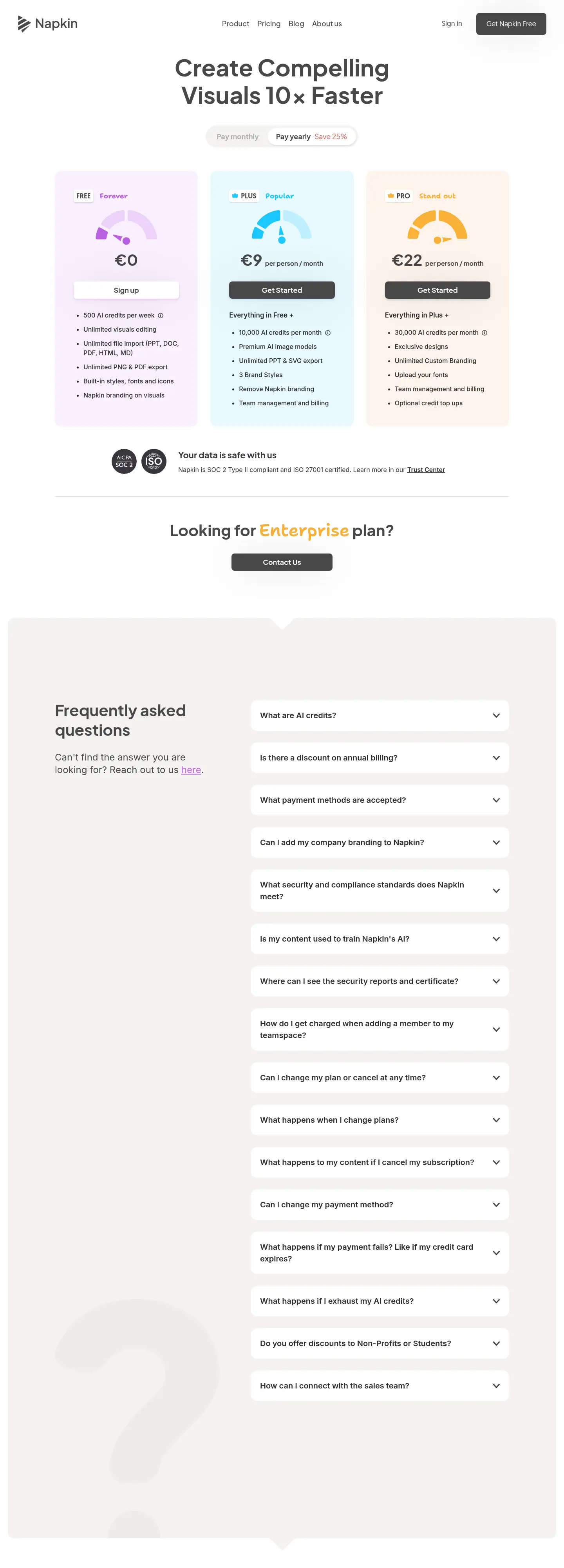
Screenshot of the top of Napkin AI's pricing page (napkin.ai) as captured on Nov 19, 2026.
The vendor's pricing page as we saw it on Nov 19, 2026 · source Captured by shouldipayBot · 1440 px wide, not logged in
napkin.ai · Nov 19, 2026
Price history · 8 changes since Oct 20, 2026
  1. RemovedEnterprise
  2. LimitsPro
  3. LimitsPlus
  4. LimitsFree
  5. NewEnterprise
  6. LimitsPro
  7. LimitsPlus
  8. LimitsFree

Our test results

Tested by us on Oct 1, 2026

7.7/10

Free tier, average of 8 tasks

Free tier: run by hand in the product's own web app on the Napkin AI Free plan by our editor on Oct 1, 2026 (free tier); the app showed the model Napkin Slides (beta) and Visuals, free plan defaults.

Paid tier not tested yet — why

We only publish paid-tier scores from access we actually have (our own subscription, a trial or access given by the vendor), and we have no paid-tier results for Napkin AI yet. So this page cannot show what paying changes in answer quality; the verdict relies on the plans and, where we have them, user reports for that.

Score = 70% quality (AI judges) + 30% automatic checks passed

Each task below opens to show the prompt, the objective checks and the full answer of each tier.

A 5-slide deck from a reportTurning a short report into a five-slide deck Free tier score: 8.7 out of 10
The task we gave it

Make a 5-slide presentation titled "The Eastbrook Tool Library" from this text. Slide 1 is the title slide. Last spring, the town library in Eastbrook ran a six-month pilot that let residents borrow tools as well as books. The library bought 140 items using a grant of 18,000 euros. 612 residents borrowed at least one tool, and new library card sign-ups rose by 31 percent. Only four items were returned damaged. The main problem was storage. The board has voted to make the scheme permanent and move the tools to a converted garage.
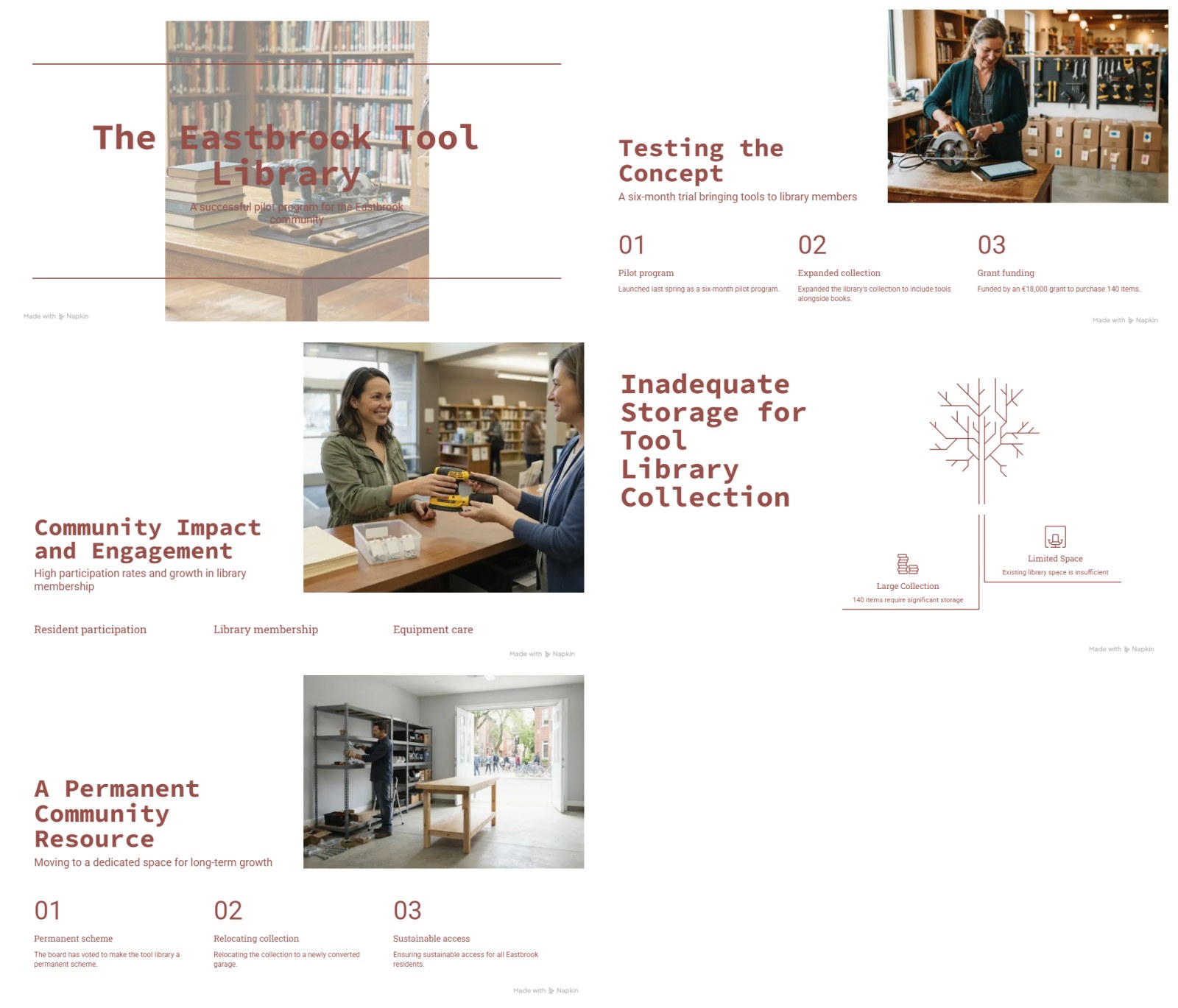
Free tierby hand in the web app, Napkin AI Free plan8.7/1070% quality · 30% checks
  • Automatic checks: 2 of 3 passed
  • ✓Exactly 5 slides
  • ✓Shows the title
  • ✗Shows the key numbers 612 and 31
  • Recorded by hand
  • Time to the result (s): 340
  • Credits used: part of the weekly free credits (not shown per job)
  • Visible watermark or badge: Yes
  • Slides or pages produced: 5
  • Export formats offered on this plan: PDF and PNG (PowerPoint, Google Slides and SVG need a paid plan)
What the judges scored
  • Shows what was asked10
  • Looks good9
A 5-slide deck from a report: the image Napkin AI made on the free tier
The first image it made, 1968×1684 px PNG (click to enlarge)
A flowchart of a processDrawing an order process as a flowchart with a decision Free tier score: 9.0 out of 10
The task we gave it

Turn this into a flowchart: A customer places an order. If the item is in stock, it is packed and shipped. If not, the customer is offered a refund or a backorder.
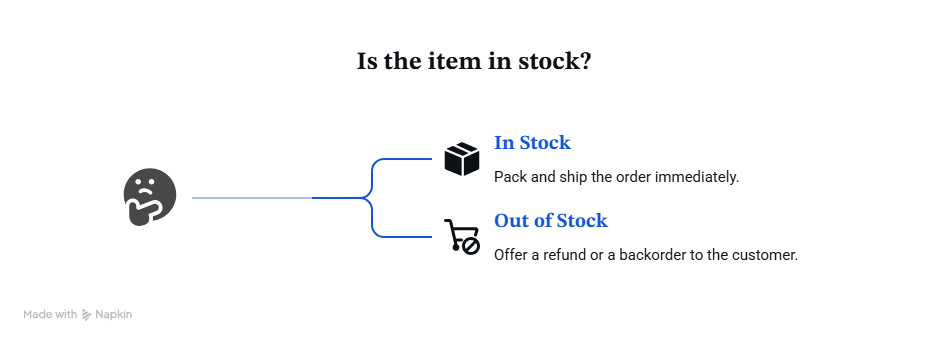
Free tierby hand in the web app, Napkin AI Free plan9.0/1070% quality · 30% checks
  • Automatic checks: 3 of 3 passed
  • ✓Shows the in-stock decision
  • ✓Shows both out-of-stock options
  • ✓Shows shipping
  • Recorded by hand
  • Time to the result (s): 11
  • Credits used: about 23 weekly AI credits
  • Visible watermark or badge: Yes
  • Slides or pages produced: 1
  • Export formats offered on this plan: PNG and PDF (SVG, PowerPoint and Google Slides need a paid plan)
What the judges scored
  • Shows what was asked8
  • Looks good9
  • Text spelled right10
A flowchart of a process: the image Napkin AI made on the free tier
The first image it made, 948×342 px PNG (click to enlarge)
A timelineLaying out four company milestones on a timeline Free tier score: 10.0 out of 10
The task we gave it

Make a timeline graphic with these milestones: 2019 Company founded; 2021 First app released; 2023 10,000 customers; 2025 Office in Lisbon.
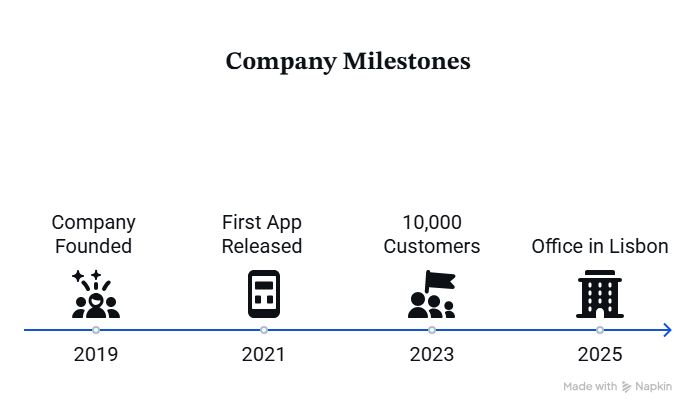
Free tierby hand in the web app, Napkin AI Free plan10.0/1070% quality · 30% checks
  • Automatic checks: 3 of 3 passed
  • ✓Shows all four years
  • ✓Years in order
  • ✓Shows the Lisbon milestone
  • Recorded by hand
  • Time to the result (s): 10
  • Credits used: about 23 weekly AI credits
  • Visible watermark or badge: Yes
  • Slides or pages produced: 1
  • Export formats offered on this plan: PNG and PDF (SVG, PowerPoint and Google Slides need a paid plan)
What the judges scored
  • Shows what was asked10
  • Looks good10
A timeline: the image Napkin AI made on the free tier
The first image it made, 696×414 px PNG (click to enlarge)
A comparison chart WeakComparing three pricing plans in one graphic Free tier score: 4.0 out of 10
The task we gave it

Make a comparison graphic of three plans: Free (0 euros, 1 user, 2 projects), Plus (8 euros a month, 3 users, 20 projects), Pro (20 euros a month, 10 users, unlimited projects).
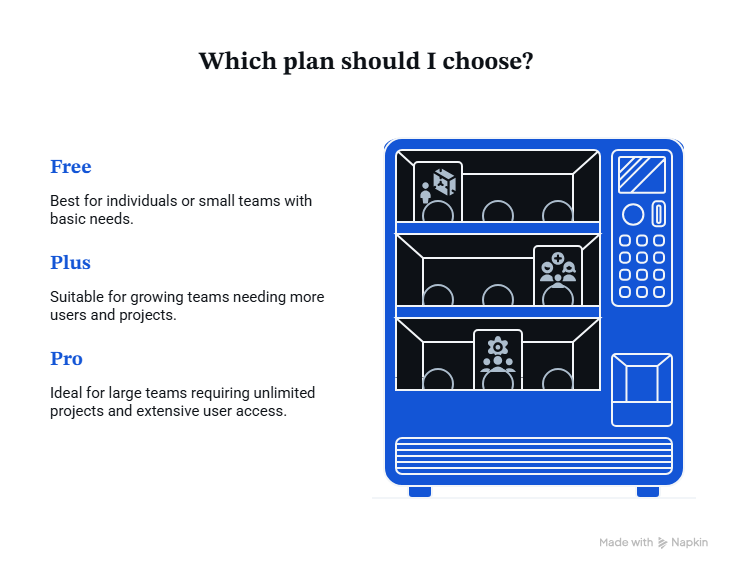
Free tierby hand in the web app, Napkin AI Free plan4.0/1070% quality · 30% checks
  • Automatic checks: 2 of 3 passed
  • ✓Shows all three plans
  • ✗Shows the prices 8 and 20
  • ✓Shows unlimited projects
  • Recorded by hand
  • Time to the result (s): 20
  • Credits used: about 23 weekly AI credits
  • Visible watermark or badge: Yes
  • Slides or pages produced: 1
  • Export formats offered on this plan: PNG and PDF (SVG, PowerPoint and Google Slides need a paid plan)
What the judges scored
  • Shows what was asked2
  • Looks good4
A comparison chart: the image Napkin AI made on the free tier
The first image it made, 732×570 px PNG (click to enlarge)
A square social post WeakDesigning a square social post for a pottery workshop Free tier score: 4.7 out of 10
The task we gave it

Design a square Instagram post announcing a pottery workshop: title "POTTERY WORKSHOP", line "Saturday 10:00, Studio 4", warm earthy colours, an illustration of a vase.
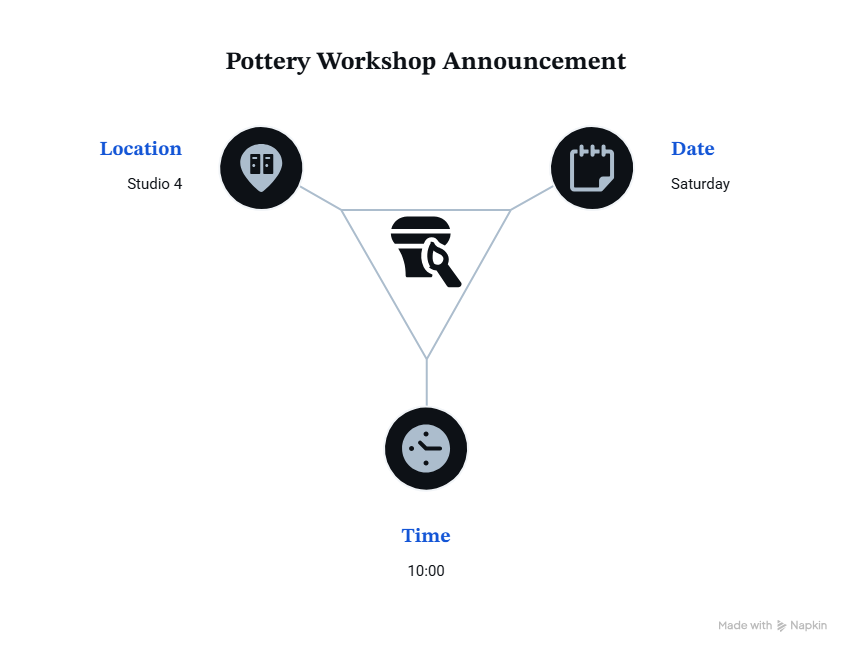
Free tierby hand in the web app, Napkin AI Free plan4.7/1070% quality · 30% checks
  • Automatic checks: 2 of 3 passed
  • ✗Square format
  • ✓Shows the title
  • ✓Shows the day and time
  • Recorded by hand
  • Time to the result (s): 13
  • Credits used: about 23 weekly AI credits
  • Visible watermark or badge: Yes
  • Slides or pages produced: 1
  • Export formats offered on this plan: PNG and PDF (SVG, PowerPoint and Google Slides need a paid plan)
What the judges scored
  • Looks good2
  • Shows what was asked3
  • Text spelled right10
A square social post: the image Napkin AI made on the free tier
The first image it made, 851×653 px PNG (click to enlarge)
A one-page infographicMaking a one-page infographic with three statistics Free tier score: 9.7 out of 10
The task we gave it

Make a one-page infographic titled "Why we switched to e-bikes" with three stats: 42% shorter commute times, 3,100 kg less CO2 per year, 18 riders in the team.
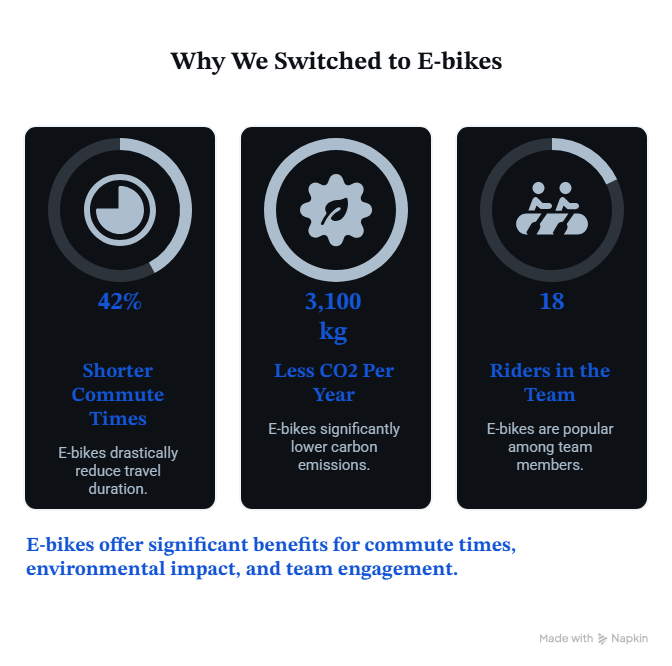
Free tierby hand in the web app, Napkin AI Free plan9.7/1070% quality · 30% checks
  • Automatic checks: 3 of 3 passed
  • ✓Shows the title topic
  • ✓Shows 42% and 18
  • ✓Shows 3,100 kg
  • Recorded by hand
  • Time to the result (s): 13
  • Credits used: about 23 weekly AI credits
  • Visible watermark or badge: Yes
  • Slides or pages produced: 1
  • Export formats offered on this plan: PNG and PDF (SVG, PowerPoint and Google Slides need a paid plan)
What the judges scored
  • Shows what was asked10
  • Looks good9
  • Text spelled right10
A one-page infographic: the image Napkin AI made on the free tier
The first image it made, 672×666 px PNG (click to enlarge)
A mind mapMaking a mind map with a centre and five branches Free tier score: 9.8 out of 10
The task we gave it

Make a mind map with the centre "Healthy week" and five branches: Sleep, Food, Movement, Friends, Screens.
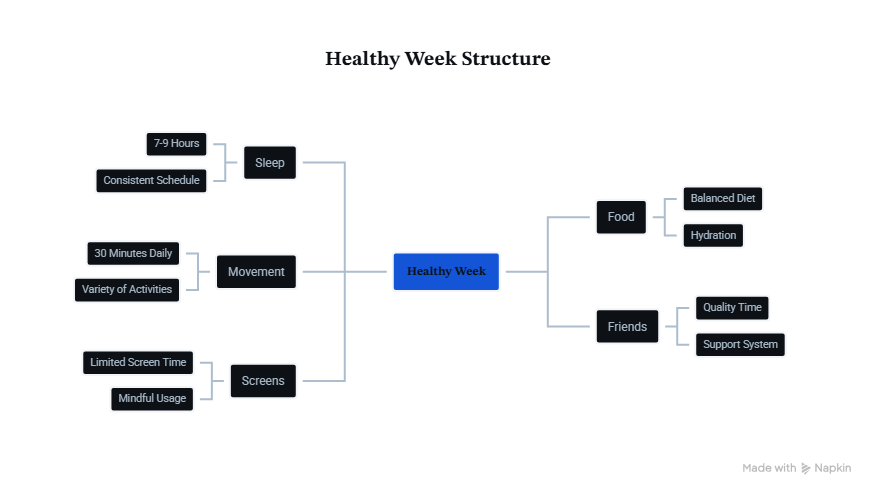
Free tierby hand in the web app, Napkin AI Free plan9.8/1070% quality · 30% checks
  • Automatic checks: 2 of 2 passed
  • ✓Shows the centre topic
  • ✓Shows all five branches
  • Recorded by hand
  • Time to the result (s): 13
  • Credits used: about 23 weekly AI credits
  • Visible watermark or badge: Yes
  • Slides or pages produced: 1
  • Export formats offered on this plan: PNG and PDF (SVG, PowerPoint and Google Slides need a paid plan)
What the judges scored
  • Shows what was asked10
  • Looks good9
A mind map: the image Napkin AI made on the free tier
The first image it made, 876×496 px PNG (click to enlarge)
Edit an existing deck WeakEditing the deck: a new colour theme and a closing slide Free tier score: 6.0 out of 10
The task we gave it

In the Eastbrook deck: change the colour theme to dark blue and add a final slide titled "Questions?". Keep everything else.
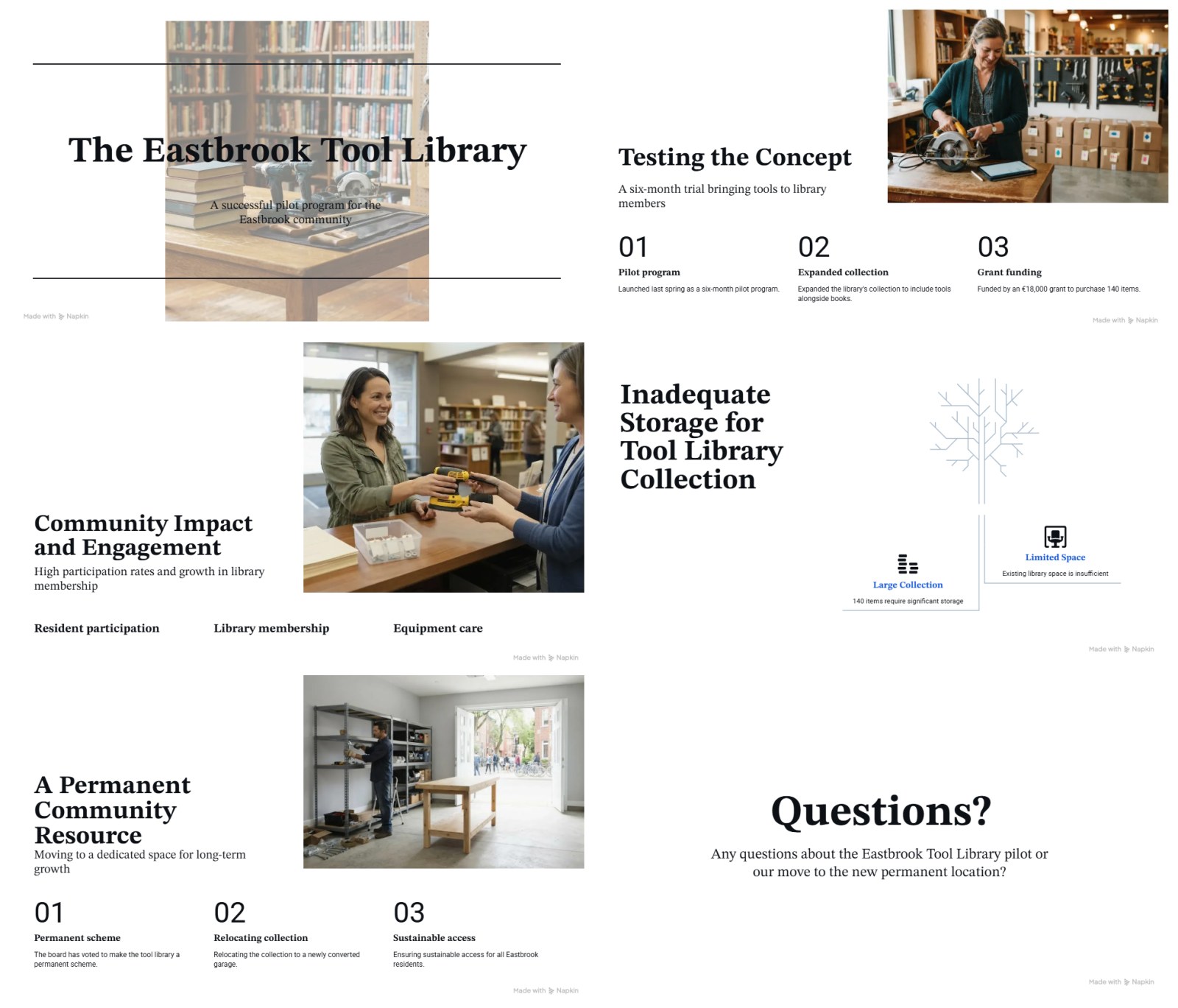
Free tierby hand in the web app, Napkin AI Free plan6.0/1070% quality · 30% checks
  • Automatic checks: 2 of 3 passed
  • ✓Now 6 slides
  • ✓Has the Questions? slide
  • ✗Keeps the existing content
  • Recorded by hand
  • Time to the result (s): 295
  • Credits used: the rest of the weekly free credits (0 left afterwards)
  • Visible watermark or badge: Yes
  • Slides or pages produced: 6
  • Export formats offered on this plan: PDF and PNG (PowerPoint, Google Slides and SVG need a paid plan)
What the judges scored
  • Shows what was asked5
  • Looks good8
Edit an existing deck: the image Napkin AI made on the free tier
The first image it made, 1968×1684 px PNG (click to enlarge)

Hands-on notes, free tier

Did you run out of credits or hit a limit? After which task, and what did the tool say?
Yes: after a 5-slide deck and one edit, the next visual was refused with "You've run out of this week's free credits. Upgrade now to get more credits"; credits refill weekly, and after the refill on 5 October the six short briefs used 139 credits (about one credit per word of the selected text).
Which export formats did the plan allow (PNG, PDF, PPTX, SVG), and at what quality?
PNG and PDF on the free plan; PowerPoint, Google Slides and SVG are marked as paid. PNG slides are 960x540 with a transparent background.
Did free exports carry a watermark or badge? Could you use your own fonts, colours or logo?
Yes: every slide shows "Made with Napkin"; removing it needs a paid plan. Styles can be picked and recoloured; Brand Studio is offered.
Anything else a buyer of this plan should know?
Slides is a guided chat: it stops to confirm the outline and to ask for a style and slide designs, so it is not one-click. The weekly free credits cover very little: one deck and one edit used them all.

The full analysis

What's free

The Free plan includes 500 AI credits per week, with about 1 credit charged for each selected word used in generation. Visuals editing is unlimited, as are imports from PPT, DOC, PDF, HTML and MD. It also includes unlimited PNG and PDF export, built-in styles, fonts and icons, and Napkin branding on visuals. The pricing page says that credit use may change for more complex outputs or advanced features. pricing pageSource · vendor pagePricing page (napkin.ai), checked Nov 3, 2026.Go to sources ↓

What paying adds

Plus costs $9/month per user and raises the allowance to 10,000 AI credits per month. It adds premium AI image models, unlimited PPT and SVG export, 3 Brand Styles, removal of Napkin branding, and team management and billing. Pro costs $22/month per user and includes 30,000 AI credits per month, exclusive designs, unlimited custom branding, font uploads, and optional credit top-ups. Annual billing is available with a discount; upgrades are charged immediately and prorated, while downgrades take effect at the end of the current billing cycle, leaving created content accessible although editing may be restricted. pricing pageSource · vendor pagePricing page (napkin.ai), checked Nov 3, 2026.Go to sources ↓

Our test

A person ran the public AI slides, diagrams and graphics suite v1 hands-on in the app on Napkin AI Free on 2026-10-01 8.7Our test · free tierA 5-slide deck from a report: 8.7/10, 2 of 3 checks passed.Read the answer ↓9.0Our test · free tierA flowchart of a process: 9.0/10, 3 of 3 checks passed.Read the answer ↓10.0Our test · free tierA timeline: 10.0/10, 3 of 3 checks passed.Read the answer ↓4.0Our test · free tierA comparison chart: 4.0/10, 2 of 3 checks passed.Read the answer ↓4.7Our test · free tierA square social post: 4.7/10, 2 of 3 checks passed.Read the answer ↓9.7Our test · free tierA one-page infographic: 9.7/10, 3 of 3 checks passed.Read the answer ↓9.8Our test · free tierA mind map: 9.8/10, 2 of 2 checks passed.Read the answer ↓6.0Our test · free tierEdit an existing deck: 6.0/10, 2 of 3 checks passed.Read the answer ↓. The free tier scored 8.7/10 on the five-slide deck task, while the free tier scored 6.0/10 on editing an existing deck, which did not apply the requested dark blue theme 8.7Our test · free tierA 5-slide deck from a report: 8.7/10, 2 of 3 checks passed.Read the answer ↓6.0Our test · free tierEdit an existing deck: 6.0/10, 2 of 3 checks passed.Read the answer ↓. The free tier scored 9.0/10 on the flowchart task, and the free tier scored 10.0/10 on the timeline task 9.0Our test · free tierA flowchart of a process: 9.0/10, 3 of 3 checks passed.Read the answer ↓10.0Our test · free tierA timeline: 10.0/10, 3 of 3 checks passed.Read the answer ↓. The free tier scored 9.7/10 on the one-page infographic task, and the free tier scored 9.8/10 on the mind map task 9.7Our test · free tierA one-page infographic: 9.7/10, 3 of 3 checks passed.Read the answer ↓9.8Our test · free tierA mind map: 9.8/10, 2 of 2 checks passed.Read the answer ↓. The free tier scored 4.0/10 on the comparison chart task because required numerical values were missing, and the free tier scored 4.7/10 on the square social post task because it became a diagram rather than a poster and lacked the requested earthy palette 4.0Our test · free tierA comparison chart: 4.0/10, 2 of 3 checks passed.Read the answer ↓4.7Our test · free tierA square social post: 4.7/10, 2 of 3 checks passed.Read the answer ↓. Plus and Pro were not tested, so there is no task-by-task free-versus-paid comparison 8.7Our test · free tierA 5-slide deck from a report: 8.7/10, 2 of 3 checks passed.Read the answer ↓9.0Our test · free tierA flowchart of a process: 9.0/10, 3 of 3 checks passed.Read the answer ↓10.0Our test · free tierA timeline: 10.0/10, 3 of 3 checks passed.Read the answer ↓4.0Our test · free tierA comparison chart: 4.0/10, 2 of 3 checks passed.Read the answer ↓4.7Our test · free tierA square social post: 4.7/10, 2 of 3 checks passed.Read the answer ↓9.7Our test · free tierA one-page infographic: 9.7/10, 3 of 3 checks passed.Read the answer ↓9.8Our test · free tierA mind map: 9.8/10, 2 of 2 checks passed.Read the answer ↓6.0Our test · free tierEdit an existing deck: 6.0/10, 2 of 3 checks passed.Read the answer ↓.

Bottom line

Start with Free for occasional visual work because it covers editing, imports, PNG and PDF export, and 500 AI credits per week. Pay for Plus if regular generation needs more credits, premium AI image models, PPT or SVG export, branding removal, or team billing. For most paying users, Plus is the clearest step up, while Pro fits those who need 30,000 monthly credits, unlimited custom branding, uploaded fonts and exclusive designs. pricing pageSource · vendor pagePricing page (napkin.ai), checked Nov 3, 2026.Go to sources ↓

Cheaper or free alternatives

Notion AISimilar priceFree plan · paid from €9.50/mo per user

Notion AI's Plus plan costs €9.50/month per user, which is comparable to Napkin AI's Plus plan at $9/month. It includes unlimited blocks and file uploads.

All alternatives to Napkin AI →

Compare Napkin AI

Questions people ask

How much do Napkin AI's plans cost?

Free includes 500 AI credits per week. Plus costs $9/month per user with 10,000 AI credits per month; Pro costs $22/month per user with 30,000 AI credits per month.

What does Plus add over Free?

Plus adds premium AI image models, unlimited PPT and SVG export, 3 Brand Styles, removal of Napkin branding, and team management and billing.

What does Pro add over Plus?

Pro adds 30,000 AI credits per month, exclusive designs, unlimited custom branding, font uploads, and optional credit top-ups.

Can I change or cancel a plan, and what happens to my content?

You can upgrade, downgrade, or cancel at any time. Upgrades are charged immediately with proration, while downgrades take effect at the end of the current cycle. Your content remains yours and accessible, though editing may be restricted after a downgrade.

What happens if I run out of AI credits?

Upgrade to Plus or Pro for a higher monthly allowance, or purchase additional credits at any time.

Can I pay annually?

The pricing FAQ says annual billing is available and discounted compared with monthly billing, but the provided pricing text does not list an annual amount.

How this verdict was made

  1. Prices, every dayWe read the vendor's own pricing and documentation pages automatically, every day.
  2. User reportsPublic posts and reviews, filtered for relevance. Only a short excerpt and the link are kept, never usernames.
  3. Our own testsA public task suite, run on the free and paid tiers where we have access. Blind AI judges score each answer; a person scores the ones they disagree on.
  4. Draft, check, reviewAI drafts the verdict from this evidence. Every draft is checked automatically against the sources, and a person reviews first verdicts, changed answers and anything the checks flag.

How we make money

The "Visit" buttons go through shouldipay.ai/go/ and may be affiliate links, so we may earn a commission if you subscribe. Commissions never decide a verdict: the evidence on this page does. Verdicts are drafted with AI from the vendors' own pricing and documentation pages and, for this verdict, our own tests shown on this page, and checked automatically against those sources before they are published; a person reviews first verdicts, changed answers and anything the checks flag. Affiliate disclosure