Independent verdicts on paid AI plans. Prices re-checked every day. We may earn a commission from "Visit" links. How we make money
shouldipay.ai

Verdict · Productivity · by Notion

Is Notion AI worth paying for in 2026?

Pay if you need unlimited blocks, charts, or file uploads; the free plan suffices for individuals with light usage.

Evidence: docs Pricing & docs No user reports yet Not yet tested by us
Cheapest paid
€9.50/user/moPlus · Unlimited blocks
What's free
€0Blocks limited for 2+ members, File uploads Up to 5 MB, Page history 7 days, Ex…
Our test score
—Not tested by us yet
Prices checked
Verdict published Sep 25, 2026
Visit Notion AI(opens in a new tab)

Start on the free plan first. The button opens notion.com through shouldipay.ai/go/notion-ai. It may be an affiliate link: we may earn a commission. Commissions never decide a verdict: the evidence on this page does. Disclosure

Who should pay

  • Users who exceed the free block limit for 2+ members
  • Teams needing unlimited charts and file uploads
  • Organizations requiring 30+ days of page history
  • Users who need unlimited external guests

Who shouldn't

  • Individuals with light collaboration needs
  • Users who stay under the free block limit
  • People who only need basic document organization
  • Those satisfied with 7-day page history

Free vs paid: the plans

Prices checked Sep 27, 2026

Business

Free

€0
  • Blockslimited for 2+ members
  • File uploadsUp to 5 MB
  • Page history7 days
  • External guest limit10
  • Charts1
  • notion.site domains1
  • Data retention30 day retention

Plus

€9.50/user/mo
  • BlocksUnlimited
  • File uploadsUnlimited
  • Page history30 days
  • External guest limitUnlimited guests
  • ChartsUnlimited
  • notion.site domains5
  • Data retention30 day retention

Business

€19.50/user/mo
  • BlocksUnlimited
  • File uploadsUnlimited
  • Page history90 days
  • External guest limitUnlimited guests
  • ChartsUnlimited
  • notion.site domains5
  • Data retention30 day retention

Enterprise

Custom
  • BlocksUnlimited
  • File uploadsUnlimited
  • Page historyUnlimited
  • External guest limitUnlimited guests
  • ChartsUnlimited
  • notion.site domains5
  • Data retentionZero data retention
Prices in EUR from Notion's own pricing page. Checked automatically every day.
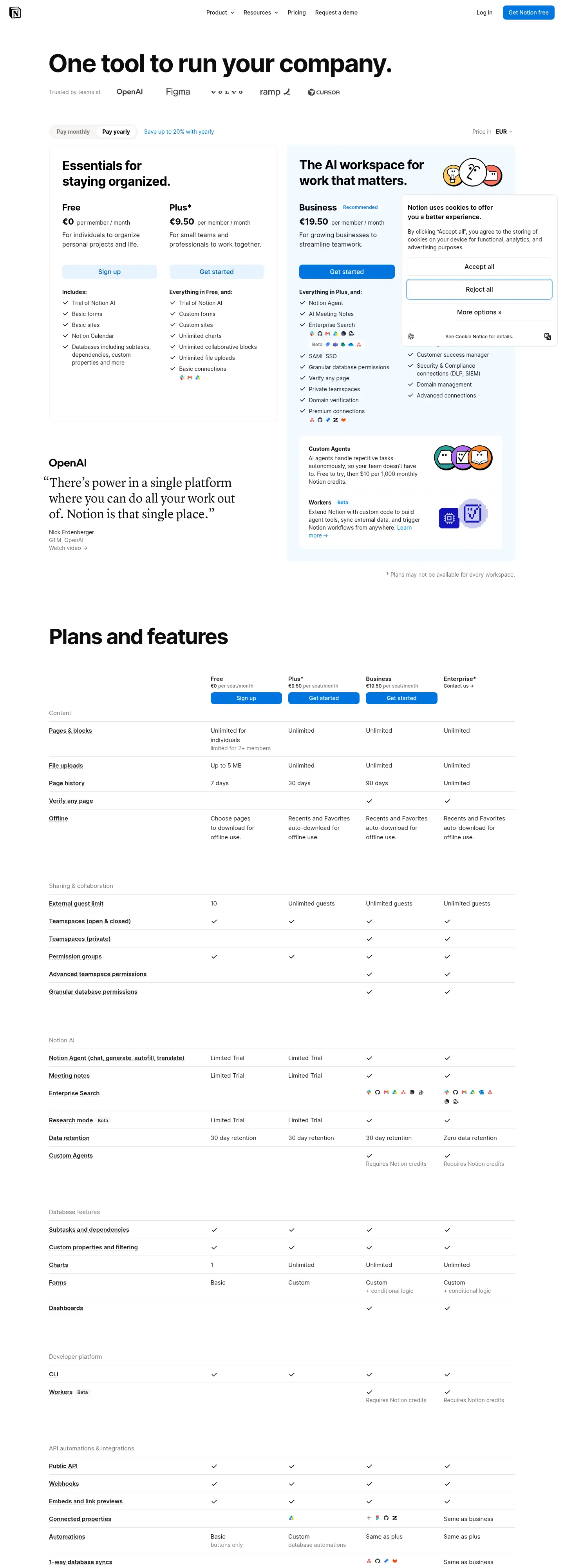
Screenshot of the top of Notion AI's pricing page (notion.com) as captured on Sep 27, 2026.
The vendor's pricing page as we saw it on Sep 27, 2026 · source Captured by shouldipayBot · 1440 px wide, not logged in
notion.com · Sep 27, 2026

The full analysis

What's free

The Free plan costs €0 per user. It is designed for individuals to organize personal projects and life. The pricing page lists the following limits for the free tier:

  • Blocks: Limited for workspaces with 2 or more members.
  • File uploads: Up to 5 MB per file.
  • Page history: 7 days.
  • External guests: Limited to 10 guests.
  • Charts: Limited to 1 chart.
  • notion.site domains: Limited to 1 domain.
  • Data retention: 30-day retention.
  • AI: Includes a trial of Notion AI capabilities, such as generating docs or autofilling databases.

What paying adds

Upgrading to a paid plan removes the restrictions found in the free tier and adds advanced features.

Plus Plan (€9.50/month per user) This plan is for small teams and professionals. It includes:

  • Unlimited blocks for collaborative work.
  • Unlimited file uploads (with a ~5GB max per file limit).
  • 30 days of page history.
  • Unlimited external guests.
  • Unlimited charts (donut, bar, line, etc.).
  • 5 notion.site domains.
  • Custom forms and sites.
  • Removal of Notion branding from public forms.
  • Customization options like themes and favicons.

Business Plan (€19.50/month per user) This plan adds features for growing businesses:

  • 90 days of page history.
  • Notion Agent for complex, multi-step tasks.
  • AI Meeting Notes for automatic transcription and summaries.
  • Enterprise Search Beta to search across connected apps like Slack and GitHub.
  • SAML SSO for secure single sign-on.
  • Granular database permissions to limit access to specific rows.
  • Private teamspaces for sensitive information.
  • Domain verification for advanced security.

Enterprise Plan (Custom price) For organizations needing scalability and control:

  • Unlimited page history.
  • Zero data retention with LLM providers.
  • User provisioning (SCIM) API.
  • Audit logs for security activity.
  • Customer success manager support.

Bottom line

The decision to pay depends on your volume of content and collaboration needs. If you are an individual using Notion for personal tasks and stay within the block and file limits, the free plan is sufficient. However, if you are part of a team that frequently adds blocks, needs to visualize data with multiple charts, or requires longer history retention, upgrading to Plus or Business is necessary. The Business plan is best for teams needing advanced security, AI agents, and deeper integrations.

Cheaper or free alternatives

Napkin AIFree optionFree plan · paid from $9/mo per user

Napkin AI offers a free tier with 500 AI credits per week, providing a cost-effective alternative for light usage compared to Notion AI's paid plans.

All alternatives to Notion AI →

Compare Notion AI

Questions people ask

How much does Notion AI cost?

Notion AI is included in the Plus (€9.50/month) and Business (€19.50/month) plans. The Free plan includes a trial of AI capabilities.

What is the limit on blocks in the free plan?

Blocks are limited for workspaces with 2 or more members in the free plan. Individual users may have unlimited blocks, but the pricing page specifies limits for 2+ members.

Can I cancel my subscription at any time?

The vendor's page does not state the cancellation policy.

What is the difference between Plus and Business plans?

The Business plan (€19.50/month) includes 90 days of page history, Notion Agent, AI Meeting Notes, Enterprise Search, SAML SSO, and granular permissions, which are not in the Plus plan (€9.50/month).

How many charts can I create on the free plan?

The free plan allows for 1 chart. Paid plans offer unlimited charts.

How this verdict was made

  1. Prices, every dayWe read the vendor's own pricing and documentation pages automatically, every day.
  2. User reportsPublic posts and reviews, filtered for relevance. Only a short excerpt and the link are kept, never usernames.
  3. Our own testsA public task suite, run on the free and paid tiers where we have access. Blind AI judges score each answer; a person scores the ones they disagree on.
  4. Draft, check, reviewAI drafts the verdict from this evidence. Every draft is checked automatically against the sources, and a person reviews first verdicts, changed answers and anything the checks flag.

How we make money

The "Visit" buttons go through shouldipay.ai/go/ and may be affiliate links, so we may earn a commission if you subscribe. Commissions never decide a verdict: the evidence on this page does. Verdicts are drafted with AI from the vendors' own pricing and documentation pages and checked automatically against those sources before they are published; a person reviews first verdicts, changed answers and anything the checks flag. Affiliate disclosure