Free
$0
- Credits0 credits / month
- Parallel generations2 video · 2 image + audio

Verdict · Video · by Pika Labs
Paying is worth it if you need commercial rights or high volume; the free plan is good for casual use but has no credits.
Start on the free plan first. The button opens pika.art through shouldipay.ai/go/pika. It may be an affiliate link: we may earn a commission. Commissions never decide a verdict: the evidence on this page does. Disclosure
Personal
+$2 on Sep 25, 2026
+$7 on Sep 25, 2026
+$19 on Sep 25, 2026
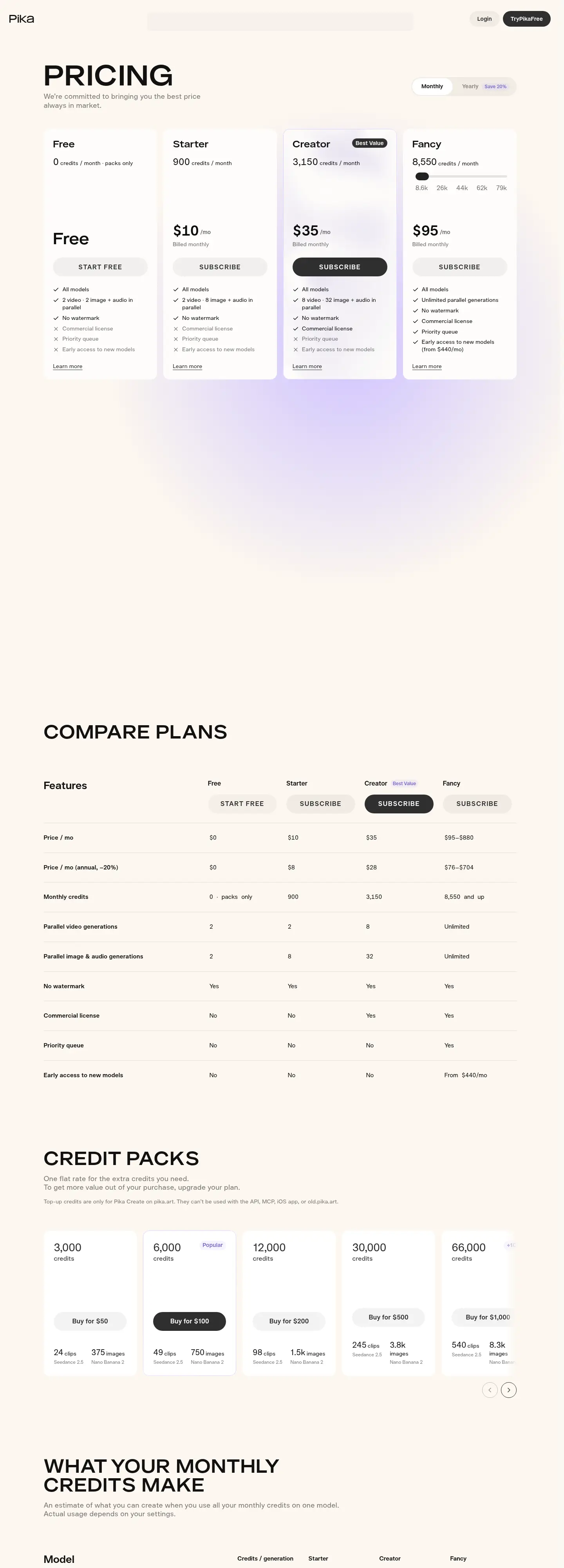
Pika offers a free plan that includes access to all video, image, and audio models. However, the free tier provides 0 credits per month, meaning you rely on packs for additional usage or limited free generations if available. You get 2 parallel video generations and 2 parallel image + audio generations. There is no watermark on free videos. The main limitations are the lack of a commercial license, no priority queue, and no early access to new models. If you run out of free allowances, you must purchase credit packs.
Paying unlocks commercial rights, higher parallel generation limits, and priority access. The Starter plan costs $10/month and provides 900 credits per month, 2 parallel video generations, and 8 parallel image + audio generations. It still lacks commercial rights. The Creator plan at $35/month is marked as the best value; it provides 3,150 credits per month, 8 parallel video generations, and 32 parallel image + audio generations, and it includes a commercial license. The Fancy plan at $95/month offers 8,550 credits per month, unlimited parallel generations, priority queue access, and early access to new models. Enterprise plans offer custom credits and dedicated support.
Paying for Pika is worth it if you need to use your generated content commercially or if you generate enough content to hit the limits of the free or Starter tiers. The Creator plan is the most logical step up for serious creators due to the commercial license and significant credit increase. If you only need to experiment with the models, the free plan is sufficient. Note that top-up credits are only valid for Pika Create on pika.art and cannot be used with the API, MCP, or iOS app. Unused plan credits do not roll over, but purchased top-up credits expire 365 days after purchase.
You can cancel any time from the Subscription page. Your plan stays active until the end of the current billing period, after which you move to the Free plan. Payments are non-refundable.
No, plan credits refresh each billing period and do not roll over. However, credits you buy as top-ups carry over and expire 365 days after purchase.
Yes, you can top up from the Credits section on any plan, including Free. A top-up is a one-off purchase and does not start a subscription.
An upgrade applies immediately. A downgrade is scheduled for the start of your next billing period, and you can undo it until then.
No, top-up credits are only for Pika Create on pika.art. They cannot be used with the API, MCP, iOS app, or old.pika.art.
The "Visit" buttons go through shouldipay.ai/go/ and may be affiliate links, so we may earn a commission if you subscribe. Commissions never decide a verdict: the evidence on this page does. Verdicts are drafted with AI from the vendors' own pricing and documentation pages and checked automatically against those sources before they are published; a person reviews first verdicts, changed answers and anything the checks flag. Affiliate disclosure