Free
€0
- CreditsA small free allowance: used up before our first 1-minute video was rendered
- AgentAgent Two Lite

Verdict · Video · by InVideo
Paying is worth it for volume and 4K video, but the free plan is too small to be useful and credits are expensive.
Start on the free plan first. The button opens invideo.io through shouldipay.ai/go/invideo. It may be an affiliate link: we may earn a commission. Commissions never decide a verdict: the evidence on this page does. Disclosure
Personal
or €120/user/yr
or €360/user/yr
"For regular users, the Starter plan at €20/month is a reasonable entry point for light use, but the Plus plan at €60/month offers better value with 2,000 credits and access to the best models." Bottom line
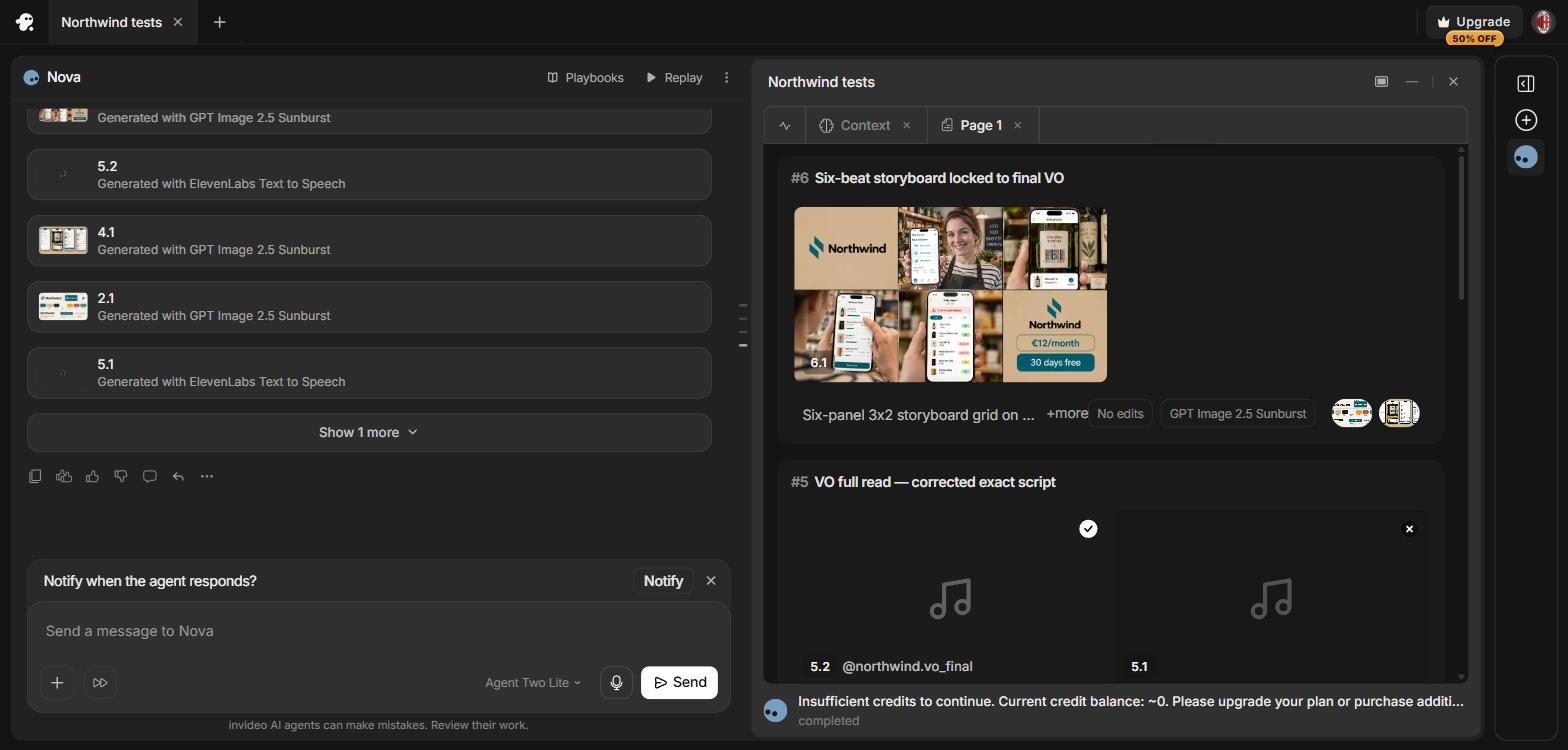
Could not be tested: The free credits ran out before a single video was assembled: the agent made a storyboard and voice-over for the first script, then stopped with 'Insufficient credits to continue. Current credit balance: ~0'.
InVideo AI offers a free plan at €0 that includes a small allowance of credits and access to the Agent Two Lite agent. In practice, this allowance is very limited. The free tier also lacks access to the timeline editor and premium models like Seedance 2.5. plan list checked by handSource · owner-checked plan listPlan list checked by hand (invideo.io), checked Oct 6, 2026.Go to sources ↓pricing pageSource · vendor pagePricing page (invideo.io), checked Nov 21, 2026.Go to sources ↓
Paying unlocks the full timeline editor, multiplayer editing, and access to advanced models like Seedance 2.5 and Seedance 2.0 at 4K resolution. pricing pageSource · vendor pagePricing page (invideo.io), checked Nov 21, 2026.Go to sources ↓
Credits do not roll over to the next month. The pricing page notes that credit costs can change without notice. pricing pageSource · vendor pagePricing page (invideo.io), checked Nov 21, 2026.Go to sources ↓
The free plan is essentially a trial that runs out before you see a finished video, making it hard to judge the tool's value without paying. For regular users, the Starter plan at €20/month is a reasonable entry point for light use, but the Plus plan at €60/month offers better value with 2,000 credits and access to the best models. If you need high-volume output or 4K video, the Max plan is the logical choice.
Many users praise the app's quality and ease of use, calling it a powerful tool for small business advertising and brand content App StoreUser report · positive · App Store reviewPosted Nov 17, 2026See the report ↓App StoreUser report · positive · App Store reviewPosted Nov 15, 2026See the report ↓App StoreUser report · positive · App Store reviewPosted Nov 14, 2026See the report ↓App StoreUser report · positive · App Store reviewPosted Nov 13, 2026See the report ↓App StoreUser report · positive · App Store reviewPosted Oct 24, 2026See the report ↓. Some reviewers highlight the consistency of characters and the all-in-one nature of the studio App StoreUser report · positive · App Store reviewPosted Nov 15, 2026See the report ↓App StoreUser report · positive · App Store reviewPosted Nov 5, 2026See the report ↓. However, a significant number of users complain about the high cost and credit consumption App StoreUser report · negative · App Store reviewPosted Nov 17, 2026See the report ↓App StoreUser report · negative · App Store reviewPosted Nov 9, 2026See the report ↓App StoreUser report · negative · App Store reviewPosted Nov 7, 2026See the report ↓App StoreUser report · negative · App Store reviewPosted Nov 5, 2026See the report ↓App StoreUser report · negative · App Store reviewPosted Nov 3, 2026See the report ↓App StoreUser report · negative · App Store reviewPosted Nov 3, 2026See the report ↓. Users report that credits are used up quickly, with some noting that 400 credits are consumed by just one video App StoreUser report · negative · App Store reviewPosted Nov 3, 2026See the report ↓. Others feel the credit system is unfair, noting that errors by the AI require more credits to fix App StoreUser report · negative · App Store reviewPosted Oct 31, 2026See the report ↓App StoreUser report · negative · App Store reviewPosted Oct 21, 2026See the report ↓. Billing and cancellation are also pain points; some users find the cancellation process invasive and report difficulties getting refunds App StoreUser report · negative · App Store reviewPosted Oct 31, 2026See the report ↓App StoreUser report · negative · App Store reviewPosted Oct 18, 2026See the report ↓App StoreUser report · negative · App Store reviewPosted Oct 24, 2026See the report ↓.
Many users praise the app's quality and ease of use, calling it a powerful tool for small business advertising and brand content.
Love this app. This app give me so much free range to make amazing video and images
Many users praise the app's quality and ease of use, calling it a powerful tool for small business advertising and brand content.
Loving it,. I have been using for about 8 months and love the consistency of the characters and the way it follows the prompts to a T 👍🏾
Many users praise the app's quality and ease of use, calling it a powerful tool for small business advertising and brand content.
Great app for creating videos. Awesome app I love the easy ability of just adding my previous post that I’ve created over the years and turn them into exciting invigorating videos
Many users praise the app's quality and ease of use, calling it a powerful tool for small business advertising and brand content.
Super useful!. Easy to use, and pretty thorough! I definitely see this app significantly leveling up my small business advertising videos!
Many users praise the app's quality and ease of use, calling it a powerful tool for small business advertising and brand content.
The bomb dot com. Easy to use well worth it
Some reviewers highlight the consistency of characters and the all-in-one nature of the studio.
Amazing all-in-one AI Studio. The only app you’ll find live assistance—and every engine for video, audio/music/voice/SFX, images and more. I use this app daily, it’s updated frequently and they are very reachable. …
However, a significant number of users complain about the high cost and credit consumption.
It’s too expensive to make video.. I was disappointed I can’t do any minute video on basic subscription.
However, a significant number of users complain about the high cost and credit consumption.
$800 a year, you must be joking. This must be the most expensive movie creator on the market
However, a significant number of users complain about the high cost and credit consumption.
Difficult to Justify. I signed up for the pro plan and successfuly used nearly half of my credits producing a 30 second video. I canceled immediately so that it doesn't renew.
However, a significant number of users complain about the high cost and credit consumption.
… I paid $60 for this app—not for the basic tier, but for a paid option that I expected to deliver a functional, reliable experience. …
However, a significant number of users complain about the high cost and credit consumption.
It consumes an excessive amount of credits; the cost is very high.. It’s impossible to produce two videos with a single plan; it consumes an excessive amount of credits—400 credits for just one video is far too much.
However, a significant number of users complain about the high cost and credit consumption.
Is video editing. Don’t waist your money for looking to make AI generator videos from scripts. They are way too expensive.
Others feel the credit system is unfair, noting that errors by the AI require more credits to fix.
… I’ve spent considerable money creating videos, only to discover errors made by InVideo’s own AI that I’m then expected to spend more credits correcting. …
Others feel the credit system is unfair, noting that errors by the AI require more credits to fix.
Off the chart mistakes. Agents will drain your credits with mistakes and get the video done right when they want.
Billing and cancellation are also pain points; some users find the cancellation process invasive and report difficulties getting refunds.
… Plus wanting to cancel my subscription was invasive. You shouldn't have to give it so much info in order to continue through the steps and cancel it.
Billing and cancellation are also pain points; some users find the cancellation process invasive and report difficulties getting refunds.
… I tried within 24 hours to cancel and they refused to refund me even though I never used the video because they were what I asked for.
Billing and cancellation are also pain points; some users find the cancellation process invasive and report difficulties getting refunds.
… Do not buy this product unless your using it every day I paid 45$ and couldn’t use it because my son got really sick so fast forward 28 days later I’m trying to use it and it’s telling me to pay again cause my month expired.. …
The Free plan is $0 and provides 125 one-time credits plus 5GB storage for light video work.
The Free plan is $0 and allows 3 videos per month, with a maximum duration of 1 minute per video.
The Basic plan is $0 and includes 3 free uses of Element AI Multi-Shot per day.
The Free plan is $0 and provides a free credit allowance, with 8 clips of 5 s at 720p.
The Free plan is $0 and includes 2 videos plus 2 image + audio generations in parallel, with no watermark.
Yes, the free plan is €0. However, it provides a small credit allowance that is often used up before a video is fully rendered.
The Plus plan costs €60/month or €360/year per user.
No, unused credits do not roll over to the next month.
Plus includes 2,000 credits per seat (vs 400 in Starter), access to Seedance 2.5 and 4K video, and 10 guest seats.
The "Visit" buttons go through shouldipay.ai/go/ and may be affiliate links, so we may earn a commission if you subscribe. Commissions never decide a verdict: the evidence on this page does. Verdicts are drafted with AI from the vendors' own pricing and documentation pages and, for this verdict, public user reports we link to, and checked automatically against those sources before they are published; a person reviews first verdicts, changed answers and anything the checks flag. Affiliate disclosure