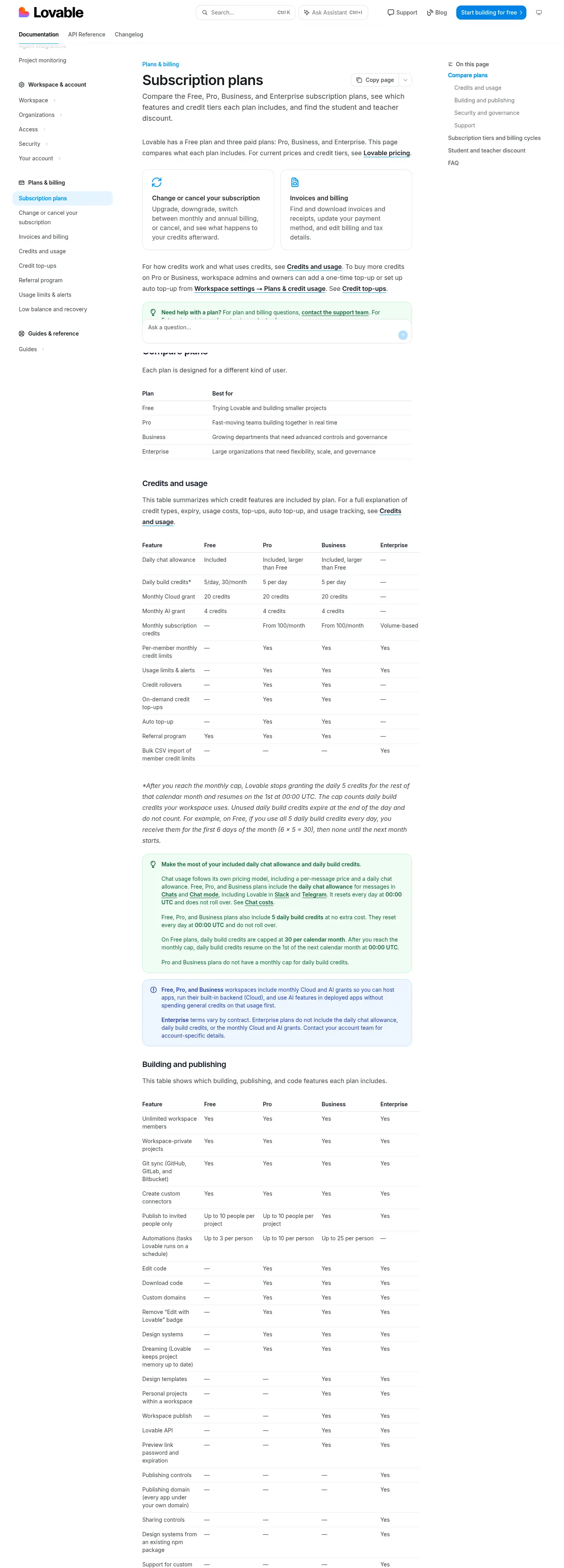
Free
$0
- Daily build credits5/day, 30/month
- Monthly Cloud grant20 credits
- Monthly AI grant4 credits
- Publish to invited people onlyUp to 10 people per project
- AutomationsUp to 3 per person

Verdict · Coding · by Lovable
The free plan handles basic building well, but paying adds code access and higher limits for serious work.
Start on the free plan first. The button opens lovable.dev through shouldipay.ai/go/lovable. It may be an affiliate link: we may earn a commission. Commissions never decide a verdict: the evidence on this page does. Disclosure
Personal
"The free plan is sufficient for trying the tool or building small projects." Bottom line
9.6/10
Free tier, average of 8 tasks
Free tier: run by hand in the product's own web app on the Lovable Free plan by our editor on Sep 29, 2026 (free tier); the app showed the model Lovable Build mode (default).
We only publish paid-tier scores from access we actually have (our own subscription, a trial or access given by the vendor), and we have no paid-tier results for Lovable yet. So this page cannot show what paying changes in answer quality; the verdict relies on the plans and, where we have them, user reports for that.
Score = 50% quality (AI judges) + 50% automatic checks passed
Each task below opens to show the prompt, the objective checks and the full answer of each tier.
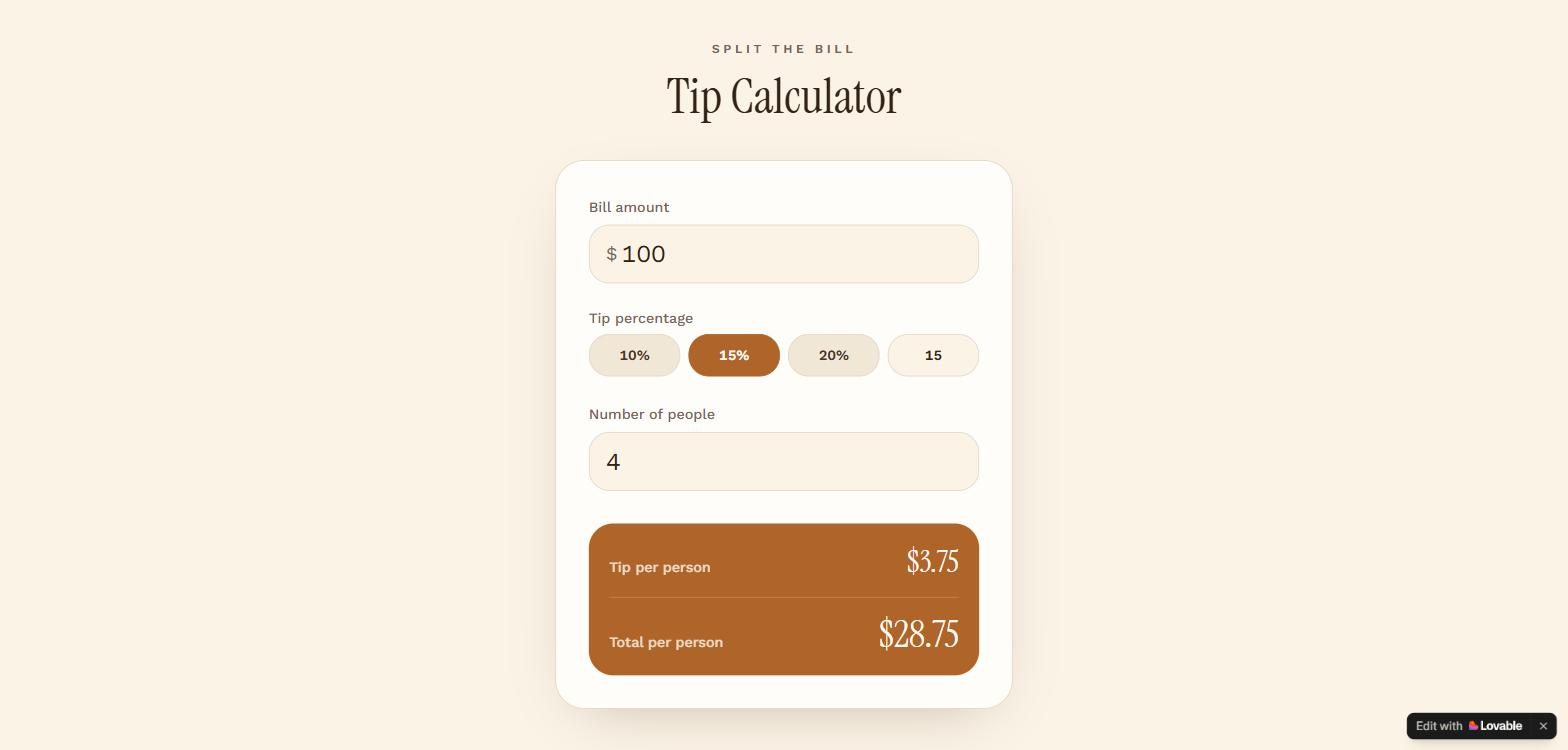
Build a single-page tip calculator. Inputs: bill amount, tip percentage (default 15) and number of people (default 1). Show the tip per person and the total per person, rounded to 2 decimals, updating as the user types. Handle bad input without showing NaN or Infinity. No login, no backend, no external services.
import { useMemo, useState } from "react";
import { createFileRoute } from "@tanstack/react-router";
export const Route = createFileRoute("/")({
head: () => ({
meta: [
{ title: "Tip Calculator — Split the bill in seconds" },
{
name: "description",
content:
"Enter the bill, pick a tip percentage, and split it between any number of people. Tip and total per person update as you type.",
},
{ property: "og:title", content: "Tip Calculator — Split the bill in seconds" },
{
property: "og:description",
content:
"Enter the bill, pick a tip percentage, and split it between any number of people.",
},
{ property: "og:type", content: "website" },
{ name: "twitter:card", content: "summary" },
],
}),
component: Index,
});
function parseAmount(raw: string): number {
const n = Number(raw.replace(",", "."));
return Number.isFinite(n) && n >= 0 ? n : NaN;
}
function formatMoney(value: number): string {
return value.toLocaleString("en-US", {
style: "currency",
currency: "USD",
minimumFractionDigits: 2,
maximumFractionDigits: 2,
});
}
const TIP_PRESETS = [10, 15, 20];
function Index() {
const [bill, setBill] = useState("");
const [tipPercent, setTipPercent] = useState(15);
const [people, setPeople] = useState("1");
const { tipPerPerson, totalPerPerson, valid } = useMemo(() => {
const billNum = parseAmount(bill);
const peopleNum = parseAmount(people);
const validBill = Number.isFinite(billNum);
const validPeople = Number.isFinite(peopleNum) && peopleNum >= 1;
if (!validBill || !validPeople) {
  return { tipPerPerson: 0, totalPerPerson: 0, valid: false };
}
const tip = (billNum * tipPercent) / 100;
return {
  tipPerPerson: Math.round((tip / peopleNum) * 100) / 100,
  totalPerPerson: Math.round(((billNum + tip) / peopleNum) * 100) / 100,
  valid: true,
};
}, [bill, tipPercent, people]);
const peopleNum = parseAmount(people);
const showPeopleWarning = people.trim() !== "" && !(Number.isFinite(peopleNum) && peopleNum >= 1);
return (
<main className="flex min-h-screen items-center justify-center px-4 py-10">
<div className="w-full max-w-md">
<header className="mb-8 text-center">
<p className="text-xs font-semibold uppercase tracking-[0.3em] text-muted-foreground">
Split the bill
</p>
<h1 className="mt-2 font-display text-5xl leading-tight">Tip Calculator</h1>
</header>
    <div className="rounded-3xl border bg-card p-6 shadow-[0_20px_60px_-30px_oklch(0.4_0.06_55/40%)] sm:p-8">
      <label className="block">
        <span className="text-sm font-medium text-muted-foreground">Bill amount</span>
        <div className="mt-1.5 flex items-center rounded-xl border bg-background px-4 transition-colors focus-within:border-ring focus-within:ring-2 focus-within:ring-ring/30">
          <span className="text-lg text-muted-foreground">$</span>
          <input
            type="text"
            inputMode="decimal"
            placeholder="0.00"
            value={bill}
            onChange={(e) => setBill(e.target.value.replace(/[^0-9.,]/g, ""))}
            className="w-full bg-transparent py-3 pl-1 text-2xl tabular-nums outline-none placeholder:text-muted-foreground/50"
          />
        </div>
      </label>

      <fieldset className="mt-6">
        <legend className="text-sm font-medium text-muted-foreground">Tip percentage</legend>
        <div className="mt-1.5 grid grid-cols-4 gap-2">
          {TIP_PRESETS.map((p) => (
            <button
              key={p}
              type="button"
              onClick={() => setTipPercent(p)}
              aria-pressed={tipPercent === p}
              className={`rounded-xl border py-2.5 text-sm font-semibold tabular-nums transition-colors ${
                tipPercent === p
                  ? "border-primary bg-primary text-primary-foreground"
                  : "bg-secondary text-secondary-foreground hover:bg-accent"
              }`}
            >
              {p}%
            </button>
          ))}
          <input
            type="number"
            min={0}
            max={100}
            aria-label="Custom tip percentage"
            value={tipPercent}
            onChange={(e) => {
              const n = Number(e.target.value);
              setTipPercent(Number.isFinite(n) && n >= 0 && n <= 100 ? n : 0);
            }}
            className="rounded-xl border bg-background py-2.5 text-center text-sm font-semibold tabular-nums outline-none transition-colors focus:border-ring focus:ring-2 focus:ring-ring/30"
          />
        </div>
      </fieldset>

      <label className="mt-6 block">
        <span className="text-sm font-medium text-muted-foreground">Number of people</span>
        <input
          type="number"
          min={1}
          step={1}
          value={people}
          onChange={(e) => setPeople(e.target.value.replace(/[^0-9]/g, ""))}
          className={`mt-1.5 w-full rounded-xl border bg-background px-4 py-3 text-2xl tabular-nums outline-none transition-colors focus:border-ring focus:ring-2 focus:ring-ring/30 ${
            showPeopleWarning ? "border-destructive" : ""
          }`}
        />
        {showPeopleWarning && (
          <span className="mt-1.5 block text-xs text-destructive">
            Enter at least 1 person to split the bill.
          </span>
        )}
      </label>

      <div className="mt-8 rounded-2xl bg-primary p-5 text-primary-foreground">
        <div className="flex items-baseline justify-between gap-4">
          <span className="text-sm font-medium opacity-80">Tip per person</span>
          <span className="font-display text-3xl tabular-nums">
            {valid ? formatMoney(tipPerPerson) : "—"}
          </span>
        </div>
        <div className="mt-4 border-t border-white/20 pt-4">
          <div className="flex items-baseline justify-between gap-4">
            <span className="text-sm font-medium opacity-80">Total per person</span>
            <span className="font-display text-4xl tabular-nums">
              {valid ? formatMoney(totalPerPerson) : "—"}
            </span>
          </div>
        </div>
      </div>

      {!valid && (
        <p className="mt-3 text-center text-xs text-muted-foreground">
          Enter a bill amount and at least 1 person to see the split.
        </p>
      )}
    </div>
  </div>
</main>
);
}
Build a to-do list app. The user can add an item (ignore empty input), mark an item done or not done, and delete an item. Done items look visibly different. The list is saved in the browser (localStorage) and is still there after a reload. No login, no backend, no external services.
import { useEffect, useState, type FormEvent } from "react";
import { createFileRoute } from "@tanstack/react-router";
export const Route = createFileRoute("/")({
head: () => ({
meta: [
{ title: "Today — To-Do List" },
{
name: "description",
content:
"A simple to-do list. Add tasks, check them off, and your list is saved right in your browser.",
},
{ property: "og:title", content: "Today — To-Do List" },
{
property: "og:description",
content:
"A simple to-do list. Add tasks, check them off, and your list is saved right in your browser.",
},
{ property: "og:type", content: "website" },
{ name: "twitter:card", content: "summary" },
],
}),
component: Index,
});
type Todo = {
id: string;
text: string;
done: boolean;
};
const STORAGE_KEY = "todo.items.v1";
function loadTodos(): Todo[] {
try {
const raw = localStorage.getItem(STORAGE_KEY);
if (!raw) return [];
const parsed: unknown = JSON.parse(raw);
if (!Array.isArray(parsed)) return [];
return parsed.filter(
(item): item is Todo =>
typeof item === "object" &&
item !== null &&
typeof (item as Todo).id === "string" &&
typeof (item as Todo).text === "string" &&
typeof (item as Todo).done === "boolean",
);
} catch {
return [];
}
}
function saveTodos(todos: Todo[]) {
try {
localStorage.setItem(STORAGE_KEY, JSON.stringify(todos));
} catch {
// Storage unavailable (private mode, quota) — list still works this session.
}
}
function Index() {
// Start empty so server-rendered and first client render match; load saved
// items right after hydration to avoid a mismatch.
const [todos, setTodos] = useState<Todo[]>([]);
const [hydrated, setHydrated] = useState(false);
const [draft, setDraft] = useState("");
useEffect(() => {
setTodos(loadTodos());
setHydrated(true);
}, []);
useEffect(() => {
if (hydrated) saveTodos(todos);
}, [todos, hydrated]);
function addTodo(e: FormEvent) {
e.preventDefault();
const text = draft.trim();
if (!text) return;
setTodos((prev) => [
{ id: crypto.randomUUID(), text, done: false },
...prev,
]);
setDraft("");
}
function toggleTodo(id: string) {
setTodos((prev) =>
prev.map((t) => (t.id === id ? { ...t, done: !t.done } : t)),
);
}
function deleteTodo(id: string) {
setTodos((prev) => prev.filter((t) => t.id !== id));
}
const doneCount = todos.filter((t) => t.done).length;
const openCount = todos.length - doneCount;
return (
<main className="mx-auto flex min-h-screen w-full max-w-xl flex-col px-5 py-12 sm:py-16">
<header>
<p className="font-mono text-[11px] uppercase tracking-[0.2em] text-muted-foreground">
Today
</p>
<div className="mt-1 flex items-end justify-between">
<h1 className="font-display text-4xl font-semibold tracking-tight text-foreground">
To-do
</h1>
{todos.length > 0 && (
<p className="pb-1 text-sm text-muted-foreground">
{doneCount} done · {openCount} to go
</p>
)}
</div>
</header>
  <form onSubmit={addTodo} className="mt-8">
    <div className="flex gap-2">
      <input
        type="text"
        value={draft}
        onChange={(e) => setDraft(e.target.value)}
        placeholder="What needs doing?"
        aria-label="New task"
        maxLength={200}
        className="min-w-0 flex-1 rounded-xl border border-input bg-card px-4 py-3 text-sm text-foreground shadow-sm outline-none transition placeholder:text-muted-foreground/70 focus:border-accent focus:ring-2 focus:ring-ring/30"
      />
      <button
        type="submit"
        className="shrink-0 rounded-xl bg-primary px-5 py-3 text-sm font-semibold text-primary-foreground shadow-sm transition hover:opacity-90 active:scale-[0.98]"
      >
        Add
      </button>
    </div>
  </form>

  <ul className="mt-6 flex flex-col gap-2">
    {todos.map((todo) => (
      <li
        key={todo.id}
        className={
          "group flex items-center gap-3 rounded-xl border px-3 py-3 transition " +
          (todo.done
            ? "border-border bg-secondary/60"
            : "border-border bg-card shadow-sm hover:border-accent/40")
        }
      >
        <button
          type="button"
          onClick={() => toggleTodo(todo.id)}
          aria-label={todo.done ? "Mark as not done" : "Mark as done"}
          aria-pressed={todo.done}
          className={
            "grid size-6 shrink-0 place-items-center rounded-full border-2 transition " +
            (todo.done
              ? "border-accent bg-accent text-accent-foreground"
              : "border-border text-transparent hover:border-accent")
          }
        >
          <svg
            viewBox="0 0 16 16"
            fill="none"
            className="size-3.5"
            aria-hidden="true"
          >
            <path
              d="M3 8.5l3.2 3.2L13 5"
              stroke="currentColor"
              strokeWidth="2.2"
              strokeLinecap="round"
              strokeLinejoin="round"
            />
          </svg>
        </button>
        <span
          className={
            "min-w-0 flex-1 break-words text-[15px] leading-snug transition " +
            (todo.done
              ? "text-muted-foreground line-through decoration-muted-foreground/50"
              : "text-foreground")
          }
        >
          {todo.text}
        </span>
        <button
          type="button"
          onClick={() => deleteTodo(todo.id)}
          aria-label={`Delete "${todo.text}"`}
          className="shrink-0 rounded-lg px-2 py-1 text-lg leading-none text-muted-foreground/40 transition hover:text-destructive"
        >
          ✕
        </button>
      </li>
    ))}
  </ul>

  {hydrated && todos.length === 0 && (
    <p className="mt-10 text-center text-sm text-muted-foreground">
      Nothing here yet — add your first task above.
    </p>
  )}

  <p className="mt-auto pt-10 text-center text-xs text-muted-foreground/70">
    Saved in this browser · still here after a reload
  </p>
</main>
);
}
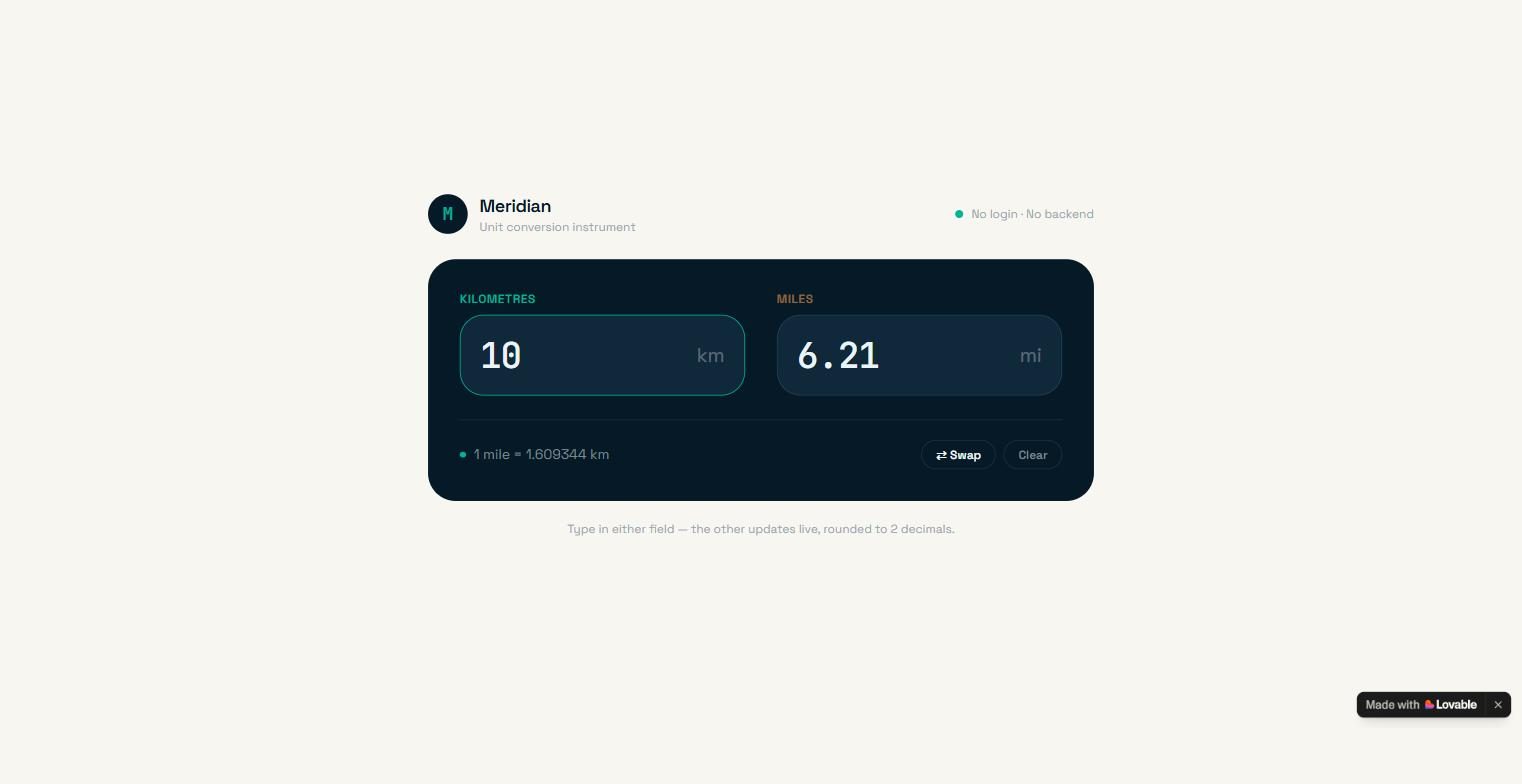
Build a kilometres/miles converter with two linked fields: typing in one updates the other, rounded to 2 decimals (1 mile = 1.609344 km). Invalid input must not show NaN. No login, no backend, no external services.
import { useCallback, useState } from "react";
import { createFileRoute } from "@tanstack/react-router";
export const Route = createFileRoute("/")({
head: () => ({
meta: [
{ title: "Kilometres ↔ Miles Converter" },
{
name: "description",
content:
"Type a distance in either field and the other updates live. 1 mile = 1.609344 km, rounded to 2 decimals.",
},
{ property: "og:title", content: "Kilometres ↔ Miles Converter" },
{
property: "og:description",
content:
"Two linked fields: type in one, the other updates live to 2 decimals. 1 mile = 1.609344 km.",
},
{ property: "og:type", content: "website" },
{ name: "twitter:card", content: "summary" },
],
}),
component: Index,
});
const KM_PER_MILE = 1.609344;
function round2(n: number): string {
return (Math.round(n * 100) / 100).toFixed(2);
}
/** Returns the parsed number, or null for empty/invalid input (never NaN). */
function parseInput(raw: string): number | null {
const trimmed = raw.trim().replace(",", ".");
if (trimmed === "") return null;
const n = Number(trimmed);
if (!Number.isFinite(n)) return null;
return n;
}
type Side = "km" | "mi";
function Index() {
const [km, setKm] = useState("");
const [mi, setMi] = useState("");
const [active, setActive] = useState<Side>("km");
const handleKm = useCallback((raw: string) => {
setKm(raw);
setActive("km");
const n = parseInput(raw);
setMi(n === null ? "" : round2(n / KM_PER_MILE));
}, []);
const handleMi = useCallback((raw: string) => {
setMi(raw);
setActive("mi");
const n = parseInput(raw);
setKm(n === null ? "" : round2(n * KM_PER_MILE));
}, []);
const swap = useCallback(() => {
const nextKm = mi;
setKm(mi);
handleMi(nextKm);
}, [mi, handleMi]);
const clear = useCallback(() => {
setKm("");
setMi("");
setActive("km");
}, []);
return (
<div className="flex min-h-screen flex-col items-center justify-center bg-background px-4 py-12 antialiased">
<main className="w-full max-w-2xl">
{/* Header */}
<div className="mb-6 flex items-center justify-between">
<div className="flex items-center gap-3">
<div className="grid size-10 place-items-center rounded-xl bg-foreground font-digit text-lg font-semibold text-primary">
M
</div>
<div>
<p className="text-lg font-semibold tracking-tight text-foreground">
Meridian
</p>
<p className="text-xs text-muted-foreground">
Unit conversion instrument
</p>
</div>
</div>
<span className="inline-flex items-center gap-2 text-xs text-muted-foreground">
<span className="size-2 rounded-full bg-primary" />
No login · No backend
</span>
</div>
    {/* Instrument panel */}
    <section className="rounded-3xl bg-card p-6 sm:p-8">
      <div className="grid grid-cols-1 gap-6 sm:grid-cols-2 sm:gap-8">
        <Field
          id="km"
          label="Kilometres"
          unit="km"
          value={km}
          onChange={handleKm}
          onFocus={() => setActive("km")}
          accent="text-distance focus-within:border-primary/60"
          labelAccent="text-distance"
          isActive={active === "km"}
        />
        <Field
          id="mi"
          label="Miles"
          unit="mi"
          value={mi}
          onChange={handleMi}
          onFocus={() => setActive("mi")}
          accent="text-distance-amber focus-within:border-accent/60"
          labelAccent="text-distance-amber"
          isActive={active === "mi"}
        />
      </div>

      <div className="mt-6 flex flex-wrap items-center justify-between gap-3 border-t border-panel-line pt-5">
        <div className="flex items-center gap-2 text-sm text-panel-muted">
          <span className="size-1.5 rounded-full bg-primary" />
          1 mile = 1.609344 km
        </div>
        <div className="flex items-center gap-2">
          <button
            type="button"
            onClick={swap}
            className="rounded-lg border border-panel-line px-3.5 py-1.5 text-xs font-semibold text-panel-ink transition-colors hover:border-primary/50 hover:text-primary"
          >
            ⇄ Swap
          </button>
          <button
            type="button"
            onClick={clear}
            className="rounded-lg border border-panel-line px-3.5 py-1.5 text-xs font-semibold text-panel-muted transition-colors hover:border-accent/50 hover:text-accent"
          >
            Clear
          </button>
        </div>
      </div>
    </section>

    <p className="mt-5 text-center text-xs text-muted-foreground">
      Type in either field — the other updates live, rounded to 2 decimals.
    </p>
  </main>
</div>
);
}
interface FieldProps {
id: string;
label: string;
unit: string;
value: string;
onChange: (raw: string) => void;
onFocus: () => void;
accent: string;
labelAccent: string;
isActive: boolean;
}
function Field({
id,
label,
unit,
value,
onChange,
onFocus,
accent,
labelAccent,
isActive,
}: FieldProps) {
return (
<div>
<label
htmlFor={id}
className={mb-2 block text-xs font-semibold uppercase tracking-wider ${labelAccent} ${ isActive ? "opacity-100" : "opacity-60" } transition-opacity}
>
{label}
</label>
<div
className={relative rounded-2xl border bg-field transition-colors ${accent} ${ isActive ? "border-current" : "border-panel-line" }}
>
<input
id={id}
type="text"
inputMode="decimal"
autoComplete="off"
spellCheck={false}
placeholder="0.00"
value={value}
onChange={(e) => onChange(e.target.value)}
onFocus={onFocus}
className="w-full rounded-2xl bg-transparent px-5 py-5 text-3xl font-medium tracking-tight text-panel-ink placeholder:text-white/25 focus:outline-none sm:text-4xl"
/>
<span className="pointer-events-none absolute right-5 top-1/2 -translate-y-1/2 text-xl text-white/30">
{unit}
</span>
</div>
</div>
);
}
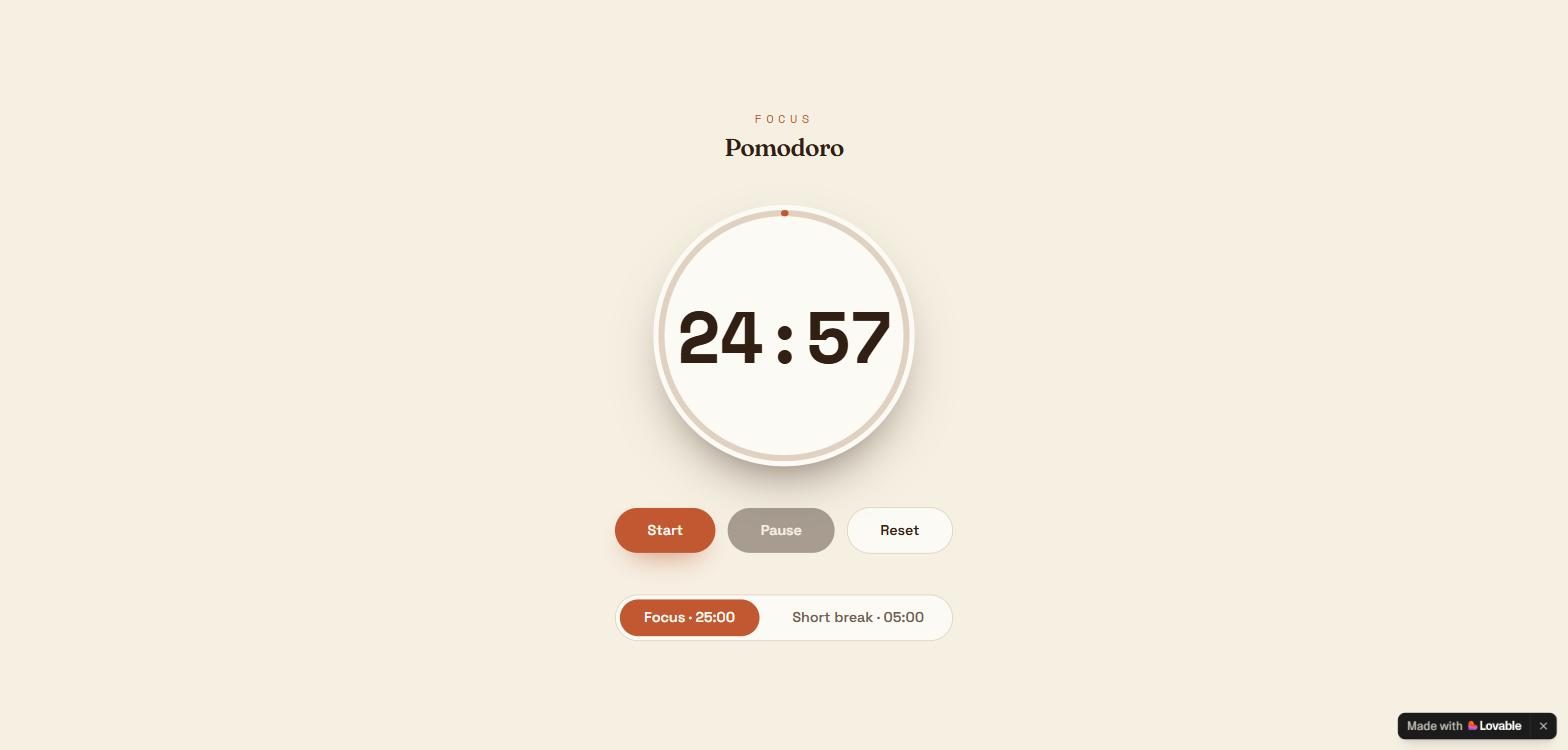
Build a Pomodoro timer: it shows 25:00, with Start, Pause and Reset buttons, and a Short break button that sets it to 05:00. The time counts down once per second while running. No login, no backend, no external services.
import { useCallback, useEffect, useMemo, useState } from "react";
import { createFileRoute } from "@tanstack/react-router";
export const Route = createFileRoute("/")({
head: () => ({
meta: [
{ title: "Pomodoro Timer" },
{
name: "description",
content:
"A simple Pomodoro timer: 25-minute focus sessions and 5-minute short breaks, right in your browser.",
},
{ property: "og:title", content: "Pomodoro Timer" },
{
property: "og:description",
content:
"A simple Pomodoro timer: 25-minute focus sessions and 5-minute short breaks.",
},
{ property: "og:type", content: "website" },
{ name: "twitter:card", content: "summary" },
],
}),
component: Index,
});
const FOCUS_SECONDS = 25 * 60;
const BREAK_SECONDS = 5 * 60;
type Mode = "focus" | "break";
function formatTime(totalSeconds: number): string {
const minutes = Math.floor(totalSeconds / 60);
const seconds = totalSeconds % 60;
return ${String(minutes).padStart(2, "0")}:${String(seconds).padStart(2, "0")};
}
function Index() {
const [mode, setMode] = useState<Mode>("focus");
const [remaining, setRemaining] = useState(FOCUS_SECONDS);
const [running, setRunning] = useState(false);
const isBreak = mode === "break";
useEffect(() => {
if (!running) return;
const interval = setInterval(() => {
setRemaining((prev) => {
if (prev <= 1) {
setRunning(false);
return 0;
}
return prev - 1;
});
}, 1000);
return () => clearInterval(interval);
}, [running]);
// Reset returns to the session's full duration.
const handleReset = useCallback(() => {
setRunning(false);
setRemaining(isBreak ? BREAK_SECONDS : FOCUS_SECONDS);
}, [isBreak]);
const handleBreak = useCallback(() => {
setMode("break");
setRunning(false);
setRemaining(BREAK_SECONDS);
}, []);
const handleFocus = useCallback(() => {
setMode("focus");
setRunning(false);
setRemaining(FOCUS_SECONDS);
}, []);
const progress = useMemo(() => {
const total = isBreak ? BREAK_SECONDS : FOCUS_SECONDS;
return 1 - remaining / total;
}, [remaining, isBreak]);
const circumference = 2 * Math.PI * 120;
const statusLabel = isBreak ? "Short break" : running ? "Focusing" : "Focus";
return (
<main className="flex min-h-screen flex-col items-center justify-center gap-10 bg-background px-6 py-12 text-foreground">
<header className="flex flex-col items-center gap-1.5 text-center">
<p className="font-timer text-xs uppercase tracking-[0.35em] text-primary">
{statusLabel}
</p>
<h1 className="font-display text-2xl font-semibold tracking-tight">
Pomodoro
</h1>
</header>
  <div className="relative grid place-items-center">
    <svg
      className="absolute -rotate-90"
      width="272"
      height="272"
      viewBox="0 0 272 272"
      aria-hidden="true"
    >
      <circle
        cx="136"
        cy="136"
        r="120"
        fill="none"
        strokeWidth="6"
        className="stroke-border"
      />
      <circle
        cx="136"
        cy="136"
        r="120"
        fill="none"
        strokeWidth="6"
        strokeLinecap="round"
        strokeDasharray={circumference}
        strokeDashoffset={circumference * (1 - progress)}
        className={
          "transition-[stroke-dashoffset] duration-1000 ease-linear " +
          (isBreak ? "stroke-break" : "stroke-primary")
        }
      />
    </svg>
    <div
      className={
        "grid size-64 place-items-center rounded-full shadow-[0_24px_60px_-32px_var(--color-foreground)] transition-colors duration-500 " +
        (isBreak ? "bg-break/10" : "bg-card")
      }
    >
      <p
        className={
          "font-timer text-6xl font-bold tabular-nums tracking-tight transition-colors duration-500 md:text-7xl " +
          (isBreak ? "text-break" : "text-foreground")
        }
      >
        {formatTime(remaining)}
      </p>
    </div>
  </div>

  <div
    className="flex flex-wrap items-center justify-center gap-3"
    role="group"
    aria-label="Timer controls"
  >
    <button
      type="button"
      onClick={() => setRunning(true)}
      disabled={running || remaining === 0}
      className="rounded-full bg-primary px-8 py-3 font-body text-sm font-semibold text-primary-foreground shadow-[0_12px_28px_-14px_var(--color-primary)] transition hover:brightness-95 disabled:cursor-not-allowed disabled:opacity-40 disabled:shadow-none"
    >
      Start
    </button>
    <button
      type="button"
      onClick={() => setRunning(false)}
      disabled={!running}
      className="rounded-full bg-foreground px-8 py-3 font-body text-sm font-semibold text-background transition hover:opacity-85 disabled:cursor-not-allowed disabled:opacity-40"
    >
      Pause
    </button>
    <button
      type="button"
      onClick={handleReset}
      className="rounded-full border border-border bg-card px-8 py-3 font-body text-sm font-semibold text-foreground transition hover:bg-accent"
    >
      Reset
    </button>
  </div>

  <div
    className="flex items-center gap-2 rounded-full border border-border bg-card p-1"
    role="group"
    aria-label="Session type"
  >
    <button
      type="button"
      onClick={handleFocus}
      aria-pressed={!isBreak}
      className={
        "rounded-full px-6 py-2 font-body text-sm font-semibold transition " +
        (!isBreak
          ? "bg-primary text-primary-foreground"
          : "text-muted-foreground hover:text-foreground")
      }
    >
      Focus · 25:00
    </button>
    <button
      type="button"
      onClick={handleBreak}
      aria-pressed={isBreak}
      className={
        "rounded-full px-6 py-2 font-body text-sm font-semibold transition " +
        (isBreak
          ? "bg-break text-break-foreground"
          : "text-muted-foreground hover:text-foreground")
      }
    >
      Short break · 05:00
    </button>
  </div>
</main>
);
}
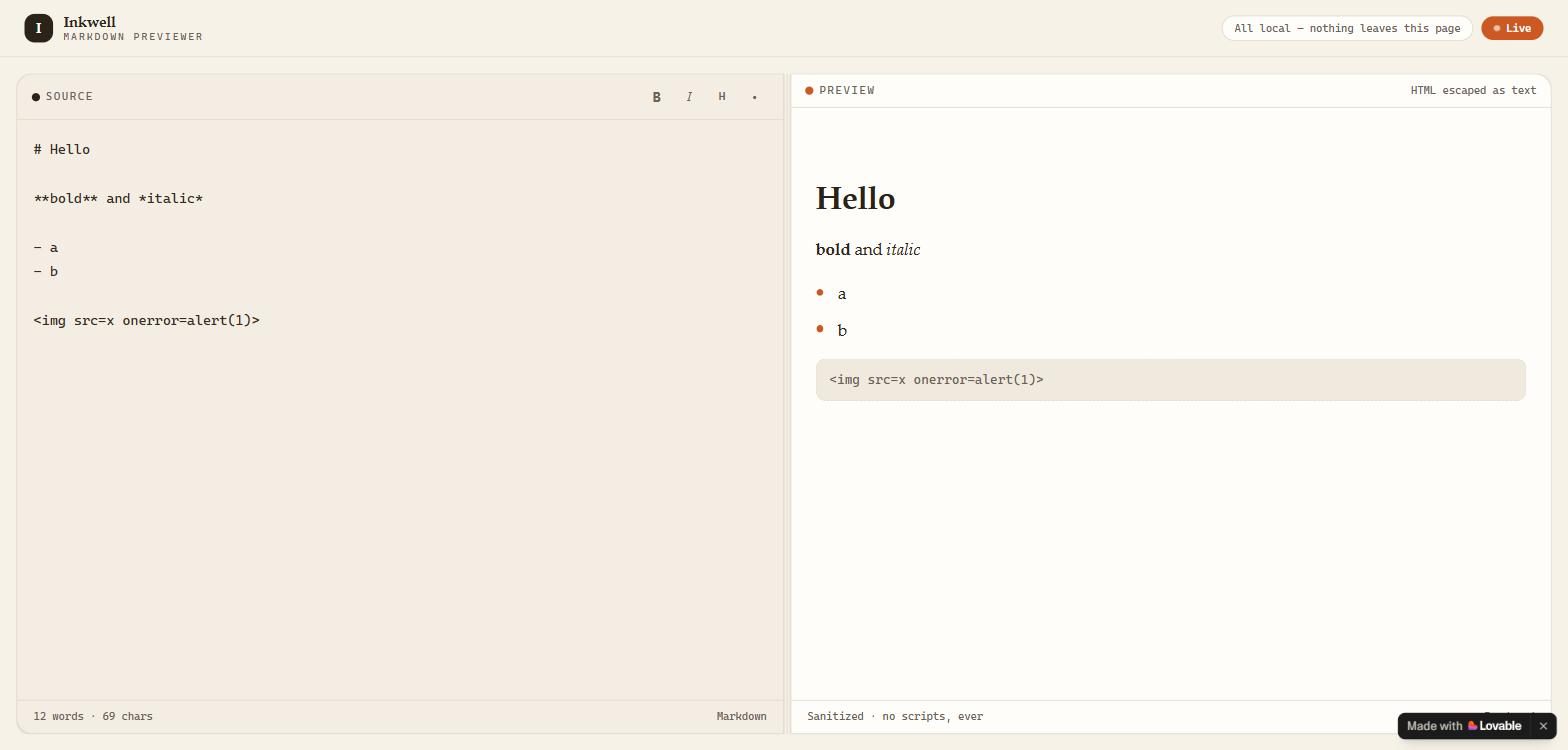
Build a Markdown previewer: a text area on the left, the rendered preview on the right, updating as the user types. It must support headings, bold, italics and bullet lists, and must not run any HTML or script the user types. No login, no backend, no external services.
// src/routes/index.tsx
import { createFileRoute } from "@tanstack/react-router";
import { useCallback, useMemo, useRef, useState } from "react";
import { renderMarkdown } from "@/lib/markdown";
export const Route = createFileRoute("/")({
head: () => ({
meta: [
{ title: "Inkwell · Markdown Previewer" },
{
name: "description",
content:
"Write Markdown on the left, see the clean render on the right — live, private, and with every raw HTML tag safely shown as plain text.",
},
{ property: "og:title", content: "Inkwell · Markdown Previewer" },
{
property: "og:description",
content:
"A live Markdown editor and previewer. Headings, bold, italics, lists — and raw HTML is never executed.",
},
{ property: "og:type", content: "website" },
{ name: "twitter:card", content: "summary" },
],
}),
component: Index,
});
const SAMPLE_MARKDOWN = `# Welcome to Inkwell
Type Markdown on the left — the clean render appears on the right as you type.
What works
Everything runs right here in your browser: no account, no backend, no network calls.
What never runs
Raw HTML is shown as plain text, never executed:
<script>alert("this never runs")</script> <div style="color: red">not a real div</div> `;type ToolbarAction = "bold" | "italic" | "heading" | "bullet";
function Index() {
const [markdown, setMarkdown] = useState(SAMPLE_MARKDOWN);
const [ratio, setRatio] = useState(50);
const editorRef = useRef<HTMLTextAreaElement>(null);
const splitRef = useRef<HTMLDivElement>(null);
const dragging = useRef(false);
const html = useMemo(() => renderMarkdown(markdown), [markdown]);
const words = useMemo(
() => (markdown.trim() ? markdown.trim().split(/\s+/).length : 0),
[markdown],
);
const startDrag = (e: React.PointerEvent<HTMLDivElement>) => {
dragging.current = true;
e.currentTarget.setPointerCapture(e.pointerId);
};
const onDrag = (e: React.PointerEvent<HTMLDivElement>) => {
if (!dragging.current || !splitRef.current) return;
const rect = splitRef.current.getBoundingClientRect();
const pct = ((e.clientX - rect.left) / rect.width) * 100;
setRatio(Math.min(75, Math.max(25, pct)));
};
const endDrag = () => {
dragging.current = false;
};
const surround = useCallback(
(before: string, after: string = before) => {
const ta = editorRef.current;
if (!ta) return;
const start = ta.selectionStart;
const end = ta.selectionEnd;
const selected = markdown.slice(start, end) || "text";
const next =
markdown.slice(0, start) + before + selected + after + markdown.slice(end);
setMarkdown(next);
requestAnimationFrame(() => {
ta.focus();
ta.setSelectionRange(
start + before.length,
start + before.length + selected.length,
);
});
},
[markdown],
);
const prefixLine = useCallback(
(prefix: string) => {
const ta = editorRef.current;
if (!ta) return;
const start = ta.selectionStart;
const end = ta.selectionEnd;
const lineStart = markdown.lastIndexOf("\n", start - 1) + 1;
const already = markdown.slice(lineStart).startsWith(prefix);
const insert = already ? "" : prefix;
const next = markdown.slice(0, lineStart) + insert + markdown.slice(lineStart);
setMarkdown(next);
requestAnimationFrame(() => {
ta.focus();
const delta = insert.length - (already ? prefix.length : 0);
ta.setSelectionRange(
start + delta,
Math.max(start + delta, end + delta),
);
});
},
[markdown],
);
const runAction = (action: ToolbarAction) => {
switch (action) {
case "bold":
return surround("**");
case "italic":
return surround("*");
case "heading":
return prefixLine("# ");
case "bullet":
return prefixLine("- ");
}
};
return (
<div className="flex min-h-screen flex-col bg-background">
{/* Top bar */}
<header className="flex h-14 shrink-0 items-center justify-between border-b border-border px-4 lg:px-6">
<div className="flex items-center gap-2.5">
<span className="grid size-7 place-items-center rounded-md bg-primary font-serif text-sm font-bold text-primary-foreground">
I
</span>
<div className="leading-none">
<p className="font-serif text-[15px] font-bold tracking-tight">
Inkwell
</p>
<p className="mt-1 font-mono text-[9.5px] uppercase tracking-[0.22em] text-muted-foreground">
Markdown previewer
</p>
</div>
</div>
<div className="flex items-center gap-2">
<span className="hidden rounded-full border border-border bg-card px-3 py-1 font-mono text-[10.5px] text-muted-foreground sm:inline">
All local — nothing leaves this page
</span>
<span className="flex items-center gap-1.5 rounded-full bg-accent px-3 py-1 font-mono text-[10.5px] font-medium text-accent-foreground">
<span className="size-1.5 animate-pulse rounded-full bg-accent-foreground" />
Live
</span>
</div>
</header>
  {/* Split workspace */}
  <main className="mx-auto flex w-full max-w-[1600px] flex-1 flex-col p-3 lg:min-h-0 lg:p-4">
    <div
      ref={splitRef}
      className="md-split flex flex-col gap-3 lg:flex-row lg:gap-0"
      style={{ "--ratio": `${ratio}%` } as React.CSSProperties}
      onPointerMove={onDrag}
      onPointerUp={endDrag}
    >
      {/* Editor pane */}
      <section className="pane-editor flex min-h-[55vh] flex-col overflow-hidden rounded-xl border border-border bg-editor shadow-sm lg:min-h-0 lg:rounded-r-none">
        <div className="flex shrink-0 items-center justify-between border-b border-border px-3.5 py-2">
          <div className="flex items-center gap-1.5">
            <span className="size-2 rounded-full bg-primary" />
            <span className="font-mono text-[10.5px] uppercase tracking-[0.16em] text-muted-foreground">
              Source
            </span>
          </div>
          <div className="flex items-center gap-1">
            <button
              type="button"
              aria-label="Bold"
              title="Bold (**) "
              onClick={() => runAction("bold")}
              className="grid size-7 place-items-center rounded-md font-sans text-[12.5px] font-bold text-muted-foreground transition-colors hover:bg-secondary hover:text-foreground"
            >
              B
            </button>
            <button
              type="button"
              aria-label="Italic"
              title="Italic (*)"
              onClick={() => runAction("italic")}
              className="grid size-7 place-items-center rounded-md font-serif text-[13px] italic text-muted-foreground transition-colors hover:bg-secondary hover:text-foreground"
            >
              I
            </button>
            <button
              type="button"
              aria-label="Heading"
              title="Heading (#)"
              onClick={() => runAction("heading")}
              className="grid size-7 place-items-center rounded-md font-mono text-[11.5px] font-semibold text-muted-foreground transition-colors hover:bg-secondary hover:text-foreground"
            >
              H
            </button>
            <button
              type="button"
              aria-label="Bullet list"
              title="Bullet list (-)"
              onClick={() => runAction("bullet")}
              className="grid size-7 place-items-center rounded-md text-[13px] text-muted-foreground transition-colors hover:bg-secondary hover:text-foreground"
            >
              •
            </button>
          </div>
        </div>
        <textarea
          ref={editorRef}
          spellCheck={false}
          aria-label="Markdown source"
          value={markdown}
          onChange={(e) => setMarkdown(e.target.value)}
          className="w-full flex-1 resize-none bg-transparent px-4 py-4 font-mono text-[13.5px] leading-6 text-editor-foreground caret-accent outline-none"
        />
        <div className="flex shrink-0 items-center justify-between border-t border-border px-4 py-2 font-mono text-[10.5px] text-muted-foreground">
          <span>
            {words} {words === 1 ? "word" : "words"} · {markdown.length} chars
          </span>
          <span>Markdown</span>
        </div>
      </section>

      {/* Drag divider — desktop only */}
      <div
        role="separator"
        aria-orientation="vertical"
        onPointerDown={startDrag}
        onPointerUp={endDrag}
        className="group relative hidden w-1.5 shrink-0 cursor-col-resize lg:block"
      >
        <span className="absolute inset-y-0 left-1/2 w-px -translate-x-1/2 bg-border transition-colors group-hover:bg-accent" />
      </div>

      {/* Preview pane */}
      <section className="pane-preview flex min-h-[55vh] flex-col overflow-hidden rounded-xl border border-border bg-print shadow-sm lg:min-h-0 lg:rounded-l-none">
        <div className="flex shrink-0 items-center justify-between border-b border-border px-3.5 py-2">
          <div className="flex items-center gap-1.5">
            <span className="size-2 rounded-full bg-accent" />
            <span className="font-mono text-[10.5px] uppercase tracking-[0.16em] text-muted-foreground">
              Preview
            </span>
          </div>
          <span className="font-mono text-[10.5px] text-muted-foreground">
            HTML escaped as text
          </span>
        </div>
        <div className="md-preview flex-1 px-6 py-5 lg:overflow-y-auto">
          {html ? (
            <div dangerouslySetInnerHTML={{ __html: html }} />
          ) : (
            <p className="font-mono text-sm text-muted-foreground">
              Nothing to preview yet — start typing.
            </p>
          )}
        </div>
        <div className="flex shrink-0 items-center justify-between border-t border-border px-4 py-2 font-mono text-[10.5px] text-muted-foreground">
          <span>Sanitized · no scripts, ever</span>
          <span>Rendered</span>
        </div>
      </section>
    </div>
  </main>
</div>
);
}
// src/lib/markdown.ts
import { marked } from "marked";
import DOMPurify from "dompurify";
/**
const escapeHtml = (s: string) =>
s
.replace(/&/g, "&")
.replace(/</g, "<")
.replace(/>/g, ">")
.replace(/"/g, """);
marked.use({
gfm: true,
breaks: true,
renderer: {
html(token) {
const text = token.text ?? "";
return <span class="escaped-html">${escapeHtml(text.trim())}</span>;
},
},
});
export function renderMarkdown(source: string): string {
if (!source.trim()) return "";
const raw = marked.parse(source, { async: false }) as string;
return DOMPurify.sanitize(raw, {
FORBID_TAGS: [
"script", "style", "img", "svg", "math", "iframe", "frame", "video",
"audio", "object", "embed", "form", "input", "button", "select",
"textarea", "link", "meta", "base", "noscript", "template",
],
FORBID_ATTR: ["style", "srcset", "background", "action", "formaction", "poster"],
ALLOWED_ATTR: ["href", "class"],
ALLOW_DATA_ATTR: false,
});
}
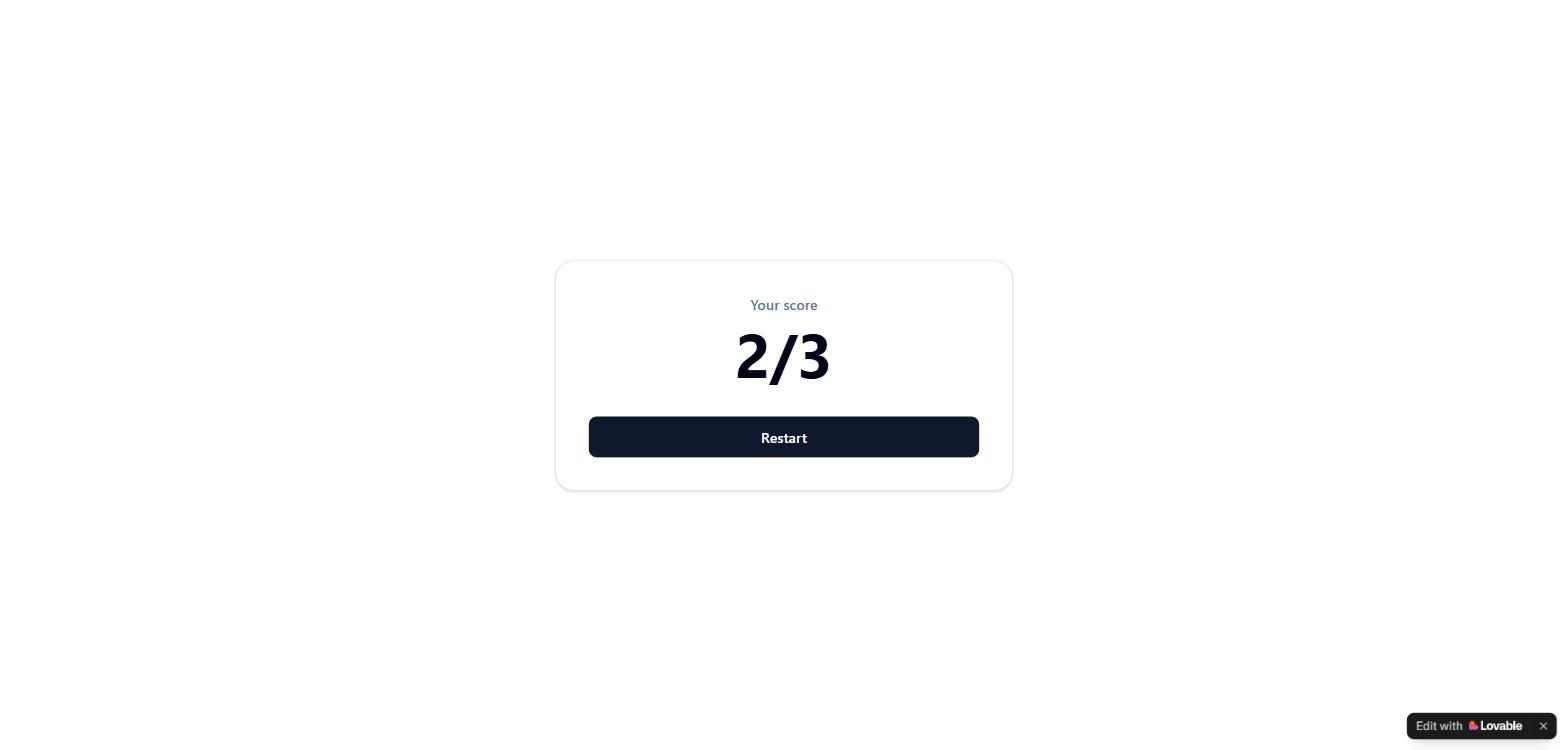
Build a quiz with these three multiple-choice questions, one at a time, then show the score like "2/3" and a Restart button. 1. What is the capital of Portugal? Lisbon, Madrid, Porto (answer: Lisbon) 2. What is 7 x 8? 54, 56, 64 (answer: 56) 3. Which is the largest planet? Mars, Jupiter, Venus (answer: Jupiter) No login, no backend, no external services.
import { createFileRoute } from "@tanstack/react-router";
import { useState } from "react";
export const Route = createFileRoute("/")({
component: Index,
});
const QUESTIONS = [
{
question: "What is the capital of Portugal?",
answers: ["Lisbon", "Madrid", "Porto"],
correct: 0,
},
{
question: "What is 7 x 8?",
answers: ["54", "56", "64"],
correct: 1,
},
{
question: "Which is the largest planet?",
answers: ["Mars", "Jupiter", "Venus"],
correct: 1,
},
];
function Index() {
const [current, setCurrent] = useState(0);
const [score, setScore] = useState(0);
const [selected, setSelected] = useState<number | null>(null);
const [finished, setFinished] = useState(false);
const q = QUESTIONS[current]!;
const handleAnswer = (index: number) => {
if (selected !== null) return;
setSelected(index);
if (index === q.correct) setScore((s) => s + 1);
setTimeout(() => {
if (current + 1 < QUESTIONS.length) {
setCurrent((c) => c + 1);
setSelected(null);
} else {
setFinished(true);
}
}, 900);
};
const restart = () => {
setCurrent(0);
setScore(0);
setSelected(null);
setFinished(false);
};
return (
<div className="flex min-h-screen items-center justify-center bg-background px-4">
<div className="w-full max-w-md rounded-2xl border border-border bg-card p-8 shadow-sm">
{finished ? (
<div className="text-center">
<p className="text-sm font-medium text-muted-foreground">Your score</p>
<p className="mt-2 text-6xl font-bold text-foreground">
{score}/{QUESTIONS.length}
</p>
<button
onClick={restart}
className="mt-8 inline-flex w-full items-center justify-center rounded-md bg-primary px-4 py-2.5 text-sm font-medium text-primary-foreground transition-colors hover:bg-primary/90"
>
Restart
</button>
</div>
) : (
<div>
<p className="text-sm font-medium text-muted-foreground">
Question {current + 1} of {QUESTIONS.length}
</p>
<h1 className="mt-3 text-2xl font-semibold text-foreground">{q.question}</h1>
<div className="mt-6 flex flex-col gap-3">
{q.answers.map((answer, i) => {
const isCorrect = selected !== null && i === q.correct;
const isWrongPick = selected === i && i !== q.correct;
return (
<button
key={answer}
onClick={() => handleAnswer(i)}
className={
"rounded-md border px-4 py-3 text-left text-sm font-medium transition-colors " +
(isCorrect
? "border-green-500 bg-green-50 text-green-800"
: isWrongPick
? "border-red-400 bg-red-50 text-red-800"
: "border-border bg-background text-foreground hover:bg-accent")
}
>
{answer}
</button>
);
})}
</div>
</div>
)}
</div>
</div>
);
}
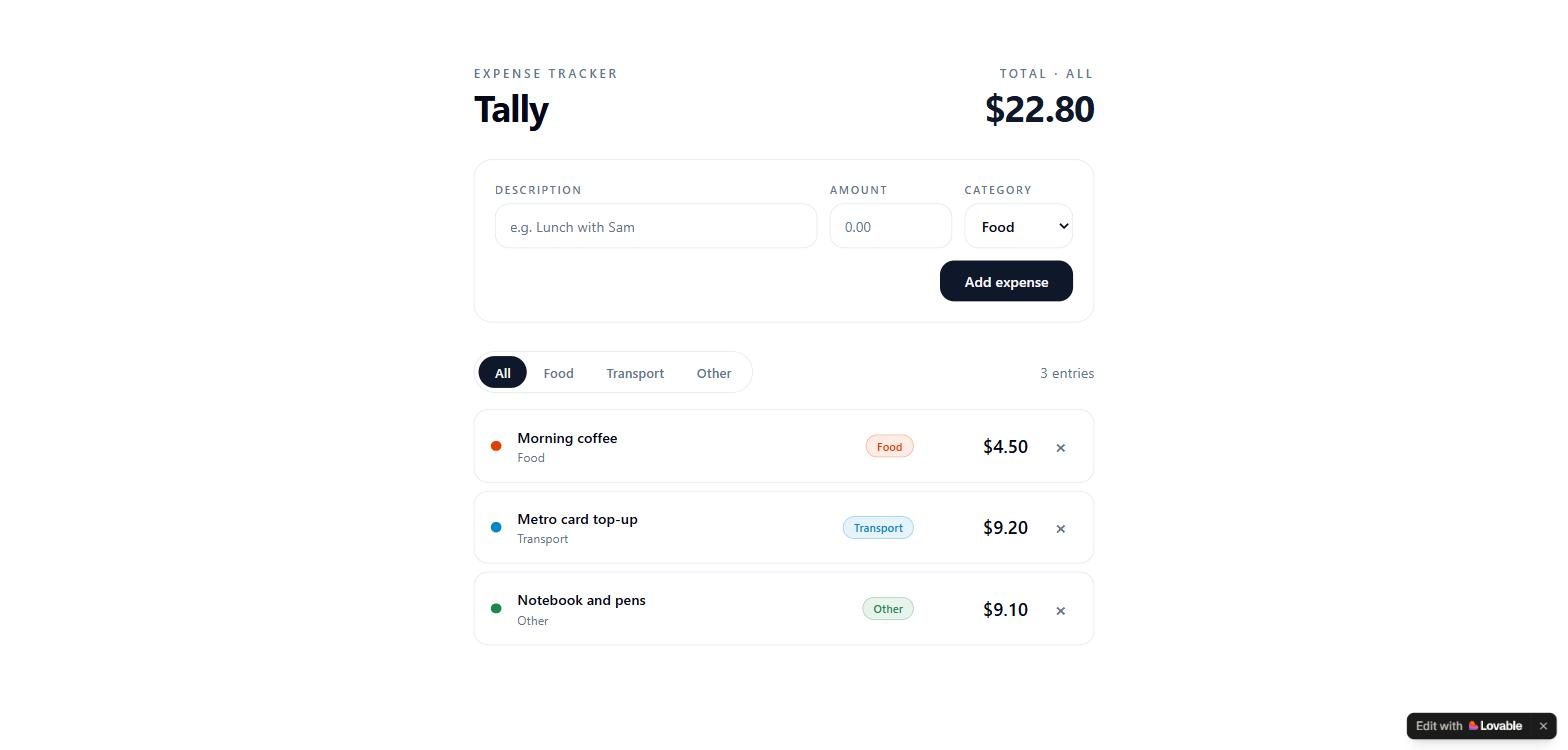
Build an expense tracker. The user adds an expense with a description, an amount and a category (Food, Transport or Other). Show the list, a total of the listed expenses, a category filter (All, Food, Transport, Other) that also changes the total, and a delete button per expense. No login, no backend, no external services.
import { createFileRoute } from "@tanstack/react-router";
import { useMemo, useState } from "react";
export const Route = createFileRoute("/")({
head: () => ({
meta: [
{ title: "Tally — Expense Tracker" },
{
name: "description",
content:
"A simple expense tracker: add expenses with a category, filter by Food, Transport or Other, and see the live total.",
},
{ property: "og:title", content: "Tally — Expense Tracker" },
{
property: "og:description",
content:
"Track expenses by category, filter the list, and see the total — right in your browser.",
},
{ property: "og:type", content: "website" },
{ name: "twitter:card", content: "summary" },
],
}),
component: Index,
});
type Category = "Food" | "Transport" | "Other";
type Filter = Category | "All";
type Expense = { id: number; description: string; amount: number; category: Category };
const CATEGORIES: Category[] = ["Food", "Transport", "Other"];
const FILTERS: Filter[] = ["All", ...CATEGORIES];
let nextId = 4;
const CATEGORY_STYLES: Record<Category, string> = {
Food: "text-expense-food border-expense-food/30 bg-expense-food/10",
Transport: "text-expense-transport border-expense-transport/30 bg-expense-transport/10",
Other: "text-expense-other border-expense-other/30 bg-expense-other/10",
};
const CATEGORY_DOT: Record<Category, string> = {
Food: "bg-expense-food",
Transport: "bg-expense-transport",
Other: "bg-expense-other",
};
function formatMoney(amount: number): string {
return $${amount.toFixed(2)};
}
function Index() {
const [expenses, setExpenses] = useState<Expense[]>([
{ id: 1, description: "Morning coffee", amount: 4.5, category: "Food" },
{ id: 2, description: "Metro card top-up", amount: 9.2, category: "Transport" },
{ id: 3, description: "Notebook and pens", amount: 9.1, category: "Other" },
]);
const [filter, setFilter] = useState<Filter>("All");
const [description, setDescription] = useState("");
const [amountInput, setAmountInput] = useState("");
const [category, setCategory] = useState<Category>("Food");
const [error, setError] = useState<string | null>(null);
const visible = useMemo(
() => (filter === "All" ? expenses : expenses.filter((e) => e.category === filter)),
[expenses, filter],
);
const total = useMemo(() => visible.reduce((sum, e) => sum + e.amount, 0), [visible]);
function addExpense(e: React.FormEvent) {
e.preventDefault();
const amount = Number.parseFloat(amountInput.replace(",", "."));
if (!description.trim()) {
setError("Add a description");
return;
}
if (!Number.isFinite(amount) || amount <= 0) {
setError("Enter an amount greater than 0");
return;
}
setError(null);
setExpenses((prev) => [
{ id: nextId++, description: description.trim(), amount, category },
...prev,
]);
setDescription("");
setAmountInput("");
setCategory("Food");
}
function removeExpense(id: number) {
setExpenses((prev) => prev.filter((e) => e.id !== id));
}
return (
<div className="min-h-screen bg-background">
<main className="mx-auto max-w-2xl px-5 py-12 sm:px-8 sm:py-16">
<header className="flex items-end justify-between gap-6">
<div>
<p className="text-xs font-semibold uppercase tracking-[0.22em] text-muted-foreground">
Expense tracker
</p>
<h1 className="mt-1 text-4xl font-bold tracking-tight text-foreground">Tally</h1>
</div>
<div className="text-right">
<p className="text-xs font-semibold uppercase tracking-[0.22em] text-muted-foreground">
Total · {filter}
</p>
<p className="mt-1 text-3xl font-bold tabular-nums tracking-tight text-primary sm:text-4xl">
{formatMoney(total)}
</p>
</div>
</header>
    <form
      onSubmit={addExpense}
      className="mt-8 rounded-2xl border border-border bg-card p-4 sm:p-5"
    >
      <div className="grid gap-3 sm:grid-cols-[1fr_7.5rem_auto]">
        <label className="flex flex-col gap-1.5">
          <span className="text-[11px] font-semibold uppercase tracking-[0.14em] text-muted-foreground">
            Description
          </span>
          <input
            type="text"
            value={description}
            maxLength={100}
            onChange={(e) => setDescription(e.target.value)}
            placeholder="e.g. Lunch with Sam"
            className="h-11 rounded-xl border border-input bg-background px-3.5 text-sm text-foreground placeholder:text-muted-foreground outline-none focus:border-ring focus:ring-2 focus:ring-ring/30"
          />
        </label>
        <label className="flex flex-col gap-1.5">
          <span className="text-[11px] font-semibold uppercase tracking-[0.14em] text-muted-foreground">
            Amount
          </span>
          <input
            type="text"
            inputMode="decimal"
            value={amountInput}
            maxLength={12}
            onChange={(e) => setAmountInput(e.target.value)}
            placeholder="0.00"
            className="h-11 rounded-xl border border-input bg-background px-3.5 text-sm tabular-nums text-foreground placeholder:text-muted-foreground outline-none focus:border-ring focus:ring-2 focus:ring-ring/30"
          />
        </label>
        <label className="flex flex-col gap-1.5">
          <span className="text-[11px] font-semibold uppercase tracking-[0.14em] text-muted-foreground">
            Category
          </span>
          <select
            value={category}
            onChange={(e) => setCategory(e.target.value as Category)}
            className="h-11 rounded-xl border border-input bg-background px-3 text-sm font-medium text-foreground outline-none focus:border-ring focus:ring-2 focus:ring-ring/30"
          >
            {CATEGORIES.map((c) => (
              <option key={c} value={c}>
                {c}
              </option>
            ))}
          </select>
        </label>
      </div>
      <div className="mt-3 flex items-center justify-between gap-3">
        {error ? (
          <p className="text-xs font-medium text-destructive" role="alert">
            {error}
          </p>
        ) : (
          <span />
        )}
        <button
          type="submit"
          className="rounded-xl bg-primary px-6 py-2.5 text-sm font-semibold text-primary-foreground transition-transform active:scale-95"
        >
          Add expense
        </button>
      </div>
    </form>

    <div className="mt-7 flex items-center justify-between gap-4">
      <div
        className="inline-flex rounded-full border border-border bg-card p-1"
        role="tablist"
        aria-label="Filter by category"
      >
        {FILTERS.map((f) => (
          <button
            key={f}
            role="tab"
            aria-selected={filter === f}
            onClick={() => setFilter(f)}
            className={
              "rounded-full px-4 py-1.5 text-[13px] font-medium transition-colors " +
              (filter === f
                ? "bg-primary text-primary-foreground"
                : "text-muted-foreground hover:text-foreground")
            }
          >
            {f}
          </button>
        ))}
      </div>
      <p className="text-sm text-muted-foreground">
        {visible.length} {visible.length === 1 ? "entry" : "entries"}
      </p>
    </div>

    <ul className="mt-4 space-y-2">
      {visible.map((expense) => (
        <li
          key={expense.id}
          className="flex items-center gap-4 rounded-xl border border-border bg-card p-4"
        >
          <span
            className={`size-2.5 shrink-0 rounded-full ${CATEGORY_DOT[expense.category]}`}
            aria-hidden="true"
          />
          <div className="min-w-0 flex-1">
            <p className="truncate text-sm font-semibold text-foreground">
              {expense.description}
            </p>
            <p className="mt-0.5 text-xs text-muted-foreground">{expense.category}</p>
          </div>
          <span
            className={`rounded-full border px-2.5 py-0.5 text-[11px] font-medium ${CATEGORY_STYLES[expense.category]}`}
          >
            {expense.category}
          </span>
          <p className="w-24 text-right text-lg font-semibold tabular-nums text-foreground">
            {formatMoney(expense.amount)}
          </p>
          <button
            aria-label={`Delete ${expense.description}`}
            onClick={() => removeExpense(expense.id)}
            className="grid size-8 shrink-0 place-items-center rounded-lg text-lg font-bold text-muted-foreground transition-colors hover:bg-destructive hover:text-destructive-foreground"
          >
            ×
          </button>
        </li>
      ))}
    </ul>

    {visible.length === 0 && (
      <p className="rounded-xl border border-dashed border-border bg-card/50 p-8 text-center text-sm text-muted-foreground">
        {filter === "All"
          ? "No expenses yet — add your first one above."
          : `No ${filter} expenses yet.`}
      </p>
    )}
  </main>
</div>
);
}
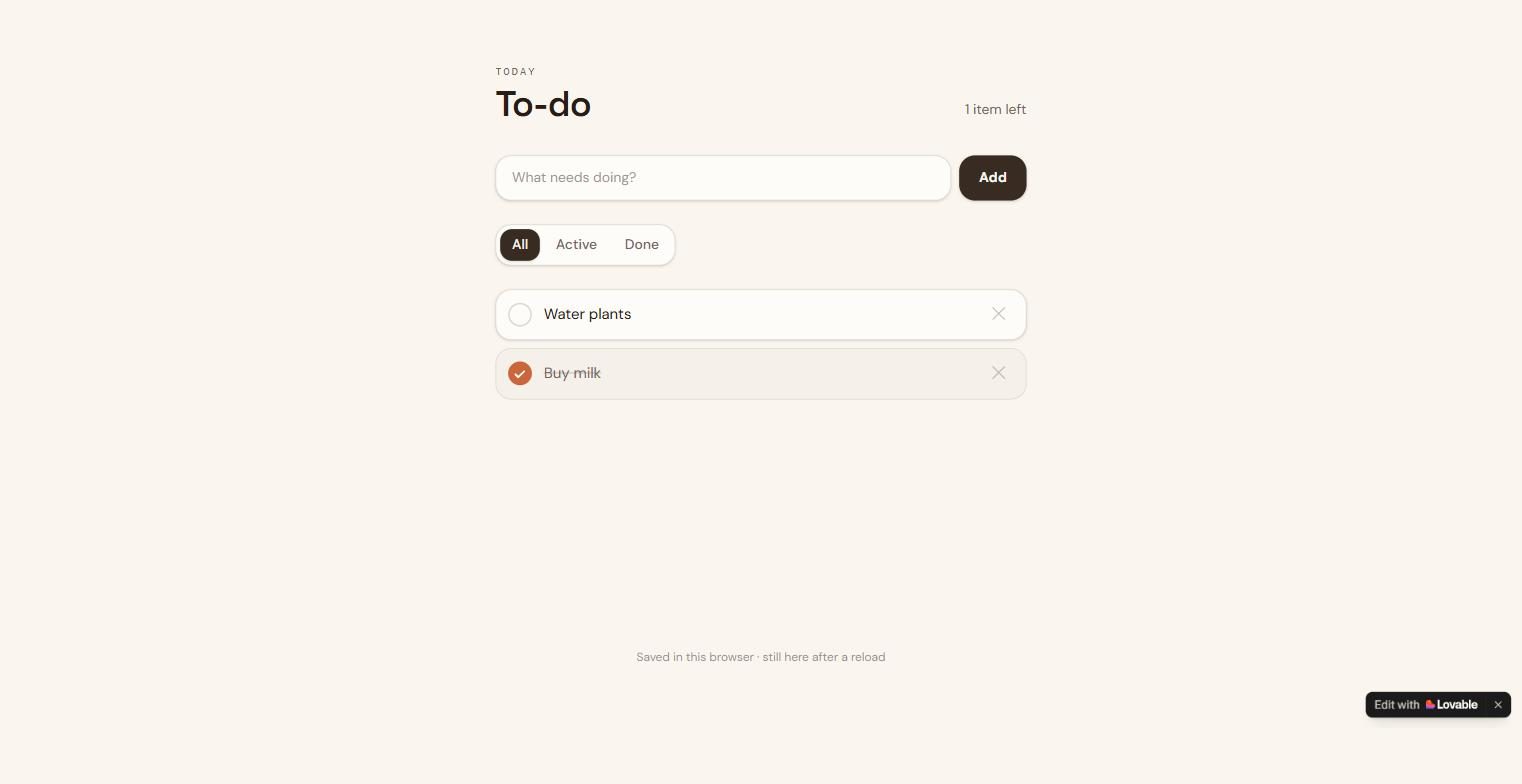
Add filter buttons All, Active and Done to the to-do list, and a counter that says how many items are left, like "1 item left" or "2 items left". Keep everything that already works.
import { useEffect, useState, type FormEvent } from "react";
import { createFileRoute } from "@tanstack/react-router";
export const Route = createFileRoute("/")({
head: () => ({
meta: [
{ title: "Today — To-Do List" },
{
name: "description",
content:
"A simple to-do list. Add tasks, check them off, and your list is saved right in your browser.",
},
{ property: "og:title", content: "Today — To-Do List" },
{
property: "og:description",
content:
"A simple to-do list. Add tasks, check them off, and your list is saved right in your browser.",
},
{ property: "og:type", content: "website" },
{ name: "twitter:card", content: "summary" },
],
}),
component: Index,
});
type Todo = {
id: string;
text: string;
done: boolean;
};
const STORAGE_KEY = "todo.items.v1";
function loadTodos(): Todo[] {
try {
const raw = localStorage.getItem(STORAGE_KEY);
if (!raw) return [];
const parsed: unknown = JSON.parse(raw);
if (!Array.isArray(parsed)) return [];
return parsed.filter(
(item): item is Todo =>
typeof item === "object" &&
item !== null &&
typeof (item as Todo).id === "string" &&
typeof (item as Todo).text === "string" &&
typeof (item as Todo).done === "boolean",
);
} catch {
return [];
}
}
function saveTodos(todos: Todo[]) {
try {
localStorage.setItem(STORAGE_KEY, JSON.stringify(todos));
} catch {
// Storage unavailable (private mode, quota) — list still works this session.
}
}
type Filter = "all" | "active" | "done";
const FILTERS: { value: Filter; label: string }[] = [
{ value: "all", label: "All" },
{ value: "active", label: "Active" },
{ value: "done", label: "Done" },
];
function Index() {
// Start empty so server-rendered and first client render match; load saved
// items right after hydration to avoid a mismatch.
const [todos, setTodos] = useState<Todo[]>([]);
const [hydrated, setHydrated] = useState(false);
const [draft, setDraft] = useState("");
const [filter, setFilter] = useState<Filter>("all");
useEffect(() => {
setTodos(loadTodos());
setHydrated(true);
}, []);
useEffect(() => {
if (hydrated) saveTodos(todos);
}, [todos, hydrated]);
function addTodo(e: FormEvent) {
e.preventDefault();
const text = draft.trim();
if (!text) return;
setTodos((prev) => [
{ id: crypto.randomUUID(), text, done: false },
...prev,
]);
setDraft("");
}
function toggleTodo(id: string) {
setTodos((prev) =>
prev.map((t) => (t.id === id ? { ...t, done: !t.done } : t)),
);
}
function deleteTodo(id: string) {
setTodos((prev) => prev.filter((t) => t.id !== id));
}
const doneCount = todos.filter((t) => t.done).length;
const openCount = todos.length - doneCount;
const visibleTodos =
filter === "active"
? todos.filter((t) => !t.done)
: filter === "done"
? todos.filter((t) => t.done)
: todos;
return (
<main className="mx-auto flex min-h-screen w-full max-w-xl flex-col px-5 py-12 sm:py-16">
<header>
<p className="font-mono text-[11px] uppercase tracking-[0.2em] text-muted-foreground">
Today
</p>
<div className="mt-1 flex items-end justify-between">
<h1 className="font-display text-4xl font-semibold tracking-tight text-foreground">
To-do
</h1>
{hydrated && todos.length > 0 && (
<p className="pb-1 text-sm text-muted-foreground">
{openCount} {openCount === 1 ? "item" : "items"} left
</p>
)}
</div>
</header>
  <form onSubmit={addTodo} className="mt-8">
    <div className="flex gap-2">
      <input
        type="text"
        value={draft}
        onChange={(e) => setDraft(e.target.value)}
        placeholder="What needs doing?"
        aria-label="New task"
        maxLength={200}
        className="min-w-0 flex-1 rounded-xl border border-input bg-card px-4 py-3 text-sm text-foreground shadow-sm outline-none transition placeholder:text-muted-foreground/70 focus:border-accent focus:ring-2 focus:ring-ring/30"
      />
      <button
        type="submit"
        className="shrink-0 rounded-xl bg-primary px-5 py-3 text-sm font-semibold text-primary-foreground shadow-sm transition hover:opacity-90 active:scale-[0.98]"
      >
        Add
      </button>
    </div>
  </form>

  <div
    role="group"
    aria-label="Filter tasks"
    className="mt-6 flex gap-1 self-start rounded-xl border border-border bg-card p-1 shadow-sm"
  >
    {FILTERS.map((f) => (
      <button
        key={f.value}
        type="button"
        onClick={() => setFilter(f.value)}
        aria-pressed={filter === f.value}
        className={
          "rounded-lg px-3 py-1.5 text-sm font-medium transition " +
          (filter === f.value
            ? "bg-primary text-primary-foreground shadow-sm"
            : "text-muted-foreground hover:text-foreground")
        }
      >
        {f.label}
      </button>
    ))}
  </div>

  <ul className="mt-6 flex flex-col gap-2">
    {visibleTodos.map((todo) => (
      <li
        key={todo.id}
        className={
          "group flex items-center gap-3 rounded-xl border px-3 py-3 transition " +
          (todo.done
            ? "border-border bg-secondary/60"
            : "border-border bg-card shadow-sm hover:border-accent/40")
        }
      >
        <button
          type="button"
          onClick={() => toggleTodo(todo.id)}
          aria-label={todo.done ? "Mark as not done" : "Mark as done"}
          aria-pressed={todo.done}
          className={
            "grid size-6 shrink-0 place-items-center rounded-full border-2 transition " +
            (todo.done
              ? "border-accent bg-accent text-accent-foreground"
              : "border-border text-transparent hover:border-accent")
          }
        >
          <svg
            viewBox="0 0 16 16"
            fill="none"
            className="size-3.5"
            aria-hidden="true"
          >
            <path
              d="M3 8.5l3.2 3.2L13 5"
              stroke="currentColor"
              strokeWidth="2.2"
              strokeLinecap="round"
              strokeLinejoin="round"
            />
          </svg>
        </button>
        <span
          className={
            "min-w-0 flex-1 break-words text-[15px] leading-snug transition " +
            (todo.done
              ? "text-muted-foreground line-through decoration-muted-foreground/50"
              : "text-foreground")
          }
        >
          {todo.text}
        </span>
        <button
          type="button"
          onClick={() => deleteTodo(todo.id)}
          aria-label={`Delete "${todo.text}"`}
          className="shrink-0 rounded-lg px-2 py-1 text-lg leading-none text-muted-foreground/40 transition hover:text-destructive"
        >
          ✕
        </button>
      </li>
    ))}
  </ul>

  {hydrated && visibleTodos.length === 0 && (
    <p className="mt-10 text-center text-sm text-muted-foreground">
      {todos.length === 0
        ? "Nothing here yet — add your first task above."
        : filter === "active"
          ? "No active tasks — everything is done."
          : "No completed tasks yet."}
    </p>
  )}

  <p className="mt-auto pt-10 text-center text-xs text-muted-foreground/70">
    Saved in this browser · still here after a reload
  </p>
</main>
);
}
Lovable offers a Free plan that includes 5 daily build credits (capped at 30 per calendar month) and 20 monthly Cloud credits. You can publish projects to up to 10 invited people and use Git sync. However, you cannot edit the code directly, download it, or use custom domains. pricing pageSource · vendor pagePricing page (docs.lovable.dev), checked Nov 19, 2026.Go to sources ↓
Paying unlocks the ability to edit and download the generated code, which is essential for professional development. The Pro plan costs $25/month per user and removes the daily credit cap, allowing unlimited daily builds. It also adds custom domains, design systems, and the "Dreaming" feature for project memory. The Business plan at $50/month adds SSO, audit logs, and higher automation limits. pricing pageSource · vendor pagePricing page (docs.lovable.dev), checked Nov 19, 2026.Go to sources ↓
We tested the free tier hands-on in the app 9.4Our test · free tierBuild a tip calculator: 9.4/10, 5 of 5 checks passed.Read the answer ↓. On the tip calculator task, the free tier scored 9.4/10 9.4Our test · free tierBuild a tip calculator: 9.4/10, 5 of 5 checks passed.Read the answer ↓. On the to-do list task, it scored 9.7/10 9.7Our test · free tierBuild a to-do list that remembers: 9.7/10, 6 of 6 checks passed.Read the answer ↓. On the unit converter task, it scored 9.5/10 9.5Our test · free tierBuild a unit converter: 9.5/10, 4 of 4 checks passed.Read the answer ↓. On the focus timer task, it scored 9.7/10 9.7Our test · free tierBuild a focus timer: 9.7/10, 6 of 6 checks passed.Read the answer ↓. On the markdown previewer task, it scored 9.7/10 9.7Our test · free tierBuild a safe Markdown previewer: 9.7/10, 5 of 5 checks passed.Read the answer ↓. On the quiz task, it scored 9.8/10 9.8Our test · free tierBuild a three-question quiz: 9.8/10, 4 of 4 checks passed.Read the answer ↓. On the expense tracker task, it scored 9.5/10 9.5Our test · free tierBuild an expense tracker: 9.5/10, 5 of 5 checks passed.Read the answer ↓. On the existing app change task, it scored 9.8/10 9.8Our test · free tierChange an existing app: 9.8/10, 5 of 5 checks passed.Read the answer ↓.
The free plan is sufficient for trying the tool or building small projects. Paying is worth it if you need to own your code or use it commercially. Alternatives like Cursor ($8/month) or GitHub Copilot ($10/month) are cheaper but offer different workflows. pricing pageSource · vendor pagePricing page (docs.lovable.dev), checked Nov 19, 2026.Go to sources ↓
Users frequently praise the quality of the generated apps, with one reviewer noting the app understands context well App StoreUser report · positive · App Store reviewPosted Nov 16, 2026See the report ↓. Some users report that credits are consumed quickly, especially when fixing mistakes App StoreUser report · negative · App Store reviewPosted Nov 3, 2026See the report ↓. There are also reports of stability issues, such as long loading times or wrong previews RedditUser report · negative · Redditr/lovable, posted Feb 3, 2026See the report ↓. Several users highlight the success of apps built on the platform, with some generating significant revenue RedditUser report · positive · Redditr/lovable, posted Mar 29, 2026See the report ↓.
Users frequently praise the quality of the generated apps, with one reviewer noting the app understands context well.
… The depth and understanding this app has is top tier and it understands everything I say and where to put things etc! Great app and I highly recommend it
Several users highlight the success of apps built on the platform, with some generating significant revenue.
My Lovable app hit $6,500+ revenue & 8,700+ downloads worldwide! Hi everyone! I launched this app last year when I started learning how to build & ship apps on the App Store. …
Some users report that credits are consumed quickly, especially when fixing mistakes.
… Burns through credits fast, makes mistakes which costs credits to fix, Unintuitive thinking in the build. Pretty good at building but basically they can go slow, make mistakes and it costs you more money. …
There are also reports of stability issues, such as long loading times or wrong previews.
… In the past few weeks, I noticed two things: * Lovable has turned the "Credit usage" knob up or did something else that drastically increased the amount of credits you need for each change. * Stability has been subpar. Wrong previews, "thinking for minutes on end" or not responding. …
Cursor offers a Plus plan at $8/month, which is lower than Lovable's $25/month Pro plan. It also provides a free tier with limited AI usage.
GitHub Copilot Pro is $10/month, which is lower than Lovable's $25/month Pro plan. It offers unlimited inline suggestions for coding tasks.
Windsurf Pro is $20/month, which is cheaper than Lovable's $25/month Pro plan. It includes increased quotas and full model availability.
Replit Core is $20/month, which is slightly cheaper than Lovable's $25/month Pro plan. It includes AI integrations and unlimited workspaces.
Bolt Pro is $25/month, matching Lovable's Pro plan price exactly. It offers 10M tokens per month for coding generation.
The Pro plan costs $25/month per user.
Yes, the free plan has a monthly cap of 30 daily build credits.
No, downloading code is available only on paid plans.
Business adds SSO, audit logs, and higher automation limits.
The "Visit" buttons go through shouldipay.ai/go/ and may be affiliate links, so we may earn a commission if you subscribe. Commissions never decide a verdict: the evidence on this page does. Verdicts are drafted with AI from the vendors' own pricing and documentation pages and, for this verdict, our own tests shown on this page and public user reports we link to, and checked automatically against those sources before they are published; a person reviews first verdicts, changed answers and anything the checks flag. Affiliate disclosure