Free
$0
No price change · limits changed Nov 18
- AccessFree access to v0
- DeploymentDeploy apps to Vercel
- Design ModeEdit visually with Design Mode
- GitHub syncSync with GitHub
- Messages7 message/day limit
Verdict · Coding · by Vercel
Depends: light users can stay on the free tier; pay for more usage, all models, and team collaboration.
Start on the free plan first. The button opens v0.app through shouldipay.ai/go/v0. It may be an affiliate link: we may earn a commission. Commissions never decide a verdict: the evidence on this page does. Disclosure
Personal
No price change · limits changed Nov 18
"Regular users should consider Plus for added usage capacity, all-model access, shared chats, and centralized billing." Bottom line
9.7/10
Free tier, average of 8 tasks
Free tier: run by hand in the product's own web app on the v0 Free plan by our editor on Sep 29, 2026 (free tier); the app showed the model v0 Max (the default model on the plan).
We only publish paid-tier scores from access we actually have (our own subscription, a trial or access given by the vendor), and we have no paid-tier results for v0 yet. So this page cannot show what paying changes in answer quality; the verdict relies on the plans and, where we have them, user reports for that.
Score = 50% quality (AI judges) + 50% automatic checks passed
Each task below opens to show the prompt, the objective checks and the full answer of each tier.
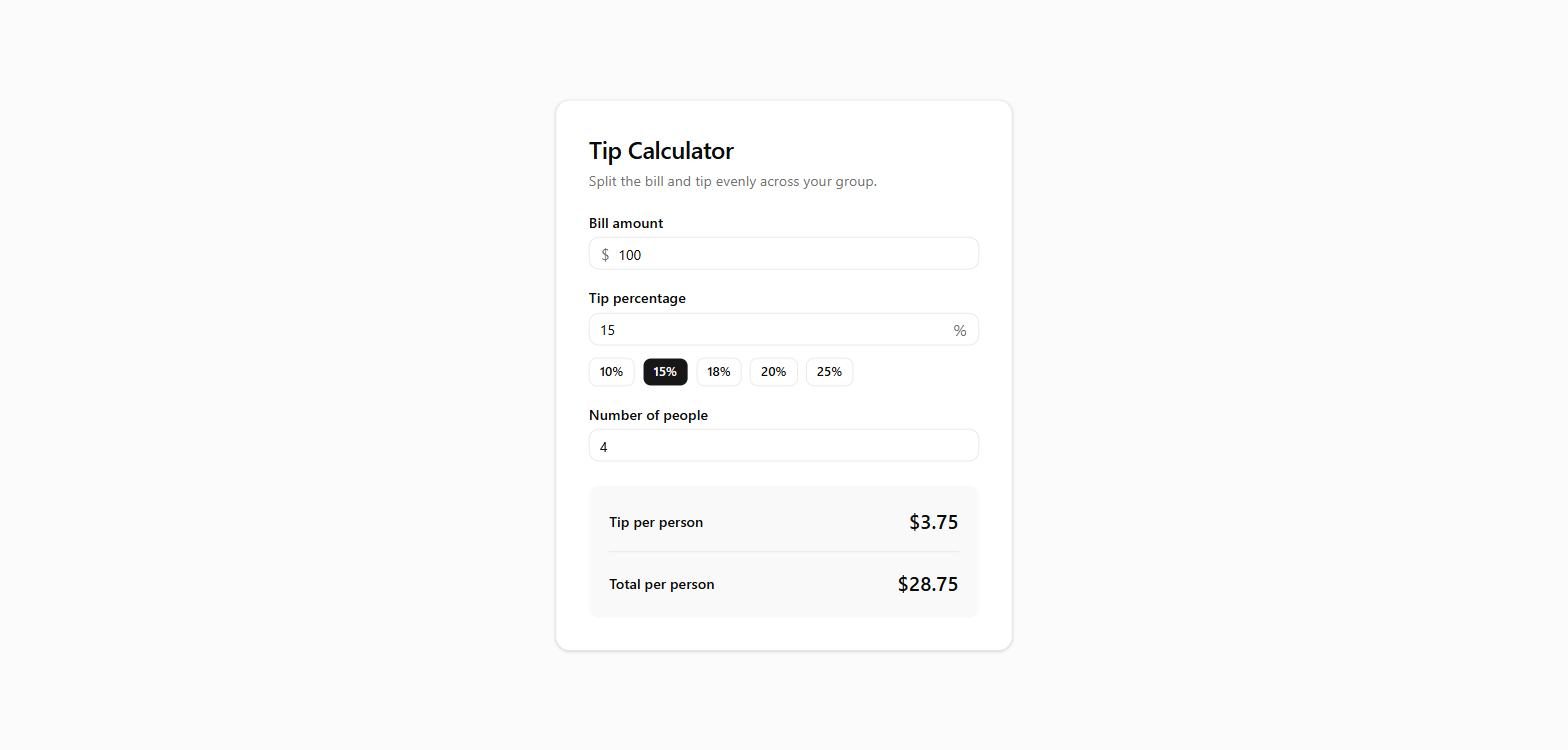
Build a single-page tip calculator. Inputs: bill amount, tip percentage (default 15) and number of people (default 1). Show the tip per person and the total per person, rounded to 2 decimals, updating as the user types. Handle bad input without showing NaN or Infinity. No login, no backend, no external services.
// components/tip-calculator.tsx
"use client"
import { useMemo, useState } from "react"
import { Label } from "@/components/ui/label"
import { Input } from "@/components/ui/input"
import { Button } from "@/components/ui/button"
const TIP_PRESETS = [10, 15, 18, 20, 25]
function formatCurrency(value: number) {
return new Intl.NumberFormat("en-US", {
style: "currency",
currency: "USD",
}).format(value)
}
/**
export function TipCalculator() {
const [bill, setBill] = useState("")
const [tipPercent, setTipPercent] = useState("15")
const [people, setPeople] = useState("1")
const result = useMemo(() => {
const billAmount = parseNonNegative(bill)
const tip = parseNonNegative(tipPercent)
const peopleCount = parseNonNegative(people)
// People must be a whole number of at least 1 to avoid division issues.
const validPeople =
  peopleCount !== null && peopleCount >= 1 ? Math.floor(peopleCount) : null

if (billAmount === null || tip === null || validPeople === null) {
  return null
}

const totalTip = billAmount * (tip / 100)
const totalWithTip = billAmount + totalTip

return {
  tipPerPerson: totalTip / validPeople,
  totalPerPerson: totalWithTip / validPeople,
}
}, [bill, tipPercent, people])
return (
<div className="w-full max-w-md rounded-xl border bg-card p-6 shadow-sm sm:p-8">
<header className="mb-6">
<h1 className="text-2xl font-semibold tracking-tight text-foreground">Tip Calculator</h1>
<p className="mt-1 text-sm text-muted-foreground">
Split the bill and tip evenly across your group.
</p>
</header>
  <div className="space-y-5">
    <div className="space-y-2">
      <Label htmlFor="bill">Bill amount</Label>
      <div className="relative">
        <span className="pointer-events-none absolute left-3 top-1/2 -translate-y-1/2 text-muted-foreground">
          $
        </span>
        <Input
          id="bill"
          inputMode="decimal"
          placeholder="0.00"
          value={bill}
          onChange={(e) => setBill(e.target.value)}
          className="pl-7"
        />
      </div>
    </div>

    <div className="space-y-2">
      <Label htmlFor="tip">Tip percentage</Label>
      <div className="relative">
        <Input
          id="tip"
          inputMode="decimal"
          placeholder="15"
          value={tipPercent}
          onChange={(e) => setTipPercent(e.target.value)}
          className="pr-8"
        />
        <span className="pointer-events-none absolute right-3 top-1/2 -translate-y-1/2 text-muted-foreground">
          %
        </span>
      </div>
      <div className="flex flex-wrap gap-2 pt-1">
        {TIP_PRESETS.map((preset) => (
          <Button
            key={preset}
            type="button"
            variant={tipPercent === String(preset) ? "default" : "outline"}
            size="sm"
            onClick={() => setTipPercent(String(preset))}
          >
            {preset}%
          </Button>
        ))}
      </div>
    </div>

    <div className="space-y-2">
      <Label htmlFor="people">Number of people</Label>
      <Input
        id="people"
        inputMode="numeric"
        placeholder="1"
        value={people}
        onChange={(e) => setPeople(e.target.value)}
      />
    </div>
  </div>

  <div className="mt-6 space-y-4 rounded-lg bg-muted/60 p-5">
    <div className="flex items-center justify-between">
      <div>
        <p className="text-sm font-medium text-foreground">Tip per person</p>
      </div>
      <p className="text-xl font-semibold tabular-nums text-foreground">
        {result ? formatCurrency(result.tipPerPerson) : "$0.00"}
      </p>
    </div>
    <div className="h-px bg-border" />
    <div className="flex items-center justify-between">
      <div>
        <p className="text-sm font-medium text-foreground">Total per person</p>
      </div>
      <p className="text-xl font-semibold tabular-nums text-foreground">
        {result ? formatCurrency(result.totalPerPerson) : "$0.00"}
      </p>
    </div>
  </div>

  {!result && (bill !== "" || tipPercent !== "" || people !== "") && (
    <p className="mt-4 text-sm text-muted-foreground" role="status">
      Enter a valid bill, tip percentage, and at least 1 person to see the split.
    </p>
  )}
</div>
)
}
Build a to-do list app. The user can add an item (ignore empty input), mark an item done or not done, and delete an item. Done items look visibly different. The list is saved in the browser (localStorage) and is still there after a reload. No login, no backend, no external services.
// hooks/use-todos.ts
"use client"
import { useCallback, useEffect, useState } from "react"
export interface Todo {
id: string
text: string
done: boolean
}
const STORAGE_KEY = "v0-todos"
export function useTodos() {
const [todos, setTodos] = useState<Todo[]>([])
const [loaded, setLoaded] = useState(false)
// Load once on mount
useEffect(() => {
try {
const raw = localStorage.getItem(STORAGE_KEY)
if (raw) {
const parsed = JSON.parse(raw)
if (Array.isArray(parsed)) {
setTodos(parsed.filter(isValidTodo))
}
}
} catch {
// Ignore malformed storage and start fresh
}
setLoaded(true)
}, [])
// Persist whenever todos change (after initial load)
useEffect(() => {
if (!loaded) return
try {
localStorage.setItem(STORAGE_KEY, JSON.stringify(todos))
} catch {
// Storage may be unavailable (e.g. private mode); fail silently
}
}, [todos, loaded])
const addTodo = useCallback((text: string) => {
const trimmed = text.trim()
if (!trimmed) return
setTodos((prev) => [
{ id: crypto.randomUUID(), text: trimmed, done: false },
...prev,
])
}, [])
const toggleTodo = useCallback((id: string) => {
setTodos((prev) =>
prev.map((t) => (t.id === id ? { ...t, done: !t.done } : t)),
)
}, [])
const deleteTodo = useCallback((id: string) => {
setTodos((prev) => prev.filter((t) => t.id !== id))
}, [])
return { todos, loaded, addTodo, toggleTodo, deleteTodo }
}
function isValidTodo(value: unknown): value is Todo {
if (typeof value !== "object" || value === null) return false
const t = value as Record<string, unknown>
return (
typeof t.id === "string" &&
typeof t.text === "string" &&
typeof t.done === "boolean"
)
}
// components/add-todo-form.tsx
"use client"
import type React from "react"
import { useState } from "react"
import { Button } from "@/components/ui/button"
import { Input } from "@/components/ui/input"
import { Plus } from "lucide-react"
interface AddTodoFormProps {
onAdd: (text: string) => void
}
export function AddTodoForm({ onAdd }: AddTodoFormProps) {
const [value, setValue] = useState("")
function handleSubmit(e: React.FormEvent) {
e.preventDefault()
if (!value.trim()) return
onAdd(value)
setValue("")
}
return (
<form onSubmit={handleSubmit} className="flex items-center gap-2">
<Input
value={value}
onChange={(e) => setValue(e.target.value)}
placeholder="Add a task..."
aria-label="New task"
className="h-11"
/>
<Button type="submit" size="lg" className="h-11 shrink-0" disabled={!value.trim()}>
<Plus className="size-4" aria-hidden="true" />
<span className="sr-only sm:not-sr-only">Add</span>
</Button>
</form>
)
}
// components/todo-item.tsx
"use client"
import type { Todo } from "@/hooks/use-todos"
import { Button } from "@/components/ui/button"
import { Checkbox } from "@/components/ui/checkbox"
import { Trash2 } from "lucide-react"
import { cn } from "@/lib/utils"
interface TodoItemProps {
todo: Todo
onToggle: (id: string) => void
onDelete: (id: string) => void
}
export function TodoItem({ todo, onToggle, onDelete }: TodoItemProps) {
return (
<li className="flex items-center gap-3 rounded-lg border bg-card px-3 py-2.5 shadow-sm">
<Checkbox
id={todo-${todo.id}}
checked={todo.done}
onCheckedChange={() => onToggle(todo.id)}
aria-label={todo.done ? "Mark as not done" : "Mark as done"}
/>
<label
htmlFor={todo-${todo.id}}
className={cn(
"flex-1 cursor-pointer text-sm leading-relaxed break-words",
todo.done && "text-muted-foreground line-through",
)}
>
{todo.text}
</label>
<Button
variant="ghost"
size="icon"
className="size-8 shrink-0 text-muted-foreground hover:text-destructive"
onClick={() => onDelete(todo.id)}
aria-label="Delete task"
>
<Trash2 className="size-4" aria-hidden="true" />
</Button>
</li>
)
}
// components/todo-list.tsx
"use client"
import { useTodos } from "@/hooks/use-todos"
import { AddTodoForm } from "@/components/add-todo-form"
import { TodoItem } from "@/components/todo-item"
export function TodoList() {
const { todos, loaded, addTodo, toggleTodo, deleteTodo } = useTodos()
const remaining = todos.filter((t) => !t.done).length
return (
<section className="w-full max-w-md">
<header className="mb-6">
<h1 className="text-2xl font-semibold tracking-tight text-balance">My Tasks</h1>
<p className="mt-1 text-sm text-muted-foreground">
{loaded
? todos.length === 0
? "Nothing here yet. Add your first task."
: ${remaining} of ${todos.length} remaining
: "Loading..."}
</p>
</header>
  <AddTodoForm onAdd={addTodo} />

  {loaded && todos.length > 0 && (
    <ul className="mt-5 flex flex-col gap-2">
      {todos.map((todo) => (
        <TodoItem
          key={todo.id}
          todo={todo}
          onToggle={toggleTodo}
          onDelete={deleteTodo}
        />
      ))}
    </ul>
  )}
</section>
)
}
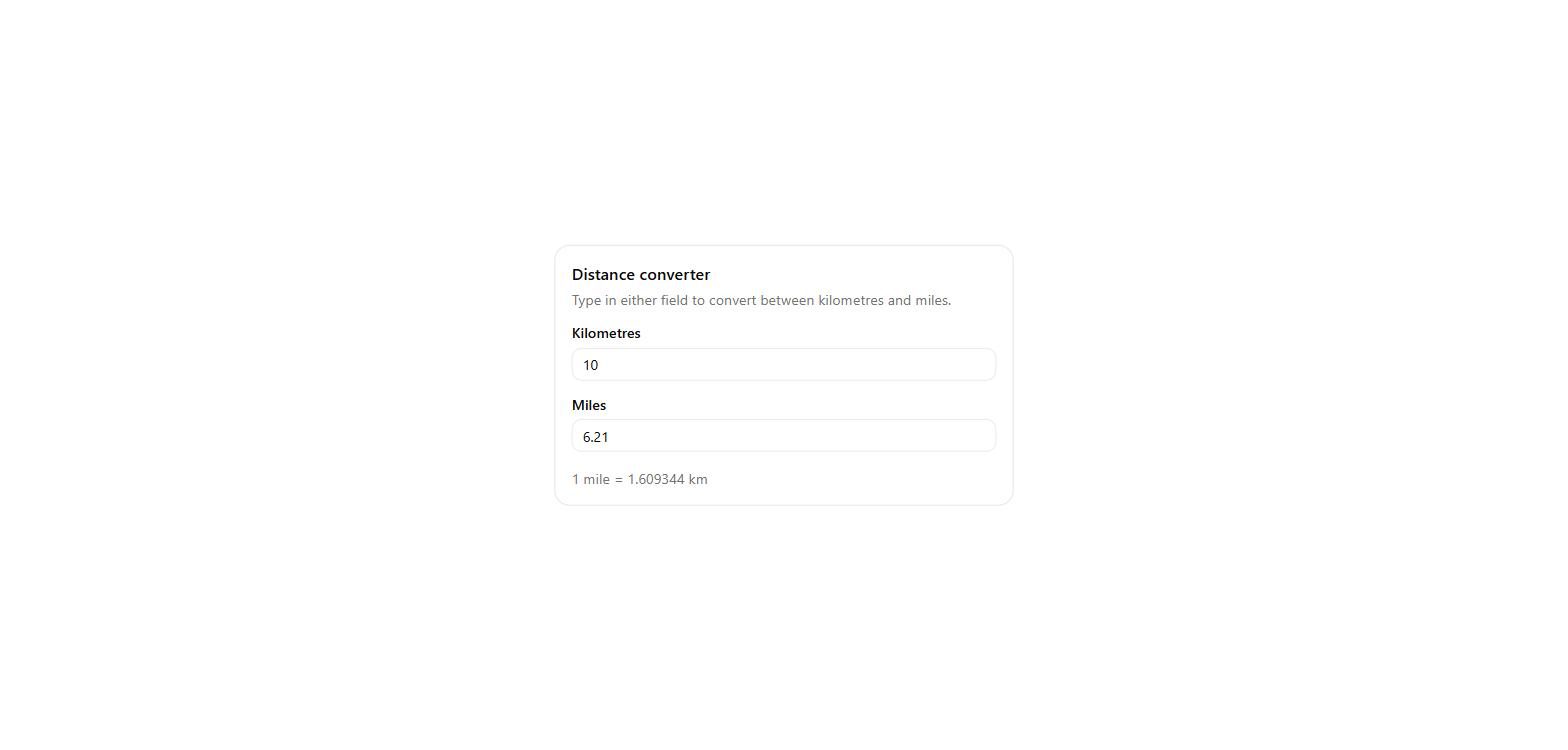
Build a kilometres/miles converter with two linked fields: typing in one updates the other, rounded to 2 decimals (1 mile = 1.609344 km). Invalid input must not show NaN. No login, no backend, no external services.
// components/converter.tsx
"use client"
import { useState } from "react"
import { Card, CardContent, CardDescription, CardHeader, CardTitle } from "@/components/ui/card"
import { Input } from "@/components/ui/input"
import { Label } from "@/components/ui/label"
const KM_PER_MILE = 1.609344
// Round to at most 2 decimals, dropping trailing zeros ("2.50" -> "2.5", "3.00" -> "3")
function format(value: number): string {
return Number.parseFloat(value.toFixed(2)).toString()
}
type Field = "km" | "miles"
export function Converter() {
const [km, setKm] = useState("")
const [miles, setMiles] = useState("")
function handleChange(field: Field, raw: string) {
if (field === "km") {
setKm(raw)
} else {
setMiles(raw)
}
// Empty input clears the linked field instead of showing NaN
if (raw.trim() === "") {
  if (field === "km") setMiles("")
  else setKm("")
  return
}

const parsed = Number(raw)

// Invalid or incomplete input (e.g. "-", "1.", "abc") leaves the other field untouched
if (!Number.isFinite(parsed)) {
  return
}

if (field === "km") {
  setMiles(format(parsed / KM_PER_MILE))
} else {
  setKm(format(parsed * KM_PER_MILE))
}
}
return (
<Card className="w-full max-w-md">
<CardHeader>
<CardTitle>Distance converter</CardTitle>
<CardDescription>Type in either field to convert between kilometres and miles.</CardDescription>
</CardHeader>
<CardContent className="flex flex-col gap-4">
<div className="flex flex-col gap-2">
<Label htmlFor="km">Kilometres</Label>
<Input
id="km"
inputMode="decimal"
placeholder="0"
value={km}
onChange={(e) => handleChange("km", e.target.value)}
/>
</div>
<div className="flex flex-col gap-2">
<Label htmlFor="miles">Miles</Label>
<Input
id="miles"
inputMode="decimal"
placeholder="0"
value={miles}
onChange={(e) => handleChange("miles", e.target.value)}
/>
</div>
<p className="text-sm text-muted-foreground">1 mile = 1.609344 km</p>
</CardContent>
</Card>
)
}
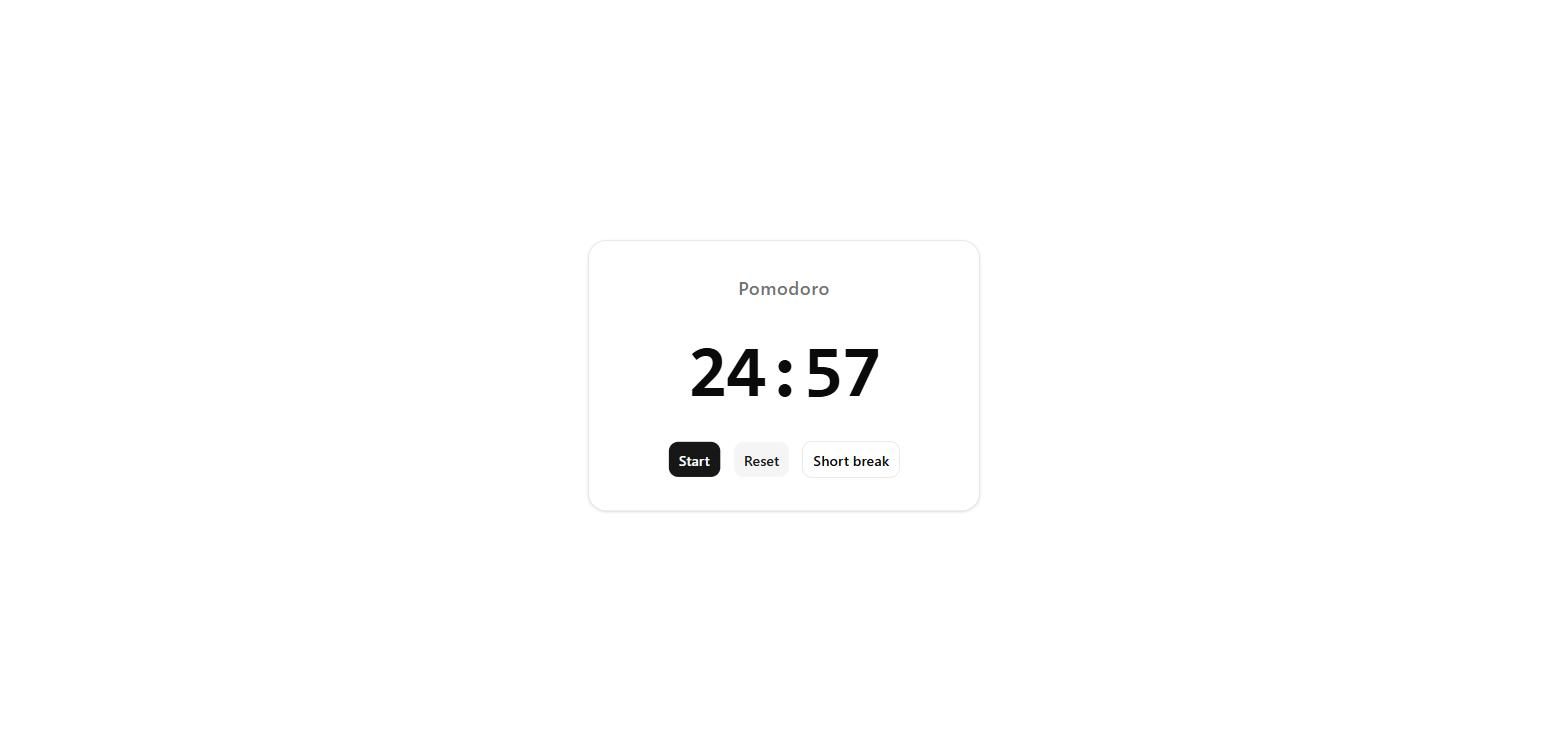
Build a Pomodoro timer: it shows 25:00, with Start, Pause and Reset buttons, and a Short break button that sets it to 05:00. The time counts down once per second while running. No login, no backend, no external services.
// components/pomodoro-timer.tsx
"use client"
import { useCallback, useEffect, useRef, useState } from "react"
import { Button } from "@/components/ui/button"
const FOCUS_SECONDS = 25 * 60
const SHORT_BREAK_SECONDS = 5 * 60
function formatTime(totalSeconds: number) {
const minutes = Math.floor(totalSeconds / 60)
const seconds = totalSeconds % 60
return ${String(minutes).padStart(2, "0")}:${String(seconds).padStart(2, "0")}
}
export function PomodoroTimer() {
const [secondsLeft, setSecondsLeft] = useState(FOCUS_SECONDS)
const [isRunning, setIsRunning] = useState(false)
const intervalRef = useRef<ReturnType<typeof setInterval> | null>(null)
const clearTimer = useCallback(() => {
if (intervalRef.current !== null) {
clearInterval(intervalRef.current)
intervalRef.current = null
}
}, [])
useEffect(() => {
if (!isRunning) return
intervalRef.current = setInterval(() => {
  setSecondsLeft((prev) => {
    if (prev <= 1) {
      clearTimer()
      setIsRunning(false)
      return 0
    }
    return prev - 1
  })
}, 1000)

return clearTimer
}, [isRunning, clearTimer])
const handleStart = () => {
if (secondsLeft > 0) setIsRunning(true)
}
const handlePause = () => setIsRunning(false)
const handleReset = () => {
setIsRunning(false)
setSecondsLeft(FOCUS_SECONDS)
}
const handleShortBreak = () => {
setIsRunning(false)
setSecondsLeft(SHORT_BREAK_SECONDS)
}
return (
<div className="w-full max-w-sm rounded-2xl border bg-card p-8 text-card-foreground shadow-sm">
<div className="flex flex-col items-center gap-8">
<h1 className="text-lg font-medium tracking-wide text-muted-foreground">Pomodoro</h1>
    <p
      className="font-mono text-7xl font-bold tabular-nums tracking-tight"
      aria-live="polite"
      role="timer"
    >
      {formatTime(secondsLeft)}
    </p>

    <div className="flex flex-wrap items-center justify-center gap-3">
      {isRunning ? (
        <Button onClick={handlePause} size="lg">
          Pause
        </Button>
      ) : (
        <Button onClick={handleStart} size="lg" disabled={secondsLeft === 0}>
          Start
        </Button>
      )}
      <Button onClick={handleReset} size="lg" variant="secondary">
        Reset
      </Button>
      <Button onClick={handleShortBreak} size="lg" variant="outline">
        Short break
      </Button>
    </div>
  </div>
</div>
)
}
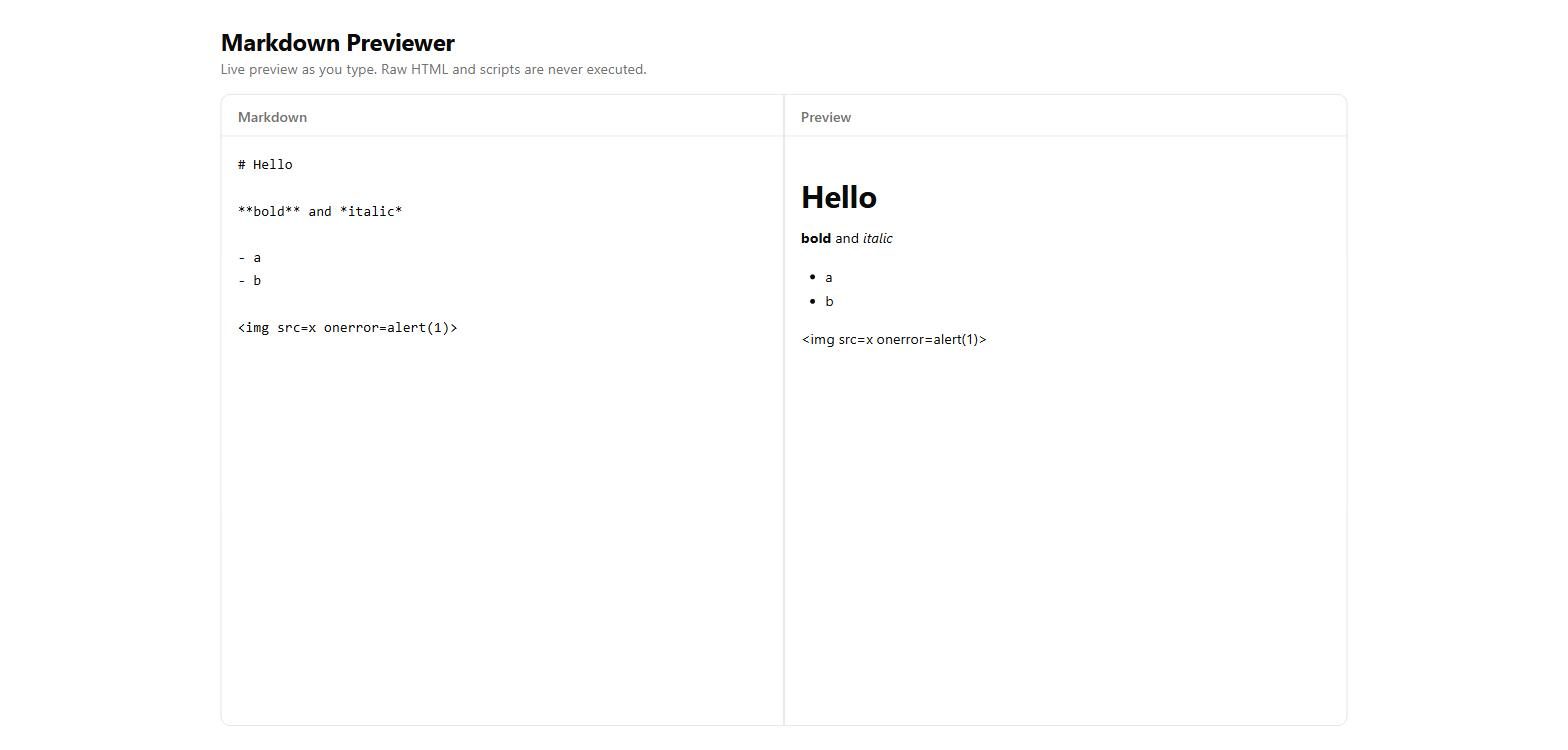
Build a Markdown previewer: a text area on the left, the rendered preview on the right, updating as the user types. It must support headings, bold, italics and bullet lists, and must not run any HTML or script the user types. No login, no backend, no external services.
// components/markdown-previewer.tsx
"use client"
import { useMemo, useState } from "react"
import { renderMarkdown } from "@/lib/markdown"
const SAMPLE = `# Markdown Previewer
Type on the left, see the result on the right.
Features
Anything like <script>alert('hi')</script> or <b>raw html</b> is shown as plain text, never executed.
`
export function MarkdownPreviewer() {
const [value, setValue] = useState(SAMPLE)
const rendered = useMemo(() => renderMarkdown(value), [value])
return (
<div className="grid flex-1 grid-cols-1 gap-px overflow-hidden rounded-lg border bg-border md:grid-cols-2">
<section className="flex min-h-0 flex-col bg-background">
<div className="border-b px-4 py-2">
<label htmlFor="markdown-input" className="text-sm font-medium text-muted-foreground">
Markdown
</label>
</div>
<textarea
id="markdown-input"
value={value}
onChange={(e) => setValue(e.target.value)}
spellCheck={false}
aria-label="Markdown input"
placeholder="Type Markdown here..."
className="flex-1 resize-none bg-transparent p-4 font-mono text-sm leading-relaxed outline-none"
/>
</section>
  <section className="flex min-h-0 flex-col bg-background">
    <div className="border-b px-4 py-2">
      <span className="text-sm font-medium text-muted-foreground">Preview</span>
    </div>
    <div
      className="flex-1 overflow-auto p-4 text-sm"
      aria-live="polite"
      aria-label="Rendered preview"
    >
      {rendered.length > 0 ? (
        rendered
      ) : (
        <p className="text-muted-foreground">Nothing to preview yet.</p>
      )}
    </div>
  </section>
</div>
)
}
// lib/markdown.tsx
import type { ReactNode } from "react"
/**
<script>, <img onerror=...>, or other markupdangerouslySetInnerHTML anywhere in this pipeline.type InlineToken =
| { type: "text"; value: string }
| { type: "bold"; children: InlineToken[] }
| { type: "italic"; children: InlineToken[] }
// Parse inline emphasis (bold / italic) into a token tree.
function parseInline(text: string): InlineToken[] {
const tokens: InlineToken[] = []
let i = 0
let buffer = ""
const flush = () => {
if (buffer) {
tokens.push({ type: "text", value: buffer })
buffer = ""
}
}
while (i < text.length) {
const two = text.slice(i, i + 2)
// Bold: ** or __
if (two === "**" || two === "__") {
  const marker = two
  const end = text.indexOf(marker, i + 2)
  if (end !== -1) {
    flush()
    tokens.push({ type: "bold", children: parseInline(text.slice(i + 2, end)) })
    i = end + 2
    continue
  }
}

// Italic: single * or _
const ch = text[i]
if (ch === "*" || ch === "_") {
  const end = text.indexOf(ch, i + 1)
  if (end !== -1 && end !== i + 1) {
    flush()
    tokens.push({ type: "italic", children: parseInline(text.slice(i + 1, end)) })
    i = end + 1
    continue
  }
}

buffer += text[i]
i++
}
flush()
return tokens
}
function renderInline(tokens: InlineToken[], keyPrefix: string): ReactNode[] {
return tokens.map((token, index) => {
const key = ${keyPrefix}-${index}
switch (token.type) {
case "bold":
return <strong key={key}>{renderInline(token.children, key)}</strong>
case "italic":
return <em key={key}>{renderInline(token.children, key)}</em>
default:
return <span key={key}>{token.value}</span>
}
})
}
const HEADING_TAGS = ["h1", "h2", "h3", "h4", "h5", "h6"] as const
export function renderMarkdown(source: string): ReactNode[] {
const lines = source.replace(/\r\n/g, "\n").split("\n")
const blocks: ReactNode[] = []
let listItems: string[] | null = null
let key = 0
const flushList = () => {
if (listItems && listItems.length > 0) {
const items = listItems
blocks.push(
<ul key={ul-${key++}} className="my-4 ml-6 list-disc space-y-1">
{items.map((item, index) => (
<li key={index}>{renderInline(parseInline(item), li-${index})}</li>
))}
</ul>,
)
}
listItems = null
}
for (const line of lines) {
// Bullet list item
const bullet = /^\s*[-+]\s+(.)$/.exec(line)
if (bullet) {
if (!listItems) listItems = []
listItems.push(bullet[1])
continue
}
flushList()

// Heading
const heading = /^(#{1,6})\s+(.*)$/.exec(line)
if (heading) {
  const level = heading[1].length
  const Tag = HEADING_TAGS[level - 1]
  const sizes = [
    "text-3xl font-bold mt-6 mb-3",
    "text-2xl font-bold mt-6 mb-3",
    "text-xl font-semibold mt-5 mb-2",
    "text-lg font-semibold mt-4 mb-2",
    "text-base font-semibold mt-4 mb-2",
    "text-sm font-semibold mt-4 mb-2",
  ]
  blocks.push(
    <Tag key={`h-${key++}`} className={sizes[level - 1]}>
      {renderInline(parseInline(heading[2]), `h-${key}`)}
    </Tag>,
  )
  continue
}

// Blank line -> spacing separator
if (line.trim() === "") {
  continue
}

// Paragraph
blocks.push(
  <p key={`p-${key++}`} className="my-3 leading-relaxed">
    {renderInline(parseInline(line), `p-${key}`)}
  </p>,
)
}
flushList()
return blocks
}
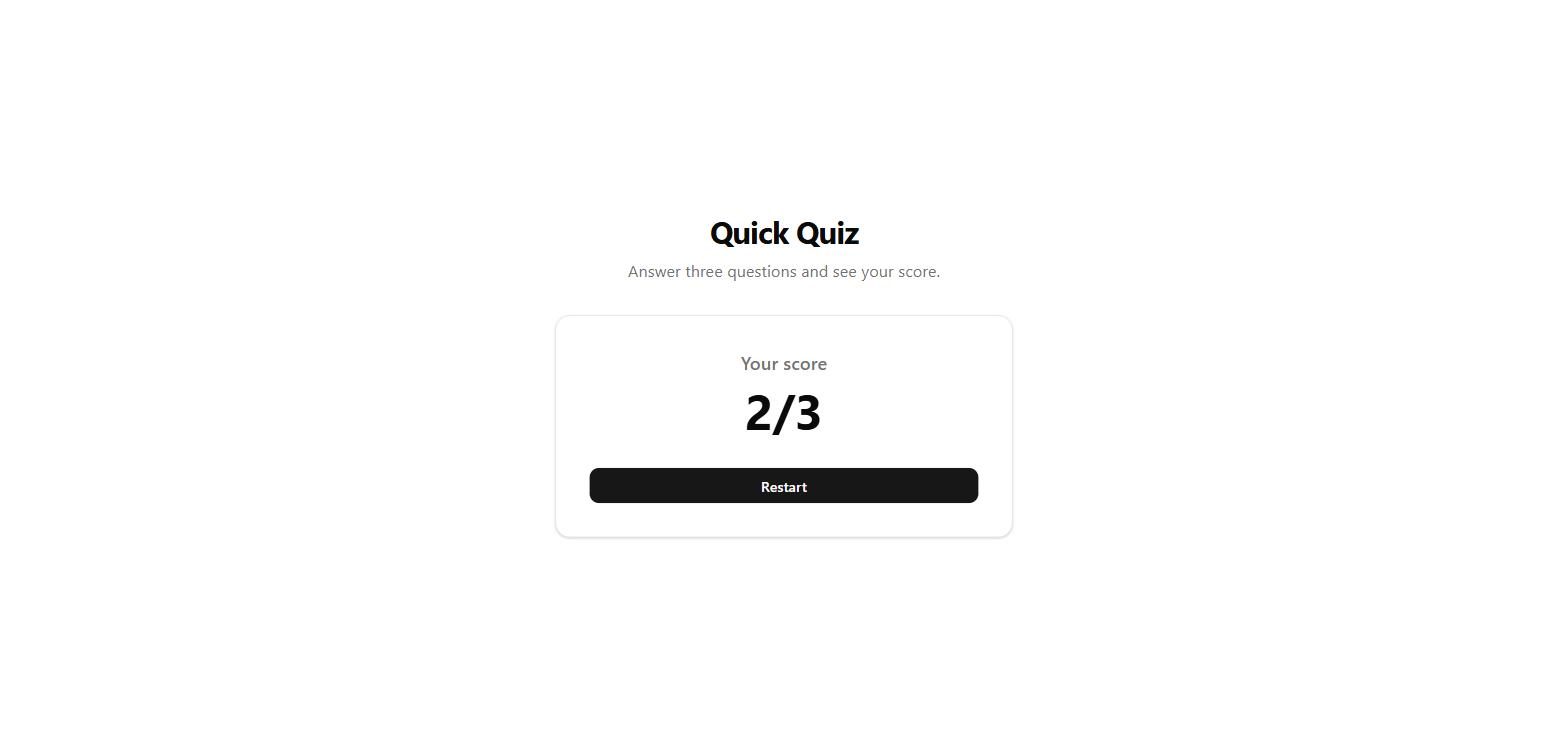
Build a quiz with these three multiple-choice questions, one at a time, then show the score like "2/3" and a Restart button. 1. What is the capital of Portugal? Lisbon, Madrid, Porto (answer: Lisbon) 2. What is 7 x 8? 54, 56, 64 (answer: 56) 3. Which is the largest planet? Mars, Jupiter, Venus (answer: Jupiter) No login, no backend, no external services.
// components/quiz.tsx
"use client"
import { useState } from "react"
import { questions } from "@/lib/quiz-data"
import { Button } from "@/components/ui/button"
import { cn } from "@/lib/utils"
export function Quiz() {
const [current, setCurrent] = useState(0)
const [selected, setSelected] = useState<string | null>(null)
const [score, setScore] = useState(0)
const [finished, setFinished] = useState(false)
const question = questions[current]
const isLast = current === questions.length - 1
function handleSelect(option: string) {
if (selected !== null) return
setSelected(option)
if (option === question.answer) {
setScore((s) => s + 1)
}
}
function handleNext() {
if (isLast) {
setFinished(true)
return
}
setCurrent((c) => c + 1)
setSelected(null)
}
function handleRestart() {
setCurrent(0)
setSelected(null)
setScore(0)
setFinished(false)
}
if (finished) {
return (
<section
aria-labelledby="result-heading"
className="w-full max-w-md rounded-xl border border-border bg-card p-8 text-center shadow-sm"
>
<h2 id="result-heading" className="text-lg font-medium text-muted-foreground">
Your score
</h2>
<p className="mt-2 text-5xl font-bold tabular-nums text-foreground">
{score}/{questions.length}
</p>
<Button onClick={handleRestart} className="mt-8 w-full" size="lg">
Restart
</Button>
</section>
)
}
return (
<section
aria-labelledby="question-heading"
className="w-full max-w-md rounded-xl border border-border bg-card p-8 shadow-sm"
>
<p className="text-sm font-medium text-muted-foreground">
Question {current + 1} of {questions.length}
</p>
<h2 id="question-heading" className="mt-2 text-balance text-2xl font-semibold text-foreground">
{question.question}
</h2>
  <div role="group" aria-label="Answer options" className="mt-6 flex flex-col gap-3">
    {question.options.map((option) => {
      const isSelected = selected === option
      const isCorrect = option === question.answer
      const showState = selected !== null

      return (
        <button
          key={option}
          type="button"
          onClick={() => handleSelect(option)}
          disabled={showState}
          aria-pressed={isSelected}
          className={cn(
            "flex items-center justify-between rounded-lg border border-border px-4 py-3 text-left text-base transition-colors",
            "focus-visible:outline-none focus-visible:ring-2 focus-visible:ring-ring focus-visible:ring-offset-2 focus-visible:ring-offset-background",
            !showState && "hover:bg-accent hover:text-accent-foreground",
            showState && isCorrect && "border-green-600 bg-green-50 text-green-900 dark:bg-green-950/40 dark:text-green-100",
            showState && isSelected && !isCorrect && "border-red-600 bg-red-50 text-red-900 dark:bg-red-950/40 dark:text-red-100",
            showState && !isCorrect && !isSelected && "opacity-60",
          )}
        >
          <span>{option}</span>
          {showState && isCorrect && <span aria-hidden="true">✓</span>}
          {showState && isSelected && !isCorrect && <span aria-hidden="true">✕</span>}
        </button>
      )
    })}
  </div>

  <Button
    onClick={handleNext}
    disabled={selected === null}
    className="mt-6 w-full"
    size="lg"
  >
    {isLast ? "See score" : "Next question"}
  </Button>
</section>
)
}
// lib/quiz-data.ts
export type Question = {
question: string
options: string[]
answer: string
}
export const questions: Question[] = [
{
question: "What is the capital of Portugal?",
options: ["Lisbon", "Madrid", "Porto"],
answer: "Lisbon",
},
{
question: "What is 7 x 8?",
options: ["54", "56", "64"],
answer: "56",
},
{
question: "Which is the largest planet?",
options: ["Mars", "Jupiter", "Venus"],
answer: "Jupiter",
},
]
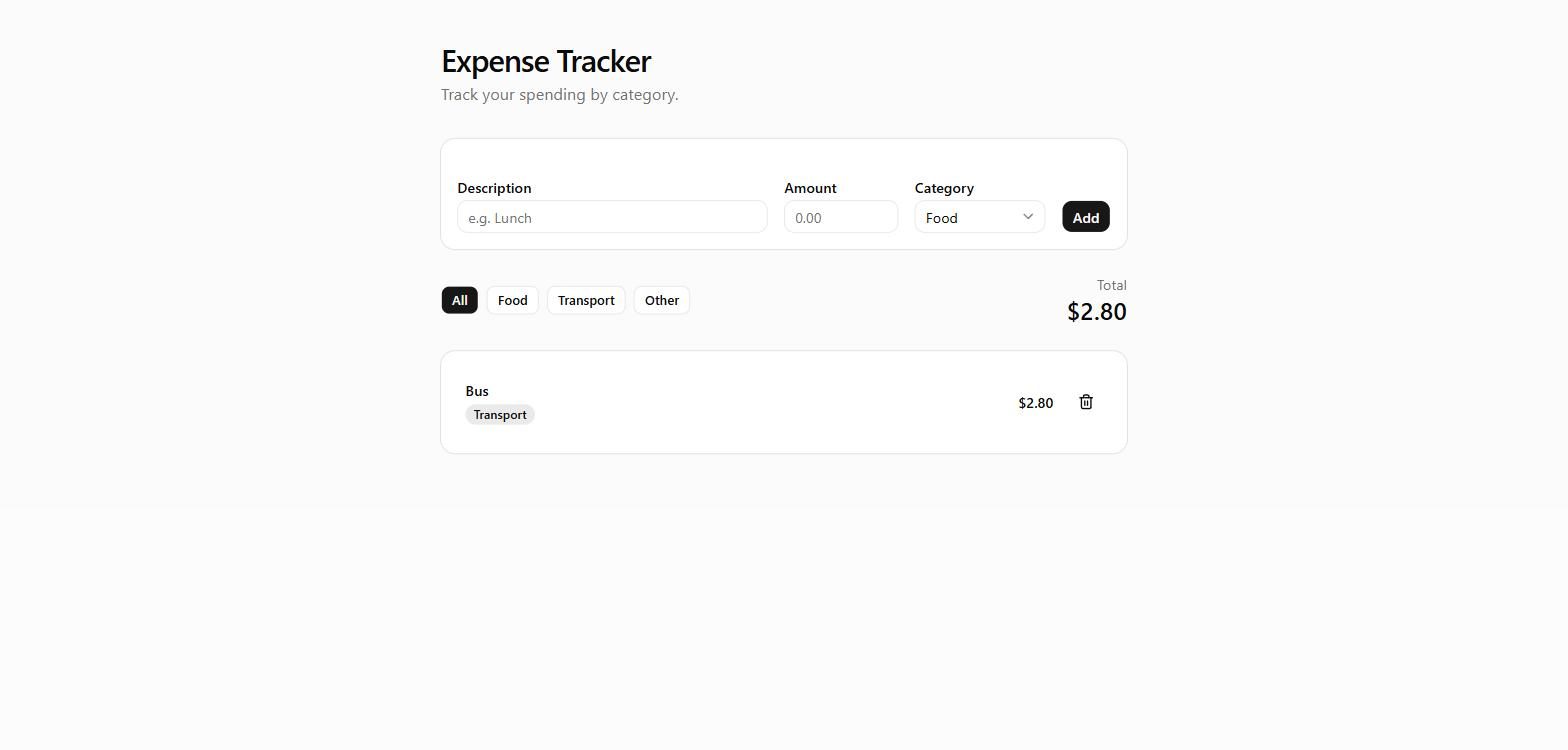
Build an expense tracker. The user adds an expense with a description, an amount and a category (Food, Transport or Other). Show the list, a total of the listed expenses, a category filter (All, Food, Transport, Other) that also changes the total, and a delete button per expense. No login, no backend, no external services.
// components/expense-tracker.tsx
"use client"
import { useEffect, useMemo, useState } from "react"
import { Trash2 } from "lucide-react"
import { Button } from "@/components/ui/button"
import { Input } from "@/components/ui/input"
import { Label } from "@/components/ui/label"
import { Card, CardContent } from "@/components/ui/card"
import {
Select,
SelectContent,
SelectItem,
SelectTrigger,
SelectValue,
} from "@/components/ui/select"
type Category = "Food" | "Transport" | "Other"
type Expense = {
id: string
description: string
amount: number
category: Category
}
const CATEGORIES: Category[] = ["Food", "Transport", "Other"]
const FILTERS = ["All", ...CATEGORIES] as const
type Filter = (typeof FILTERS)[number]
const STORAGE_KEY = "expense-tracker:expenses"
const currency = new Intl.NumberFormat("en-US", {
style: "currency",
currency: "USD",
})
const categoryStyles: Record<Category, string> = {
Food: "bg-chart-1/15 text-foreground",
Transport: "bg-chart-2/15 text-foreground",
Other: "bg-chart-3/15 text-foreground",
}
export function ExpenseTracker() {
const [expenses, setExpenses] = useState<Expense[]>([])
const [loaded, setLoaded] = useState(false)
const [description, setDescription] = useState("")
const [amount, setAmount] = useState("")
const [category, setCategory] = useState<Category>("Food")
const [error, setError] = useState<string | null>(null)
const [filter, setFilter] = useState<Filter>("All")
useEffect(() => {
try {
const raw = localStorage.getItem(STORAGE_KEY)
if (raw) setExpenses(JSON.parse(raw))
} catch {
// ignore malformed storage
}
setLoaded(true)
}, [])
useEffect(() => {
if (!loaded) return
localStorage.setItem(STORAGE_KEY, JSON.stringify(expenses))
}, [expenses, loaded])
const visibleExpenses = useMemo(
() => (filter === "All" ? expenses : expenses.filter((e) => e.category === filter)),
[expenses, filter],
)
const total = useMemo(
() => visibleExpenses.reduce((sum, e) => sum + e.amount, 0),
[visibleExpenses],
)
function handleAdd(e: React.FormEvent) {
e.preventDefault()
const trimmed = description.trim()
const value = Number.parseFloat(amount)
if (!trimmed) {
  setError("Please enter a description.")
  return
}
if (!Number.isFinite(value) || value <= 0) {
  setError("Please enter an amount greater than 0.")
  return
}

setExpenses((prev) => [
  {
    id: crypto.randomUUID(),
    description: trimmed,
    amount: Math.round(value * 100) / 100,
    category,
  },
  ...prev,
])
setDescription("")
setAmount("")
setCategory("Food")
setError(null)
}
function handleDelete(id: string) {
setExpenses((prev) => prev.filter((e) => e.id !== id))
}
return (
<div className="space-y-6">
<Card>
<CardContent className="pt-6">
<form onSubmit={handleAdd} className="grid gap-4 sm:grid-cols-[1fr_auto_auto_auto] sm:items-end">
<div className="grid gap-1.5">
<Label htmlFor="description">Description</Label>
<Input
id="description"
placeholder="e.g. Lunch"
value={description}
onChange={(e) => setDescription(e.target.value)}
/>
</div>
        <div className="grid gap-1.5">
          <Label htmlFor="amount">Amount</Label>
          <Input
            id="amount"
            type="number"
            inputMode="decimal"
            min="0"
            step="0.01"
            placeholder="0.00"
            value={amount}
            onChange={(e) => setAmount(e.target.value)}
            className="sm:w-28"
          />
        </div>

        <div className="grid gap-1.5">
          <Label htmlFor="category">Category</Label>
          <Select value={category} onValueChange={(v) => setCategory(v as Category)}>
            <SelectTrigger id="category" className="sm:w-32">
              <SelectValue />
            </SelectTrigger>
            <SelectContent>
              {CATEGORIES.map((c) => (
                <SelectItem key={c} value={c}>
                  {c}
                </SelectItem>
              ))}
            </SelectContent>
          </Select>
        </div>

        <Button type="submit">Add</Button>
      </form>
      {error ? (
        <p className="mt-3 text-sm text-destructive" role="alert">
          {error}
        </p>
      ) : null}
    </CardContent>
  </Card>

  <div className="flex flex-wrap items-center justify-between gap-3">
    <div className="flex flex-wrap gap-2">
      {FILTERS.map((f) => (
        <Button
          key={f}
          type="button"
          variant={filter === f ? "default" : "outline"}
          size="sm"
          onClick={() => setFilter(f)}
        >
          {f}
        </Button>
      ))}
    </div>
    <div className="text-right">
      <p className="text-sm text-muted-foreground">
        Total{filter !== "All" ? ` (${filter})` : ""}
      </p>
      <p className="text-2xl font-semibold tabular-nums text-foreground">
        {currency.format(total)}
      </p>
    </div>
  </div>

  <Card>
    <CardContent className="p-0">
      {visibleExpenses.length === 0 ? (
        <p className="px-6 py-10 text-center text-muted-foreground">
          {expenses.length === 0
            ? "No expenses yet. Add your first one above."
            : "No expenses in this category."}
        </p>
      ) : (
        <ul className="divide-y">
          {visibleExpenses.map((expense) => (
            <li key={expense.id} className="flex items-center gap-4 px-4 py-3 sm:px-6">
              <div className="min-w-0 flex-1">
                <p className="truncate font-medium text-foreground">{expense.description}</p>
                <span
                  className={`mt-1 inline-block rounded-full px-2 py-0.5 text-xs font-medium ${categoryStyles[expense.category]}`}
                >
                  {expense.category}
                </span>
              </div>
              <p className="font-semibold tabular-nums text-foreground">
                {currency.format(expense.amount)}
              </p>
              <Button
                type="button"
                variant="ghost"
                size="icon"
                onClick={() => handleDelete(expense.id)}
                aria-label={`Delete ${expense.description}`}
              >
                <Trash2 className="size-4" />
              </Button>
            </li>
          ))}
        </ul>
      )}
    </CardContent>
  </Card>
</div>
)
}
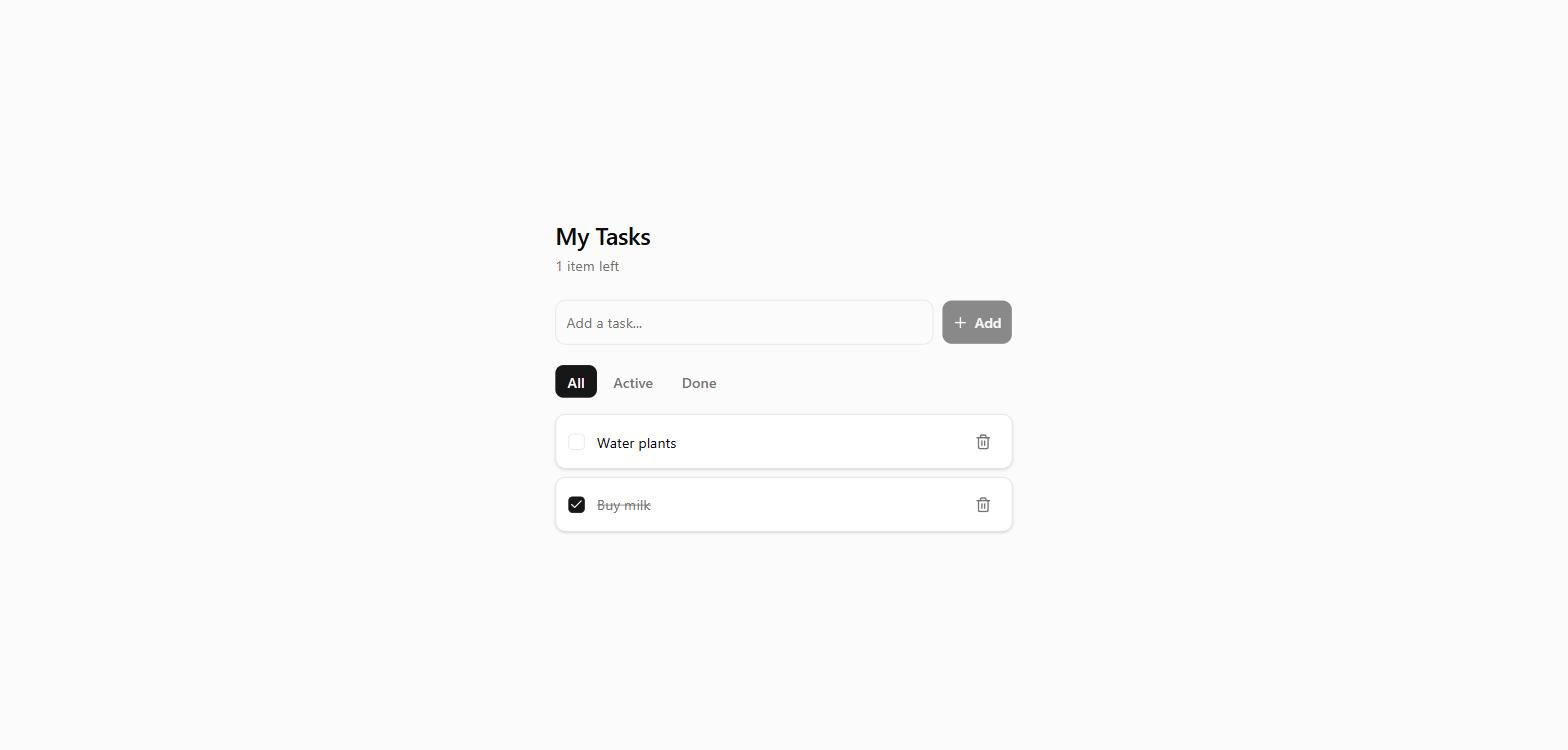
Add filter buttons All, Active and Done to the to-do list, and a counter that says how many items are left, like "1 item left" or "2 items left". Keep everything that already works.
// components/todo-list.tsx (changed file)
"use client"
import { useState } from "react"
import { useTodos } from "@/hooks/use-todos"
import { AddTodoForm } from "@/components/add-todo-form"
import { TodoItem } from "@/components/todo-item"
import { cn } from "@/lib/utils"
type Filter = "all" | "active" | "done"
const FILTERS: { value: Filter; label: string }[] = [
{ value: "all", label: "All" },
{ value: "active", label: "Active" },
{ value: "done", label: "Done" },
]
export function TodoList() {
const { todos, loaded, addTodo, toggleTodo, deleteTodo } = useTodos()
const [filter, setFilter] = useState<Filter>("all")
const remaining = todos.filter((t) => !t.done).length
const visibleTodos = todos.filter((t) => {
if (filter === "active") return !t.done
if (filter === "done") return t.done
return true
})
return (
<section className="w-full max-w-md">
<header className="mb-6">
<h1 className="text-2xl font-semibold tracking-tight text-balance">My Tasks</h1>
<p className="mt-1 text-sm text-muted-foreground">
{loaded
? todos.length === 0
? "Nothing here yet. Add your first task."
: ${remaining} ${remaining === 1 ? "item" : "items"} left
: "Loading..."}
</p>
</header>
  <AddTodoForm onAdd={addTodo} />

  {loaded && todos.length > 0 && (
    <>
      <div className="mt-5 flex items-center gap-1" role="group" aria-label="Filter tasks">
        {FILTERS.map(({ value, label }) => (
          <button
            key={value}
            type="button"
            onClick={() => setFilter(value)}
            aria-pressed={filter === value}
            className={cn(
              "rounded-md px-3 py-1.5 text-sm font-medium transition-colors",
              filter === value
                ? "bg-primary text-primary-foreground"
                : "text-muted-foreground hover:bg-muted hover:text-foreground",
            )}
          >
            {label}
          </button>
        ))}
      </div>

      {visibleTodos.length > 0 ? (
        <ul className="mt-4 flex flex-col gap-2">
          {visibleTodos.map((todo) => (
            <TodoItem
              key={todo.id}
              todo={todo}
              onToggle={toggleTodo}
              onDelete={deleteTodo}
            />
          ))}
        </ul>
      ) : (
        <p className="mt-4 text-sm text-muted-foreground">
          {filter === "active" ? "No active tasks." : "No completed tasks."}
        </p>
      )}
    </>
  )}
</section>
)
}
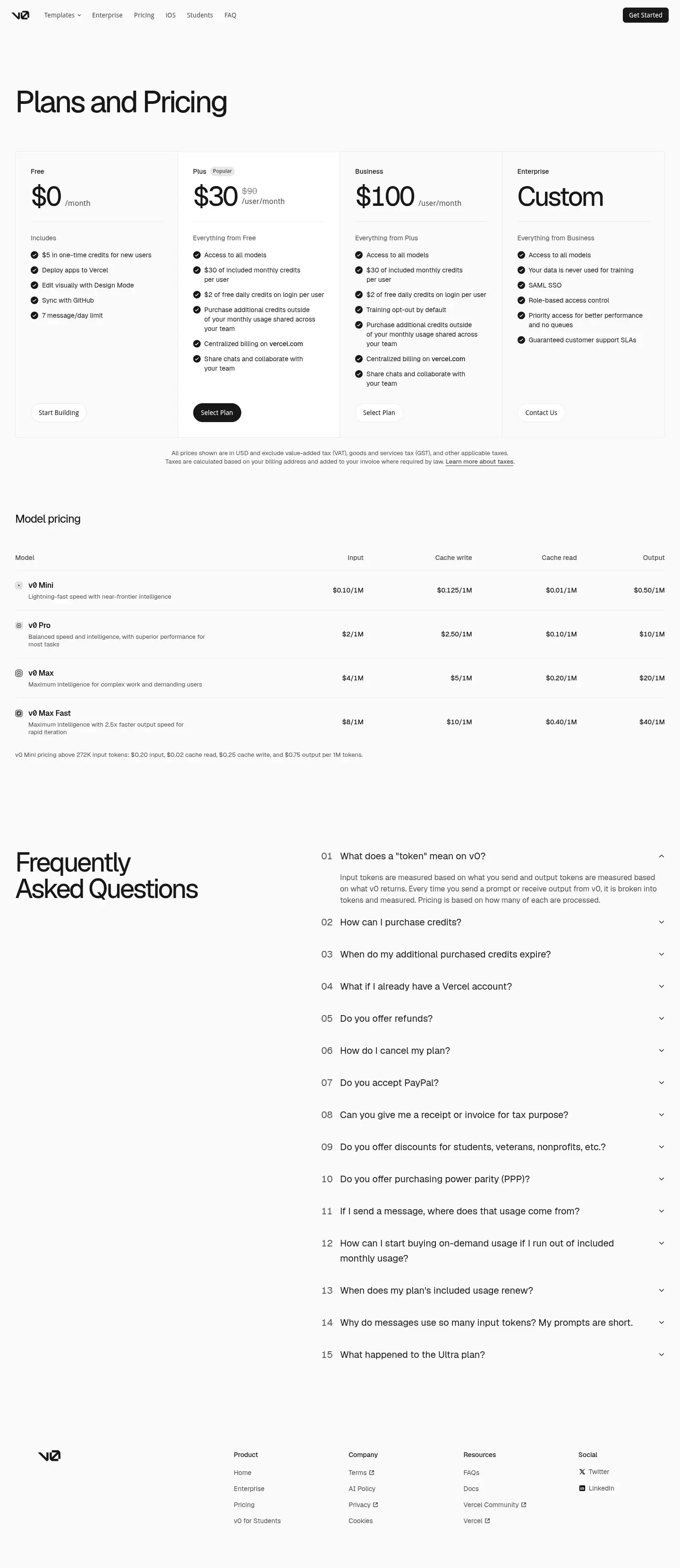
The Free plan costs $0 and includes access to v0, deployment to Vercel, visual editing with Design Mode, and GitHub sync. Its stated usage limit is 7 message/day. pricing pageSource · vendor pagePricing page (v0.app), checked Nov 18, 2026.Go to sources ↓
Plus costs $90/month per user and adds access to all models, included monthly credits, free daily credits on login, shared additional-credit purchases, centralized billing on vercel.com, and the ability to share chats with a team. Business costs $100/month per user, includes everything from Plus, and adds training opt-out by default. Enterprise includes everything from Business and adds a guarantee that your data is never used for training, SAML SSO, role-based access control, priority access without queues, and guaranteed customer support SLAs. pricing pageSource · vendor pagePricing page (v0.app), checked Nov 18, 2026.Go to sources ↓
The fixed public AI app builders suite was run hands-on in the app by a person on v0 Free on 2026-09-29 9.6Our test · free tierBuild a tip calculator: 9.6/10, 5 of 5 checks passed.Read the answer ↓9.7Our test · free tierBuild a to-do list that remembers: 9.7/10, 6 of 6 checks passed.Read the answer ↓9.7Our test · free tierBuild a unit converter: 9.7/10, 4 of 4 checks passed.Read the answer ↓9.7Our test · free tierBuild a focus timer: 9.7/10, 6 of 6 checks passed.Read the answer ↓9.4Our test · free tierBuild a safe Markdown previewer: 9.4/10, 5 of 5 checks passed.Read the answer ↓9.9Our test · free tierBuild a three-question quiz: 9.9/10, 4 of 4 checks passed.Read the answer ↓9.7Our test · free tierBuild an expense tracker: 9.7/10, 5 of 5 checks passed.Read the answer ↓9.7Our test · free tierChange an existing app: 9.7/10, 5 of 5 checks passed.Read the answer ↓. The free tier scored 9.6/10 on the tip calculator; the free tier scored 9.7/10 on the to-do list; the free tier scored 9.7/10 on the unit converter 9.6Our test · free tierBuild a tip calculator: 9.6/10, 5 of 5 checks passed.Read the answer ↓9.7Our test · free tierBuild a to-do list that remembers: 9.7/10, 6 of 6 checks passed.Read the answer ↓9.7Our test · free tierBuild a unit converter: 9.7/10, 4 of 4 checks passed.Read the answer ↓. The free tier scored 9.7/10 on the focus timer; the free tier scored 9.4/10 on the Markdown previewer; the free tier scored 9.9/10 on the quiz 9.7Our test · free tierBuild a focus timer: 9.7/10, 6 of 6 checks passed.Read the answer ↓9.4Our test · free tierBuild a safe Markdown previewer: 9.4/10, 5 of 5 checks passed.Read the answer ↓9.9Our test · free tierBuild a three-question quiz: 9.9/10, 4 of 4 checks passed.Read the answer ↓. The free tier scored 9.7/10 on the expense tracker; the free tier scored 9.7/10 on changing an existing app; the paid tier was not tested, so there is no direct paid-versus-free comparison 9.6Our test · free tierBuild a tip calculator: 9.6/10, 5 of 5 checks passed.Read the answer ↓9.7Our test · free tierBuild a to-do list that remembers: 9.7/10, 6 of 6 checks passed.Read the answer ↓9.7Our test · free tierBuild a unit converter: 9.7/10, 4 of 4 checks passed.Read the answer ↓9.7Our test · free tierBuild a focus timer: 9.7/10, 6 of 6 checks passed.Read the answer ↓9.4Our test · free tierBuild a safe Markdown previewer: 9.4/10, 5 of 5 checks passed.Read the answer ↓9.9Our test · free tierBuild a three-question quiz: 9.9/10, 4 of 4 checks passed.Read the answer ↓9.7Our test · free tierBuild an expense tracker: 9.7/10, 5 of 5 checks passed.Read the answer ↓9.7Our test · free tierChange an existing app: 9.7/10, 5 of 5 checks passed.Read the answer ↓.
For light or occasional work, the Free plan covers v0 access, Vercel deployment, Design Mode, GitHub sync, and a 7 message/day allowance. Regular users should consider Plus for added usage capacity, all-model access, shared chats, and centralized billing. Business is the practical step up for training opt-out, while Enterprise targets organizations needing SAML SSO, role-based access control, priority access, and guaranteed support. Cursor Plus at $8/month and Bolt Pro at $25/month cost less, so budget-first coders should compare them before choosing v0 Plus. pricing pageSource · vendor pagePricing page (v0.app), checked Nov 18, 2026.Go to sources ↓
Some App Store reviewers praise v0 for getting the job done and for being easy for anyone to use when making websites App StoreUser report · positive · App Store reviewPosted Oct 21, 2026See the report ↓App StoreUser report · positive · App Store reviewPosted Oct 16, 2026See the report ↓. One web reviewer says v0 produced a cleaner dashboard, while one Hacker News user says the generated interface was solid but the code lacked state management and real logic WebUser report · positive · WebPosted Jul 13, 2026See the report ↓HNUser report · mixed · Hacker NewsPosted Feb 14, 2026See the report ↓. One web user calls the pricing neutral, another mentions a credit system, and two App Store reviewers report unusable or unapplied credits after buying or upgrading WebUser report · mixed · WebFound Oct 2, 2026See the report ↓WebUser report · mixed · WebFound Oct 14, 2026See the report ↓App StoreUser report · negative · App Store reviewPosted Apr 25, 2026See the report ↓App StoreUser report · negative · App Store reviewPosted May 30, 2026See the report ↓. Reddit and App Store reports describe small edits consuming credits and model-access restrictions, while one App Store reviewer mentions poor customer-service response and one web reviewer says an update weakened diagnostics RedditUser report · mixed · Redditr/vibecoding, posted Mar 5, 2026See the report ↓App StoreUser report · negative · App Store reviewPosted Aug 6, 2026See the report ↓App StoreUser report · negative · App Store reviewPosted Aug 7, 2026See the report ↓App StoreUser report · negative · App Store reviewPosted Aug 28, 2026See the report ↓WebUser report · negative · WebPosted Mar 22, 2026See the report ↓.
Some App Store reviewers praise v0 for getting the job done and for being easy for anyone to use when making websites.
Si>Ai. The only one to get the job done!
Some App Store reviewers praise v0 for getting the job done and for being easy for anyone to use when making websites.
Best app for making websites. Anyone can use this
One web reviewer says v0 produced a cleaner dashboard, while one Hacker News user says the generated interface was solid but the code lacked state management and real logic.
v0 vs Bolt.new: I Built the Same App in Both. … tries to nail the interface, so it hands you components … away, login screen and all. v0 gave me a cleaner dashboard … blank screen, that momentum is worth more than it sounds …
One web user calls the pricing neutral, another mentions a credit system, and two App Store reviewers report unusable or unapplied credits after buying or upgrading.
CJ. Wish the app worked better with updating upgrades when purchased. Have credits available to use and can’t because it still thinks I’m on free mode. Otherwise this app would be amazing.
One web user calls the pricing neutral, another mentions a credit system, and two App Store reviewers report unusable or unapplied credits after buying or upgrading.
… I purchased a V0 Team to seat for 30$ on may 28, 2026. Team plan is confirmed as active, but 30$ monthly credits that should have been provisioned with the team seat have not been applied to my account -there are 0$ and still reports “you out of credits and “hobby workspace. …
Reddit and App Store reports describe small edits consuming credits and model-access restrictions, while one App Store reviewer mentions poor customer-service response and one web…
… I’ve been working on my website through v0 and everything was going great until I had to go back the next day and make some minor edits. It was a simple change that the BOT didn’t understand and so I had to keep going back-and-forth with it and it drained all of my credits. …
Reddit and App Store reports describe small edits consuming credits and model-access restrictions, while one App Store reviewer mentions poor customer-service response and one web…
This app now sucks everyone. You heard me the are now restricting access to all models except v0 mini the worst one they made it so we can no longer use fable. Everyone give your salutes to the new worst free vibe code app ever
Reddit and App Store reports describe small edits consuming credits and model-access restrictions, while one App Store reviewer mentions poor customer-service response and one web…
Problematic glitch science experiment. Earth to Vercel?! Very glitchy app with terrible customer service. Crickets after emailing them and submitting a service request? Impossible to figure out unless you’re in your mom’s basement writing code geeking it up.
Reddit and App Store reports describe small edits consuming credits and model-access restrictions, while one App Store reviewer mentions poor customer-service response and one web…
The latest V0 update completely ruined it... - v0 - Vercel Community. … boundaries. Definitely worth investigating … team is looking into it dk-hello (DK) March … diagnostic approach is useless. V0 doesn’t identify almost any …
One web reviewer says v0 produced a cleaner dashboard, while one Hacker News user says the generated interface was solid but the code lacked state management and real logic.
… I used v0 to generate the full UI — landing page, calculator, pricing — then threw away all the code and rebuilt from scratch. The AI-generated designs were solid. The code behind them wasn't. Hardcoded numbers, no state management, no real logic. …
One web user calls the pricing neutral, another mentions a credit system, and two App Store reviewers report unusable or unapplied credits after buying or upgrading.
v0 reviews 2026. … thing about the payment. Pricing is pretty neutral, not that … alone, so I utilize v0's powers to build my applications … ready. I handle code reviews and all tasks …
One web user calls the pricing neutral, another mentions a credit system, and two App Store reviewers report unusable or unapplied credits after buying or upgrading.
Bolt vs v0 vs Lovable | Better Stack Community. … automatic deployment. It includes built-in … use the AI features. v0 uses a credit system … tier includes $5 worth of credits monthly …
Reddit and App Store reports describe small edits consuming credits and model-access restrictions, while one App Store reviewer mentions poor customer-service response and one web…
… Someone built something cool in Lovable or v0 or Replit, it works, users are signing up, and now every small change costs credits or hits some weird platform limit. You're editing in a browser IDE and praying nothing breaks. You don't need to rewrite anything. …
The Plus plan costs $8/month, which is lower than v0's Plus price of $30/month per user.
Bolt Pro is $25/month, which is cheaper than v0's Plus plan at $30/month per user.
Replit Pro is $100/month, matching v0's Business plan price of $100/month per user.
Plus costs $90/month per user. It adds all-model access, included monthly credits, team collaboration, and centralized billing.
The Free plan costs $0 and includes v0 access, Vercel deployment, Design Mode, GitHub sync, and a 7 message/day limit.
Business costs $100/month per user, includes everything from Plus, and adds training opt-out by default.
Enterprise includes SAML SSO, role-based access control, priority access without queues, a guarantee that your data is never used for training, and guaranteed customer support SLAs.
The vendor's pricing page lists cancellation and refund questions but does not provide answers, and it does not state PayPal terms.
The "Visit" buttons go through shouldipay.ai/go/ and may be affiliate links, so we may earn a commission if you subscribe. Commissions never decide a verdict: the evidence on this page does. Verdicts are drafted with AI from the vendors' own pricing and documentation pages and, for this verdict, our own tests shown on this page and public user reports we link to, and checked automatically against those sources before they are published; a person reviews first verdicts, changed answers and anything the checks flag. Affiliate disclosure